
Shopping for the best smart door locks with keypad means deciding whether you want direct Wi-Fi control, biometric entry, or a complete handle set. That choice matters most for households sharing access with family, guests, tenants, or service providers.
Pros
- Built-in WiFi, no hub needed
- Fingerprint entry in 0.3 seconds
- Temporary and one-time passcodes
- Alexa and Google Assistant control
Cons
- Only for wooden doors
- Fits doors 1-3/8 to 2 inches thick

Pros
- Built-in WiFi, remote control from anywhere
- Stores up to 100 access codes
- Works with Alexa and Google Home
- Forced-entry alarm and encrypted connection
Cons
- Requires Schlage Home app for smart features
- Four AA batteries last up to six months

Pros
- Apple Home Key with iPhone and Apple Watch
- Fingerprint reader stores up to 50 prints
- Four AA batteries last up to 8 months
- IP65 zinc-alloy body, emergency USB-C charging
Cons
- Aqara Zigbee hub required for remote passwords
- NFC card sold separately

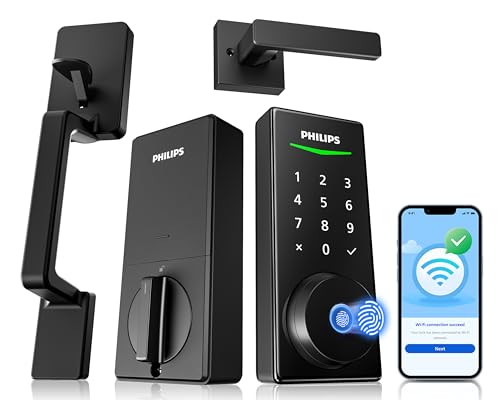
Pros
- Five entry methods, including fingerprint and PIN
- Remote control through the Philips App
- Up to 100 user codes
- Auto-lock timer from 30 to 180 seconds
Cons
- Requires compatible 35 to 50mm door
- Remote features depend on Wi-Fi and app access

Pros
- Fingerprint recognition with self-learning AI chip
- Eight entry methods for flexible access
- Remote user permissions and activity logs
- USB-C emergency port and low-battery alerts
Cons
- G1 Gateway required for remote access
- Four AA batteries not included
Pros
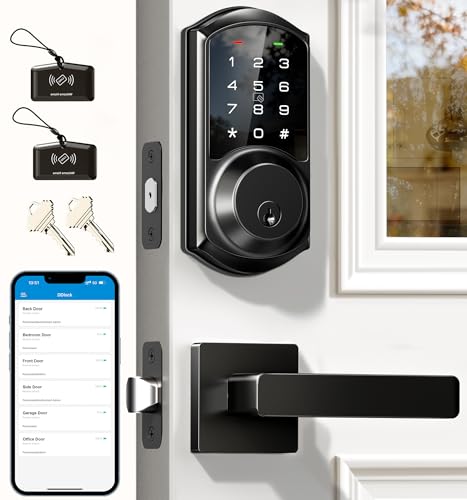
- App and web control with no subscription fee
- Stores 250+ flexible access codes
- IP54 weatherproof, BHMA/ANSI Grade 3
- IC card capacity exceeds 1,000 cards
Cons
- Remote features require separate G2 gateway
- Two-year warranty requires product registration
Start with the access methods you will actually use
A keypad is useful when you want to leave keys behind, but the six locks differ in how many alternatives they provide. Philips WiFi Smart Lock with Handle Set adds fingerprint entry, app control, voice control, permanent codes, temporary codes, and one-time codes. The Philips Wi-Fi Front Lock Set similarly combines app, fingerprint, PIN, key, and voice access.
Fingerprint entry favors busy households that want quick access without remembering a code. Code management is more useful for visitors and recurring help because you can create temporary, scheduled, recurring, or one-time credentials on supported models. Veise VE017 Fingerprint Smart Door Lock with App also adds anti-peeping PIN entry, activity logs, and local AES128-encrypted access data.
If your home already centers on Apple devices, Aqara Smart Lock U100, Apple Home Key offers Apple Home Key access through an iPhone or Apple Watch. Its remotely configurable passwords require an Aqara Zigbee 3.0 hub, while Apple Home Key sharing requires an Apple Home Hub. Review how a smart lock bridge works before buying extra equipment, especially if remote access is essential.
Pro Tip: Choose one primary entry method and one backup method before installation. A mechanical key, emergency charging port, or another available option can matter when batteries are depleted.
Separate direct Wi-Fi from hub-dependent control
Philips WiFi Smart Lock with Handle Set and Schlage Encode Smart WiFi Deadbolt Lock include built-in Wi-Fi, so their apps can provide remote lock control, access management, alerts, or history without an additional gateway. Schlage also supports up to 100 access codes, customizable notifications, voice control through Alexa and Google Home, and an alarm for door movement or forced-entry attempts.
Other locks place some connected features behind separate hardware. Aqara requires its hub for app-configured passwords and broader third-party integration. Veise VE017 requires the G1 Gateway for remote access and voice control, while Veise VE06-L requires the G2 gateway for remote operation, monitoring, alerts, and Alexa or Google Assistant commands.
| Access model | Main distinction | Best fit |
|---|---|---|
| Direct Wi-Fi | No extra gateway | Remote app households |
| Hub required | Added hardware needed | Existing smart homes |
| Local keypad | Works at the door | Guests and family |
That distinction affects more than convenience. If you only need keypad, fingerprint, or mechanical-key entry at the door, a hub may not be necessary. If you expect remote management while away, confirm the required gateway before choosing a model.
Check the Door Fit: A smart lock can work poorly when the door and frame are misaligned. Confirm the stated door thickness, backset, hole size, and latch alignment before installation.
Match the hardware to your entry door
Handle-set models are intended for buyers replacing more than the deadbolt. Philips WiFi Smart Lock with Handle Set includes a coordinated handle set, while Philips Wi-Fi Front Lock Set includes two handles and supports doors measuring 35 to 50 mm thick. Veise VE06-L also combines a deadbolt with two lever handles and fits 35 to 50 mm doors.
Deadbolt-only designs may suit a door where the existing knob or lever remains in place. Schlage Encode fits standard doors from 1-3/8 to 1-3/4 inches thick with a 2-3/8 or 2-3/4-inch backset. Veise VE06-L supports left- or right-handed doors and includes app, web portal, code, card, e-key, and mechanical-key options.
Battery details also separate these choices. Schlage uses four AA batteries with a typical life of up to six months, Aqara uses four included AA batteries with up to eight months, and Veise VE017 lists about 12 months from four AA batteries, which are not included. Aqara and Veise VE017 provide USB-C emergency charging, while Schlage includes a low-battery indicator on the lock and in its app.
Expert Examined
From Jenna Castellano

I keep an eye on the door alignment first because friction can make a smart lock feel unreliable even when the electronics are working. The mistake I see is tightening hardware around a latch that does not move freely, so I would correct the frame and latch movement before adding app settings.
Read more about Jenna CastellanoFor security terminology, certifications are useful context rather than a substitute for correct installation. Schlage lists the highest residential Security, Durability and Finish rating from BHMA experts, while Aqara and Veise VE06-L identify BHMA-related ratings in their specifications. The UL Solutions site is a useful place to understand how safety standards and certification information are presented.
Which lock fits your household
I would point you to Philips WiFi Smart Lock with Handle Set if you want a complete handle set with direct Wi-Fi, fingerprint access, app alerts, voice control, and flexible PIN codes. It is a practical match for a busy family that needs both quick entry and remote access without a separate gateway.
I would choose Aqara Smart Lock U100, Apple Home Key for an Apple-centered home where tapping an iPhone or Apple Watch is more convenient than entering a code. Its IP65 rating, local AES-encrypted fingerprint storage, emergency USB-C port, and up to eight months of battery life add useful detail for an exposed entry door.
For a lower-cost route to fingerprint entry, app management, one-time codes, and local encrypted storage, I would consider Veise VE017 Fingerprint Smart Door Lock with App. Choose it when a deadbolt-only design suits the door and you are comfortable adding the G1 Gateway for remote or voice features.
The Bottom Line
The biggest mistake buyers make is treating every keypad lock as equally connected. Some models include direct Wi-Fi, while others need a gateway for remote access, app passwords, or voice control.
Before ordering, measure the door and identify the access method you will use most. Then confirm whether the selected lock works with your existing handle arrangement, required door dimensions, preferred smart-home platform, and backup entry plan.
FAQs
Fingerprint entry can be faster for household members, while keypad codes are easier to assign to guests, service providers, or tenants. Several models combine both methods, so choose based on whether recurring access management or quick personal entry matters more. Not always. Keypad, fingerprint, and mechanical-key entry can work locally, while remote app control and voice features may require built-in Wi-Fi or a separately sold gateway. Check the connection requirements for the exact model. Battery life varies by model and usage. The listed products use AA batteries, and some provide low-battery alerts or USB-C emergency charging. Keep the backup key or emergency power option available before the battery warning appears. A BHMA rating relates to categories such as security, durability, or finish performance. It does not remove the need to verify door fit, latch alignment, correct installation, and sensible access management.Are fingerprint locks better than keypad locks?
Do smart locks with keypads need Wi-Fi?
How often do smart lock batteries need attention?
What does a BHMA rating mean on a smart lock?
Sources
- Builders Hardware Manufacturers Association and residential hardware standards. buildershardware.com
- UL Solutions and product safety certification information. www.ul.com