
Shoppers comparing the best smart door locks with fingerprint should first match the lock body to the door, then decide whether Bluetooth access is enough or remote control matters. This selection suits homeowners, renters, hosts, and office users choosing among knobs, deadbolts, handles, and sliding-door hardware.

Pros
- Fingerprint, app, and mechanical-key entry
- Rechargeable battery with one-year life
- Access records and shared app access
- Passage, Normal, Privacy, and Silent modes
Cons
- Remote control requires a separately purchased gateway
- Not suitable for doors with weather strips

Pros
- 3D fingerprint recognition in under 0.3 seconds
- Stores up to 99 fingerprints
- Five entry methods, including physical key
- Remote app control and real-time alerts
Cons
- Not compatible with storm doors
- Not compatible with round latch holes

Pros
- Fingerprint recognition with 99.98% accuracy
- Four entry methods, including backup keys
- Removable battery charges indoors via USB-C
- Local fingerprint and passcode storage
Cons
- Remote access requires a separately sold gateway
- Fits standard interior doors, not every entry door

Pros
- Five entry methods for flexible access
- Matter support for major smart-home platforms
- DIY installation in under 15 minutes
- Adjustable five-second auto-lock feature
Cons
- Emergency power requires a power bank
- Auto-lock begins after five seconds by default

Pros
- Eight entry methods for flexible household access
- Built-in camera with two-way audio
- Tuya app supports history and user permissions
- 3200mAh battery with Type-C backup charging
Cons
- Larger than standard residential deadbolt assemblies
- 2.4GHz Wi-Fi connection needed for app functions
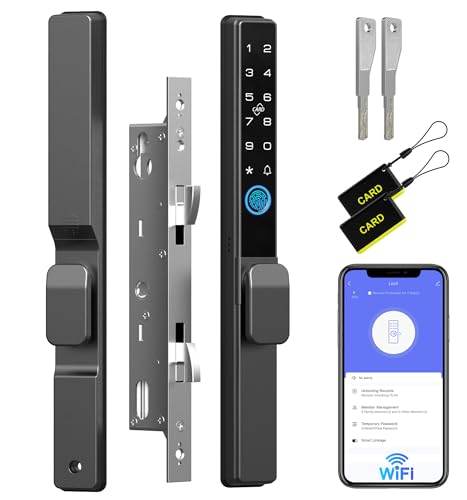
Pros
- Five access methods, including fingerprint and RFID
- WiFi remote control through mobile app
- 90-second shutdown after five invalid attempts
- Up to eight months of battery life
Cons
- Requires compatible mortise and door dimensions
- Frame must be at least 1.6 inches wide
Start With the Door, Not the App
A fingerprint knob is usually aimed at an interior bedroom, office, or apartment door, while a deadbolt or full mortise assembly may suit a primary entry. The Lockly model fits left or right swing doors from 1⅜ to 2 inches thick, but it is not compatible with storm doors or round latch holes.
Sliding glass doors require a different decision entirely. The Anweller 2085 uses a mortise system with double hooks and requires a frame at least 1.6 inches wide, so measure the existing mortise and frame before ordering. For broader front-door coverage, the camera lock fits doors from 35 to 100 mm but has a larger full assembly.
Before You Mount It: Do not assume a smart handle replaces every deadbolt. Confirm door thickness, latch or mortise shape, swing direction, frame clearance, and weather-strip placement first.
Fingerprint Access Is Only One Entry Method
Biometric entry is convenient, but backup options matter when a finger is wet, a battery is low, or another household member needs access. The KLLOQUE model combines fingerprint access, app control within Bluetooth range, and a mechanical key, while the GHome model adds keypad codes and two backup keys.
For a larger household or rental, more access methods can reduce daily friction. GUSEI adds a card to fingerprint, code, key, and Tuya app entry. The Lockly deadbolt adds PIN Genie, smartphone control, voice control, and offline access codes, which can be useful for visitors who should not receive a permanent key.
If you are weighing a physical spare key against app access, review how key lock boxes compare with smart locks before deciding which fallback belongs at the door.
| Lock type | Main access | Best placement |
|---|---|---|
| Fingerprint knob | Fingerprint, app, key | Bedroom or office |
| Smart deadbolt | Fingerprint, PIN, app | Standard entry door |
| Mortise lock | Fingerprint, card, app | Sliding or full-hardware door |
Plan Power and Connectivity
Battery design separates these products as much as the fingerprint sensor does. KLLOQUE uses a rechargeable battery with a stated one-year battery life, while GHome uses a removable 700mAh battery that charges indoors and is rated for more than 300 days of typical use. That removable format avoids taking the whole knob off for charging.
Do not treat app control as remote control by default. KLLOQUE requires a separate gateway for remote access, GHome requires an optional gateway for remote access and voice control, and Lockly provides remote operation through its app or access portal. The camera lock connects directly to 2.4GHz Wi-Fi, while Anweller lists Wi-Fi remote access.
Expert Examined
From Ray Okafor

I keep seeing buyers focus on fingerprint speed while overlooking the charging routine. The mistake I see is choosing a lock that requires removing hardware when an interior-mounted or removable battery would fit the household better, so check the low-battery alert and emergency-power method before installation.
Read more about Ray OkaforFor practical maintenance advice, keep the manufacturer’s reset instructions available and read how to reset a smart lock before the first setup. Also consider the privacy implications of stored fingerprints, passcodes, and access history.
FYI: Matter compatibility describes smart-home interoperability, not a guarantee that every feature works without the correct app, hub, or network.
Match the Lock to Your Household
I would point apartment renters and bedroom users toward the Fingerprint Door Lock, Smart Fingerprint Door Knob when a compact knob, mechanical-key backup, and Bluetooth app access meet the need. Its installation uses a screwdriver, but it is not suitable for doors with weather strips, and remote access requires an added gateway.
For a main entry with several users, I would choose the Lockly Secure Pro Wi-Fi Smart Deadbolt Lock. Its fingerprint reader, changing PIN layout, app access, voice controls, offline codes, and real-time alerts create more ways to enter without handing out physical keys.
I would reserve the 3D Face Recognition Smart Door Lock with Camera for a household that genuinely wants video intercom and multiple biometric options at a larger front-door assembly. It adds face, palm-vein, fingerprint, card, key, app, and remote methods, but its larger dimensions make measuring the installation space especially important.
The Bottom Line
The most common mistake is buying a fingerprint lock before confirming the door hardware. A knob, deadbolt, mortise lock, and sliding-door set are not interchangeable, even when their apps and biometric features sound similar.
If you do one thing first, measure the door thickness, existing latch or mortise, frame clearance, and available charging space. Then choose the access mix you will actually use, keeping a mechanical key, emergency power method, or other supported fallback available.
FAQs
Fingerprint access is quick and avoids remembering a code, but keypad entry helps guests, children, and users whose fingers are not recognized. A model with both methods gives you more flexibility, while a key remains useful as an emergency fallback. Match the lock type to the door. Knob models are commonly suited to bedrooms and offices, deadbolts to standard entry doors, and mortise sets to doors designed for that hardware. Always verify thickness, latch shape, frame clearance, and weather-strip restrictions. Battery features vary. Look for low-battery alerts, USB-C or power-bank emergency access, removable batteries, and a mechanical key when available. Set a charging routine before the battery reaches a critical level. Matter is a smart-home interoperability standard that can help compatible devices work with platforms such as Alexa, Google Home, and Apple Home. It does not mean every feature works without the required app, hub, or network connection.Are fingerprint locks better than keypad locks?
Where should a fingerprint smart lock be installed?
How do fingerprint smart locks handle low power?
What does Matter compatibility mean for a smart lock?
Sources
- UL Solutions www.ul.com
- National Fire Protection Association www.nfpa.org