
Shopping for the best smart door locks that work with ring means deciding whether you want built-in Wi-Fi or a Z-Wave connection through a hub. The right fit depends on your Ring setup, access-code needs, and whether direct control away from home matters most.

Pros
- Built-in WiFi, remote control from anywhere
- Stores up to 100 access codes
- Works with Alexa and Google Home
- Forced-entry alarm and encrypted connection
Cons
- Requires Schlage Home app for smart features
- Four AA batteries last up to six months

Pros
- Built-in WiFi with remote lock control
- Manages up to 250 access codes
- Backlit, fingerprint-resistant push-button keypad
- Alexa, Google Home, and Ring compatible
Cons
- App features require secure WiFi connection
- Fits only 1-3/8 to 1-3/4-inch doors

Pros
- Fingerprint entry with backlit keypad
- Unlimited scheduled and revocable access codes
- Z-Wave integration with compatible hubs
- BHMA Grade 2 certified
- DoorSense and Auto-Lock features
Cons
- Requires a compatible Z-Wave hub and app
- Z-Wave integration limited to US and Canada
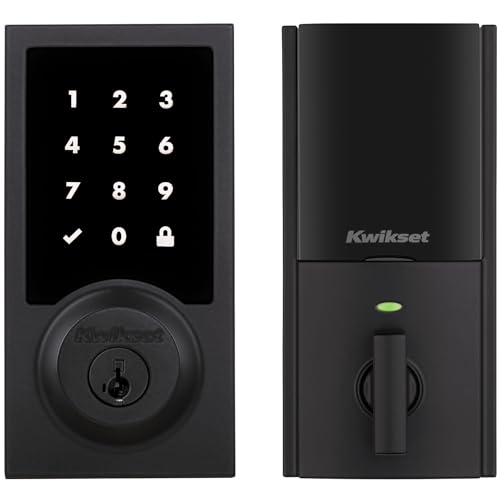
Pros
- Touchscreen keyless entry
- Up to 250 customizable user codes
- Auto-lock schedules from 30 seconds to 10 minutes
- Grade 2 BHMA certified security
- 12-month battery life with included AA batteries
Cons
- Compatible Z-Wave hub required
- Ring Alarm use requires Ring Alarm smart hub

Pros
- Up to 250 customizable user codes
- Z-Wave 700 Long Range coverage
- Grade 2 BHMA certified security
- Auto-lock scheduling from 30 seconds to 10 minutes
Cons
- Compatible Z-Wave hub required separately
- Uses four AA alkaline batteries

Pros
- Unlimited access codes for guests
- Keypad, app, and Apple Watch access
- DoorSense-triggered Auto-Lock
- Backup key included
Cons
- Remote control requires compatible hub and app
- Only compatible in the US and Canada
Choose the Connection Before the Finish
Built-in Wi-Fi makes the Schlage Encode Smart WiFi Deadbolt Lock and Schlage Arrive Smart WiFi Deadbolt Lock convenient for households that want app control without purchasing a separate hub. Both connect to a secure home Wi-Fi network through the Schlage Home app, with remote locking, access-code management, history, and notifications.
Z-Wave models take a different route. The Yale Z-Wave Smart Lock Deadbolt, Yale Assure Lock 2 Keypad Deadbolt with Z-Wave, Kwikset HomeConnect 918 Contemporary Z-Wave Long, and Kwikset HomeConnect 620 Z-Wave Long require a compatible hub and app, while the two Kwikset models specifically require a Ring Alarm smart hub for Ring control.
Pro Tip: Confirm which Ring hub you own before ordering a Z-Wave lock. A keypad can work at the door, but remote management depends on the compatible hub and app.
Keypad, Fingerprint, or App Access
Access style is the next meaningful split. The Yale Z-Wave Smart Lock Deadbolt adds fingerprint entry, a backlit keypad, smartphone control, Auto-Unlock, and a backup key. It also supports unlimited codes, which suits a home that gives different access to family, service workers, or guests.
Keypad-focused models keep entry straightforward. Schlage Arrive uses backlit silicone push buttons and supports up to 250 access codes, while the Kwikset HomeConnect 918 and 620 also support up to 250 user codes plus a programming code. The Schlage Encode manages up to 100 access codes and uses a touchscreen with one-touch exterior locking.
| Connection | Access style | Hub requirement |
|---|---|---|
| Wi-Fi | Touchscreen or buttons | No separate hub stated |
| Z-Wave | Keypad or fingerprint | Compatible hub required |
| Ring Alarm | Keypad control | Ring Alarm hub required |
If you want to share or revoke access frequently, code capacity matters more than the exterior trim. Yale offers unlimited codes on both listed Yale models, while the Kwikset and Schlage models specify set code limits.
Learn how to reset a smart lock before changing ownership or clearing old access information.
Battery Life and Automatic Locking
Battery details can influence which lock belongs on a busy entrance. Schlage Encode uses four included AA batteries and lists up to six months of typical battery life. Kwikset HomeConnect 918 and 620 use four included AA alkaline batteries and list at least 12 months, with low-battery information provided by the lock features described for those products.
Automatic locking is available across several options, but the controls differ. Schlage Encode offers selectable time delays or lets you turn the feature off. Both Kwikset models provide intervals from 30 seconds to 10 minutes, while the Yale models use DoorSense to detect whether the door is closed before Auto-Lock secures it.
Before You Mount It: Do not assume a smart lock can compensate for a door that does not close correctly. Check the door and deadbolt alignment first, then follow the stated thickness and backset requirements for the model you select.
For related hardware context, see why a strike plate matters before installation.
Expert Examined
From Ray Okafor

I keep an eye out for one recurring mistake with connected locks: buyers focus on the keypad finish and overlook the required hub. I would match the connection type to the equipment already supporting the entry system, then confirm the door dimensions before purchase.
Read more about Ray OkaforSecurity Features and Compatibility
All six choices are deadbolt-style smart locks, but their stated security features vary. Schlage lists an encrypted connection, a customizable alarm for door movement and forced-entry attempts, and the highest residential Security, Durability and Finish rating by BHMA industry experts. Yale lists Grade 2 BHMA certification for its Z-Wave fingerprint model, while Kwikset lists S2 encryption for its Z-Wave connection.
Compatibility language deserves careful reading. Schlage Encode and Schlage Arrive list Ring compatibility alongside Alexa and Google Home. The Kwikset HomeConnect 918 and 620 specifically describe Ring Alarm control through the Ring Alarm system and app. Yale products require a compatible Z-Wave system, and the listed Yale keypad model states that it is limited to the US and Canada.
For broader security context, the smart-lock hacking risks are worth considering alongside connection security and account management.
Which Lock Fits Your Ring Setup
I would put the Schlage Encode Smart WiFi Deadbolt Lock on a door where direct Wi-Fi access is the priority. It offers remote control through the Schlage Home app, up to 100 access codes, lock history, notifications, Alexa and Google Home support, a touchscreen, an alarm feature, and a physical backup key. Its one-touch exterior locking and selectable Auto-Lock timing also suit a household that wants simple departure routines.
I would point Ring Alarm households toward the Kwikset HomeConnect 620 Z-Wave Long Range Keypad when a lower-cost entry into this feature set matters and a touchscreen is preferred. It offers Ring Alarm control through the required hub, up to 250 user codes, Z-Wave 700 Long Range coverage, S2 encryption, scheduled Auto-Lock, and listed 12-month battery life.
For a home that wants biometric entry, I would choose the Yale Z-Wave Smart Lock Deadbolt. Fingerprint access removes the need to remember a code, while unlimited scheduled codes, DoorSense, Auto-Lock, a backup key, and support for compatible Z-Wave systems make it a strong fit for multiple users. Remember that its Z-Wave functions require a compatible hub and app.
The Bottom Line
The biggest mistake is treating every Ring-compatible label as the same connection. Some locks use built-in Wi-Fi, while others need a compatible Z-Wave hub, and the Kwikset Ring Alarm features specifically require a Ring Alarm smart hub.
Start by identifying the hub and app already installed in your home. Then compare access style, code capacity, battery details, and door fit before choosing the trim that matches your entry.
FAQs
[q question=”Which type of smart lock works with Ring?”>The products listed here use either built-in Wi-Fi or Z-Wave. Schlage lists Ring compatibility with its Wi-Fi models, while the Kwikset HomeConnect 918 and 620 use Ring Alarm through a required Ring Alarm smart hub.
[q question=”Do Z-Wave smart locks need a hub?”>Yes. The Yale and Kwikset Z-Wave models require a compatible hub and app for their connected features. The Kwikset models specifically state that Ring Alarm control requires a Ring Alarm smart hub.
[q question=”How often do smart lock batteries need changing?”>Battery life varies by model and usage. Schlage Encode lists up to six months of typical use, while both listed Kwikset models list at least 12 months. Check the lock or app for low-battery information when available.
[q question=”What does BHMA certification mean on these locks?”>BHMA ratings refer to residential security, durability, and finish performance stated for the product. The listed Schlage models cite the highest residential rating, and the Yale fingerprint model lists Grade 2 certification.
Sources
- Builders Hardware Manufacturers Association (BHMA) buildershardware.com
- Ring ring.com