
Shopping for the best smart door locks for Google Home means choosing more than voice control. The important split is between direct Wi-Fi access and Matter over Thread systems that need a compatible hub, especially for households deciding how much setup they want.

Pros
- Multiple entry methods, including fingerprint and passcode
- Matter over Thread supports multiple ecosystems
- Rechargeable battery lasts up to six months
- BHMA-certified with IP65 outdoor protection
Cons
- UWB requires specific Apple devices and a Thread hub
- NFC cards sold separately
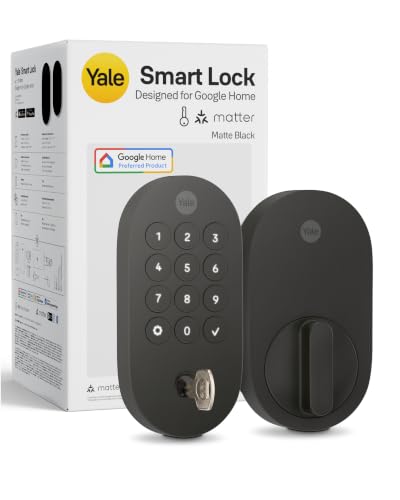
Pros
- Matter over Thread, energy-efficient mesh network
- Google Home and Google Assistant control
- Keypad, phone, voice, and backup key entry
- BHMA Grade 2 certified
- Designed for -22 to 140°F
Cons
- Matter hub required for remote access
- Google Home features limited to US and Canada

Pros
- Fingerprint, PIN, app, FOB, voice, and key access
- Built-in WiFi, no extra gateway required
- Supports 50 fingerprints and 50 passcodes
- ANSI Grade 3 and IP54 rated
Cons
- Requires 8 AA batteries
- Fingerprint and passcode capacity capped at 50 each

Pros
- ANSI Grade 3 mechanical certification
- IP54 rating for rain and dust
- Supports 50 fingerprints and passcodes
- Voice, fingerprint, app, and key entry
Cons
- Requires eight AA batteries
- Remote management needs home WiFi

Pros
- 3D face recognition with liveness detection
- Local storage for facial and fingerprint data
- Built-in WiFi, no hub required
- Face, fingerprint, app, voice, and key access
Cons
- Solar charging depends on available light
- Fits only specified door sizes and backsets

Pros
- UWB auto-entry when you truly arrive
- NFC, app, PIN, and physical key access
- Matter works with major smart-home platforms
- BHMA certified, IP65 weather resistant
Cons
- Remote control requires a Matter hub
- Battery-powered, so periodic replacement remains necessary
Start With Your Google Home Setup
Google Home can control several locks in this group, but the connection method changes the ownership experience. The Yale Smart Lock Deadbolt with Google Matter and both LINGDU models offer Google Assistant control, while Matter models connect through a compatible Matter hub or controller.
Built-in Wi-Fi is convenient if you want app access without adding a gateway. Matter over Thread can reduce power use and work across multiple ecosystems, but remote features depend on the required hub. Review what a smart lock bridge does before choosing a hub-based setup.
Pro Tip: Confirm which Google Home device or Matter hub your household already owns before ordering. A lock can support Google Home while still requiring additional hardware for remote access.
Match Entry Methods to Daily Use
A keypad is useful for family members and guests who do not want an app. Fingerprint access adds another quick option, while the DESLOC V150 Plus Solar Smart Lock adds 3D face recognition, local biometric storage, and support for up to 50 facial profiles and 50 fingerprints.
The Aqara UWB Smart Lock U400, Apple Home Key and ULTRALOQ Bolt Mission UWB Smart Lock,Matter Over focus on approach-based access. Their UWB features are especially relevant to households that want hands-free entry, although each has specific platform or hub requirements. A physical key remains available on the products that list one, which matters if electronics or batteries become unavailable.
Before You Mount It: Do not assume every smart lock fits every door. Check the listed door thickness, bore hole, backset, and whether you need a deadbolt-only unit or a handle set before removing existing hardware.
Compare Power and Weather Protection
Power maintenance varies sharply across these choices. Aqara uses a removable rechargeable battery rated for up to six months per charge, the DESLOC model combines solar charging with a 10000mAh battery, and the LINGDU models use eight AA batteries with up to eight months of stated battery life.
Outdoor exposure also deserves attention. Aqara and ULTRALOQ list IP65 protection, while the LINGDU models list IP54. Battery alerts, app notifications, and a physical key can reduce the chance of being locked out, but you should still keep maintenance on your household calendar.
| Access style | Power approach | Useful placement |
|---|---|---|
| UWB deadbolt | Rechargeable or Thread | Main entry door |
| Wi-Fi handle set | Eight AA batteries | Front door replacement |
| Solar biometric lock | Solar and lithium battery | Exterior entry door |
Certification gives another useful point of comparison, but it does not replace checking installation fit. Yale lists Grade 2 BHMA certification, while Aqara and ULTRALOQ list BHMA certification. UL Solutions explains how safety standards and certification marks help identify products evaluated against defined requirements.
Expert Examined
From Ray Okafor

I keep the emergency entry method in mind before focusing on phone features. The mistake I see is treating low battery warnings as a substitute for maintenance, so I would set a recurring reminder and keep the listed backup method available.
Read more about Ray OkaforChoose the Right Lock for Your Household
I would point Google Home households wanting the simplest branded Matter route toward the Yale Smart Lock Deadbolt with Google Matter. It combines keypad entry, phone access, Google Assistant control, a backup key, and Matter over Thread, making it a sensible fit when you already use Google TV, Nest Hub, or another compatible Matter device.
I would choose the Aqara UWB Smart Lock U400, Apple Home Key for a multi-platform home that values several entry methods. It offers UWB approach unlocking, fingerprint access, passcodes, NFC card support, voice control, and a physical key, but its UWB and Apple Home Key features require the specified Apple hardware and software.
For a household prioritizing biometric access without a separate hub, I would point you to the DESLOC V150 Plus Solar Smart Lock. Built-in Wi-Fi, local biometric storage, solar charging support, face recognition, fingerprint access, and app notifications make it the most specialized choice for users who want several direct access options.
The Bottom Line
The biggest mistake is treating Google Home support as proof that every feature works in the same way. Direct Wi-Fi, Matter over Thread, UWB access, remote control, and biometric options can each require different hardware or setup.
Start by identifying your existing Google Home or Matter hub, then confirm the door measurements and preferred backup entry method. That short check will narrow the six locks more reliably than choosing by voice control alone.
FAQs
Keypad access is practical for family members and guests because it does not require an app or biometric enrollment. Fingerprint and face recognition add speed, while UWB approach unlocking is designed for hands-free access on supported devices and platforms. Not always. The LINGDU models and DESLOC V150 Plus list built-in Wi-Fi, while Matter over Thread models require a compatible Matter controller for their respective platform features and may need a hub for remote access. Use the lock’s low-battery alerts or app notifications, and schedule periodic checks even if the lock reports remaining power. Rechargeable, solar-assisted, and AA battery designs have different maintenance routines, so follow the power method listed for your chosen model. BHMA certification indicates that the product is evaluated against defined requirements for areas such as security, strength, and durability. The grade or certification claim still needs to be considered alongside door fit, installation, weather exposure, and the lock’s electronic features.Which smart lock entry type is easiest for a family?
Do Google Home smart locks need a hub?
How should I manage smart lock batteries?
What does BHMA certification mean on a smart lock?
Sources
- BHMA, Builders Hardware Manufacturers Association. www.buildershardware.com
- UL Solutions, Safety Standards and Certification. www.ul.com