
Shopping for the best smart door locks gets easier once you separate deadbolt replacement from handle-set replacement, then match connectivity to your home. This selection suits households deciding between Apple Home Key, direct Wi-Fi control, fingerprint access, and a lower-cost keypad.

Pros
- Apple Home Key with iPhone and Apple Watch
- Fingerprint reader stores up to 50 prints
- Four AA batteries last up to 8 months
- IP65 zinc-alloy body, emergency USB-C charging
Cons
- Aqara Zigbee hub required for remote passwords
- NFC card sold separately

Pros
- Fingerprint access in 0.42 seconds
- Six entry methods
- One-year rechargeable battery
- Scheduled guest access codes
Cons
- Wi-Fi needed for remote management
- Rechargeable battery requires periodic charging

Pros
- Five entry methods, including fingerprint and PIN
- Remote control through the Philips App
- Up to 100 user codes
- Auto-lock timer from 30 to 180 seconds
Cons
- Requires compatible 35 to 50mm door
- Remote features depend on Wi-Fi and app access

Pros
- Apple Home Key with iPhone or Apple Watch
- Fingerprint recognition in under 0.3 seconds
- Matter over Thread supports multiple ecosystems
- Up to 10 months on four AA batteries
Cons
- Alkaline batteries required for stable operation
- Thread-enabled Matter controller required for platforms

Pros
- Fingerprint recognition with self-learning AI chip
- Eight entry methods for flexible access
- Remote user permissions and activity logs
- USB-C emergency port and low-battery alerts
Cons
- G1 Gateway required for remote access
- Four AA batteries not included
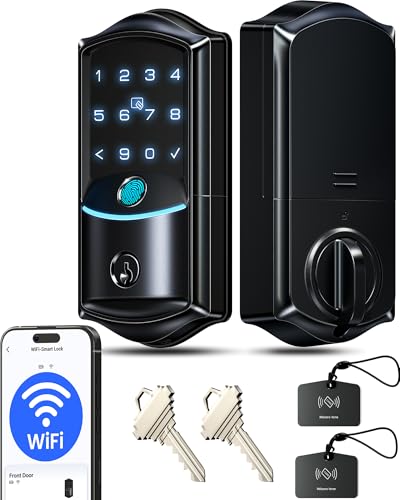
Pros
- Built-in Wi-Fi, no hub required
- 0.2-second fingerprint entry
- IP65 weatherproof, ANSI Grade 3
- Remote codes, logs, and security alerts
Cons
- Eight batteries required, not included
- Two-year warranty requires product registration
Match the Lock to Your Door
Most products here are deadbolt-style replacements, while the Philips Wi-Fi Front Lock Set includes matching handles. That distinction matters before you order: a handle set changes the appearance and operation of the door, whereas a deadbolt model is aimed at the existing deadbolt area.
Check the door thickness and hardware arrangement first. Philips states compatibility with standard doors from 35 to 50 mm thick, while the other listed products are presented as deadbolt or front-door locks. If your entry uses an unusual backset, multipoint hardware, or a separate handle, confirm the fit before removing anything.
For related hardware context, see why the strike plate matters. A motorized lock still depends on a properly aligned door and frame.
Before You Mount It: A smart lock is not a substitute for checking that the deadbolt moves freely. Binding hardware can drain batteries, prevent the door from securing, or leave the latch partly engaged.
Choose Access Around Your Household
Fingerprint readers suit families who want to avoid carrying keys, but capacity differs. Aqara U100 supports up to 50 fingerprints, Tapo supports up to 100, Aqara U300 supports up to 25, and Veise VE027 stores 20 or more. PIN codes, physical keys, apps, and cards add alternatives for visitors.
Guest access is more flexible on models with scheduled or one-time codes. Tapo offers resident profiles plus one-time or scheduled guest codes, Philips supports temporary, permanent, recurring, and one-time PINs, and the Veise models provide several remote code types through their apps.
I keep a physical entry option available for emergencies, even when daily access is biometric. The Aqara U100 includes a mechanical key and emergency USB-C charging, while Tapo includes backup keys and USB-C charging.
Expert Examined
From Ray Okafor

I keep seeing access problems start with an overcomplicated routine rather than the keypad itself. Give household members a primary method, retain a physical backup, and remove old guest credentials instead of letting the user list grow unchecked.
Read more about Ray OkaforConnectivity and Battery Choices
Built-in Wi-Fi is useful when you want remote control without buying a separate gateway. Veise VE027 connects directly to 2.4GHz Wi-Fi, while Philips provides remote management through its app. Veise VE017 needs the G1 Gateway for remote access and voice integration, and Aqara U100 needs an Aqara Zigbee 3.0 hub for remotely configurable passwords and broader integrations.
Apple households should pay attention to hub requirements. Aqara U100 supports Apple Home and Home Key, while U300 requires a Thread-enabled Apple hub for Apple features. Matter over Thread can also connect the U300 with multiple smart-home platforms, but each ecosystem requires its own Thread-enabled Matter controller.
| Device type | Key distinction | Best fit |
|---|---|---|
| Deadbolt | Existing deadbolt area | Most front doors |
| Handle set | Includes handles | Matching door hardware |
| Wi-Fi lock | Remote app control | Away-from-home access |
Battery design affects maintenance. U100 uses four included AA batteries for up to eight months, U300 uses four alkaline AAs for up to ten months, Tapo has a removable rechargeable battery rated for one year, and VE017 uses four AA batteries for about twelve months. VE027 uses eight batteries and includes a Type-C backup port.
Pro Tip: Save the emergency charging method and physical-key location in your household notes before the first low-battery alert.
For privacy questions, the smart lock security discussion explains why local storage and access management deserve attention. Aqara and Veise describe local encrypted storage, but connected features still depend on account and network security.
Which Lock Fits Your Home
I would point Apple households toward Aqara Smart Lock U100, Apple Home Key when fingerprint entry, Apple Home management, and a mechanical backup all matter. Its support for up to 50 fingerprints and emergency USB-C charging make it practical for a busy family, provided you have the required Aqara hub for remote passwords and wider integrations.
I would choose Tapo Smart Wi-Fi Door Lock, Deadbolt for a household that wants direct Wi-Fi management, a rechargeable battery, and a larger fingerprint capacity. Its scheduled guest codes are useful when access changes regularly.
For a tighter budget, I would put Veise VE027 WiFi Smart Lock Fingerprint Keyless on the shortlist. Built-in Wi-Fi avoids a gateway purchase, and the app supports remote codes, fingerprints, history, and alerts. Confirm that your network uses compatible 2.4GHz Wi-Fi before ordering.
The Bottom Line
The mistake most buyers make is treating every smart lock as a universal deadbolt replacement. Handle configuration, door thickness, hub requirements, and Wi-Fi details can matter more than the number of entry methods.
If you do only one thing first, inspect your existing door hardware and measure the door before comparing apps. Then choose the access method your household will actually use, while keeping a dependable physical or emergency-power backup.
FAQs
Fingerprint access can reduce the need to remember or share codes, while a keypad is convenient for guests and people without registered fingerprints. Models in this selection often combine fingerprints with PINs, apps, keys, or cards, so you can keep more than one entry method available. Battery-powered locks can continue operating when household power is unavailable, but connected features may depend on your network and hub. Keep the physical key or emergency USB-C or Type-C power method accessible, and watch the lock’s low-battery alerts. Confirm whether the product replaces a deadbolt or includes handles, then check door thickness, existing hardware alignment, and required hub or Wi-Fi support. A lock that binds against the frame may not secure reliably and can consume power faster. A grade identifies performance requirements under a standard, but it does not guarantee that every door installation will work correctly. The listed products cite different grades, so treat the rating as one factor alongside fit, battery design, access controls, and installation quality.Is a fingerprint lock better than a keypad lock?
Do smart locks work during a power outage?
What should I check before installing a smart lock?
What does a BHMA or ANSI grade mean on a smart lock?
Sources
- BHMA standards information. buildershardware.com
- UL Solutions. www.ul.com