
Shopping for the best retrofit smart locks means deciding whether you want to preserve your existing deadbolt, add biometric entry, or connect directly to Wi-Fi. That choice matters most for renters, homeowners, and anyone who wants smart access without changing the exterior hardware.

Pros
- Installs inside without replacing existing deadbolt
- Remote control through Yale Access app
- Unlimited virtual keys for shared entry
- Included Yale Connect for door control
Cons
- Requires an existing compatible deadbolt
- Uses four AA batteries

Pros
- Multiple entry methods, including fingerprint and passcode
- Matter over Thread supports multiple ecosystems
- Rechargeable battery lasts up to six months
- BHMA-certified with IP65 outdoor protection
Cons
- UWB requires specific Apple devices and a Thread hub
- NFC cards sold separately

Pros
- Apple Home Key with iPhone and Apple Watch
- Fingerprint reader stores up to 50 prints
- Four AA batteries last up to 8 months
- IP65 zinc-alloy body, emergency USB-C charging
Cons
- Aqara Zigbee hub required for remote passwords
- NFC card sold separately

Pros
- Five entry methods, including fingerprint access
- Stores 50 passwords, fingerprints, and key fobs
- Auto-lock and app-based locking
- Screwdriver installation for standard American doors
Cons
- Remote control requires a separately sold Wi-Fi gateway
- Bluetooth connection limits control without the gateway

Pros
- Eight-minute DIY installation
- Keeps original keys as backup
- Built-in Wi-Fi, no hub required
- Up to 10-month battery life
Cons
- Fits only compatible existing deadbolts
- Keypad sold separately
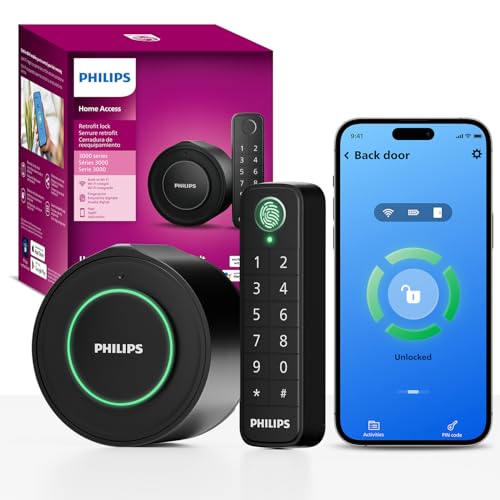
Pros
- Keeps original exterior hardware and keys
- Wireless fingerprint and passcode keypad
- Built-in WiFi, no extra hub required
- Remote app control and access history
Cons
- Requires a 2.4GHz WiFi network
- Keypad must sit within 39 inches
Start With the Door Hardware
A true retrofit model replaces or covers the interior portion of an existing lock while preserving the outside hardware and physical key. The Yale Approach Smart Wi-Fi Deadbolt Retrofit and FEOCEY Retrofit Smart Lock for Existing Deadbolt follow that approach. Philips also replaces only the interior lock, while its wireless keypad adds another entry point.
Compatibility still deserves attention before purchase. FEOCEY specifies single-cylinder deadbolts, standard US door thickness ranges, and compatibility with Schlage and Kwikset deadbolts. Yamiry is a different format: its keypad handle works with existing deadbolts, but it is not the same inside-only retrofit design.
Pro Tip: Confirm the deadbolt type, backset, and door thickness before removing anything. A retrofit lock cannot compensate for a latch or strike plate that does not align correctly.
Match Entry Methods to Your Household
App access is useful for remote control and activity records, but households often need a local fallback. Aqara U400 combines UWB, Apple Home Key, fingerprint, passcode, voice control, NFC card support, and a physical key. Aqara U100 offers Apple Home Key, fingerprint access for up to 50 fingerprints, passwords, and a mechanical key.
Yamiry provides app, password, key fob, fingerprint, and key entry, while Philips adds fingerprint and passcode access through a wireless keypad. For family members who do not use a phone, fingerprint or code entry may be more practical than app-only access.
| Entry style | Main distinction | Best fit |
|---|---|---|
| Retrofit interior | Keeps outside hardware | Renters and existing keys |
| Biometric keypad | Fingerprint or code | Families and guests |
| UWB smart lock | Automatic approach unlock | Compatible Apple homes |
Comparing a key lock box with a smart lock can also clarify whether remote credentials are worth changing your current backup routine.
Check Connectivity and Power
Built-in Wi-Fi is convenient when you want remote access without another bridge. FEOCEY connects directly to 2.4GHz Wi-Fi, and Philips does the same. Yale includes Yale Connect for app control, while Yamiry requires a separately sold Wi-Fi gateway for remote control.
Aqara U400 uses Matter over Thread and requires a Thread-enabled Matter controller for each supported ecosystem. Its removable rechargeable battery lasts up to six months per charge. Aqara U100 uses four AA batteries with a stated life of up to eight months, while Philips uses two CR123 batteries for up to four months.
Before You Rely on Remote Access: A Wi-Fi or hub-dependent feature is not the same as local entry. Keep the physical key, passcode, or fingerprint option usable, and pay attention to low-battery alerts before the battery reaches its limit.
Expert Examined
From Jenna Castellano

I keep spare physical keys available even when a lock offers several digital entry methods. The mistake I see is treating a phone connection as the only fallback, so I prefer a setup with a mechanical key or local code and a clear battery warning.
Read more about Jenna CastellanoWhich Lock Fits Your Door
I would point renters and homeowners who want to keep the current key and exterior appearance toward the Yale Approach Smart Wi-Fi Deadbolt Retrofit. It installs inside the door without replacing the existing deadbolt, includes Yale Connect, and supports unlimited virtual keys through the Yale Access app.
For an Apple-focused household that wants the widest range of local entry choices, I would choose the Aqara U400. Its UWB feature requires specific Apple hardware and software, so I would select it only when those requirements already fit your home. The Aqara U100 is the more practical alternative if fingerprint access and Apple Home Key matter but UWB is unnecessary.
I would reserve FEOCEY for a compatible standard deadbolt where direct Wi-Fi, long stated battery life, door-ajar alerts, and no subscription are priorities. Its removable design also suits renters, landlords, and people who may move the lock later.
The Bottom Line
The mistake most buyers make is treating every retrofit lock as universally compatible. Interior-only models still depend on the existing deadbolt, door dimensions, alignment, and sometimes a particular hub or ecosystem.
If you do one thing first, identify your current deadbolt and decide which backup entry method you will use. Then compare the lock’s connectivity and battery requirements against the way your household actually enters the home.
FAQs
Are retrofit smart locks better than replacing a deadbolt?
Retrofit models can preserve the outside hardware and existing physical keys, which is useful for renters or homeowners who do not want to alter the door appearance. They still require a compatible deadbolt and proper alignment, so replacement is sometimes simpler when the current hardware is unsuitable.
Which entry method is best for a family?
Fingerprint, keypad, physical key, and app access each suit different users. A lock with several local options, such as fingerprint and passcode entry, can be easier for family members and guests who do not want to manage an app.
How often do retrofit smart lock batteries need attention?
Battery life varies by model and usage. The listed options range from up to four months for Philips to up to ten months for FEOCEY, while rechargeable and AA-powered models have different charging or replacement routines.
What does BHMA certification mean for a smart lock?
BHMA certification refers to mechanical performance and durability standards for door hardware. Aqara identifies the U400 as BHMA-certified, while the U100 states that it complies with the same safety standard as BHMA Level 3.
For general door hardware terminology, UL Solutions provides safety and performance information relevant to product standards.
Sources
- BHMA and door hardware standards. www.buildershardware.com
- UL Solutions safety standards. www.ul.com