
Shopping for the best residential smart locks gets easier once you decide whether your household values biometric entry, phone-based access, or broad smart-home compatibility. This selection suits homeowners, renters, and hosts comparing everyday convenience with battery and hub requirements.

Pros
- Apple Home Key access with compatible devices
- Built-in WiFi, no extra gateway for remote control
- Eight entry methods for varied households
- Complete deadbolt, pull handle, and lever set
Cons
- Home Key requires a compatible iPhone or Apple Watch
- Black finish is the only listed color

Pros
- Built-in WiFi, remote control from anywhere
- Stores up to 100 access codes
- Works with Alexa and Google Home
- Forced-entry alarm and encrypted connection
Cons
- Requires Schlage Home app for smart features
- Four AA batteries last up to six months

Pros
- Multiple entry methods, including fingerprint and passcode
- Matter over Thread supports multiple ecosystems
- Rechargeable battery lasts up to six months
- BHMA-certified with IP65 outdoor protection
Cons
- UWB requires specific Apple devices and a Thread hub
- NFC cards sold separately

Pros
- Apple Home Key with iPhone and Apple Watch
- Fingerprint reader stores up to 50 prints
- Four AA batteries last up to 8 months
- IP65 zinc-alloy body, emergency USB-C charging
Cons
- Aqara Zigbee hub required for remote passwords
- NFC card sold separately
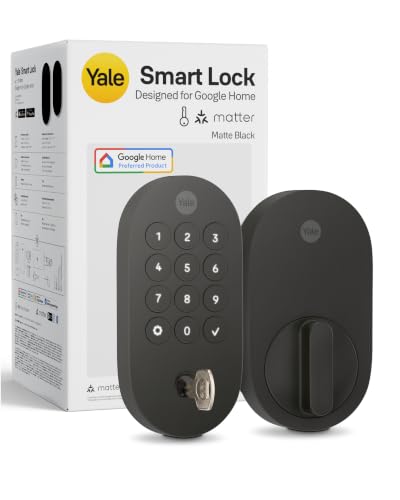
Pros
- Matter over Thread, energy-efficient mesh network
- Google Home and Google Assistant control
- Keypad, phone, voice, and backup key entry
- BHMA Grade 2 certified
- Designed for -22 to 140°F
Cons
- Matter hub required for remote access
- Google Home features limited to US and Canada

Pros
- Apple Home key support with iPhone and Apple Watch
- Built-in WiFi for remote access and monitoring
- Stores up to 100 access codes
- Forced-entry alarm and encrypted connection
Cons
- App and secure WiFi required for remote features
- Voice control requires a compatible enabled device
Start With Your Entry Routine
Fingerprint readers help when you want to leave your phone in your pocket, while keypads make guest access easier. Apple Home Key is especially useful for compatible iPhone and Apple Watch households, but several models also retain a mechanical key for emergencies.
Remote control is another major dividing line. The SMONET Smart Front Door Lock Set and both Schlage Encode models include built-in Wi-Fi, while the Yale Smart Lock Deadbolt with Google Matter needs a Matter hub for remote access. Aqara models add ecosystem features through Matter, Thread, or an Aqara hub depending on the function.
Pro Tip: Check your phone, watch, and smart-home hub requirements before choosing a lock. A feature can be present on the lock but unavailable without the compatible controller or app setup.
Match Connectivity to Your Home
Matter over Thread can suit a home that combines platforms, but it is not the same as having direct Wi-Fi control. The Aqara UWB Smart Lock U400, Apple Home Key requires a Thread-enabled Apple Home hub for UWB unlocking, and the Yale model is designed around Google Home and Matter hubs.
Built-in Wi-Fi reduces the need for an additional gateway for app remote control. That makes the SMONET Smart Front Door Lock Set practical for households that want remote lock control, activity logs, and alerts without buying a separate gateway for that purpose.
| Entry method | Connectivity | Best fit |
|---|---|---|
| Fingerprint | Wi-Fi or hub | Mixed households |
| Apple Home Key | Apple hub | iPhone households |
| Matter over Thread | Matter hub | Multi-platform homes |
Before choosing a platform, consider the role of a smart lock bridge and whether your current hub supports the lock’s required protocol. This avoids buying a lock whose most appealing function cannot operate in your home.
Check Power, Weather, and Security Details
Battery format affects maintenance. The Aqara U400 uses a removable rechargeable lithium battery rated for up to six months per charge, while the Schlage Encode Smart WiFi Deadbolt Lock uses four AA batteries with typical life of up to six months. The Aqara U100 uses four AA batteries and lists up to eight months of battery life.
Outdoor exposure also matters at the entry. The U400 and U100 carry IP65 ratings, while the SMONET set carries IP64 weather resistance. Yale lists operation from -22 to 140 degrees Fahrenheit, and the Schlage locks provide low-battery warnings plus a physical backup key.
Before You Mount It: Confirm that your door thickness, backset, handing, and existing hardware match the lock requirements. A smart deadbolt cannot compensate for a misaligned door or a weak strike plate, so review why the strike plate matters before installation.
Security labels are useful only when you understand their scope. BHMA certification or grading describes defined performance categories, not a promise that every installation or account is protected from misuse. Schlage lists the highest residential Security, Durability and Finish rating from BHMA, while Yale lists Grade 2 certification and Aqara lists BHMA certification for the U400.
Expert Examined
From Jenna Castellano

I keep seeing access problems start with forgotten batteries, not complicated software. I would enable low-battery alerts, keep the emergency charging or backup-key method available, and verify the door closes freely before relying on auto-lock.
Read more about Jenna CastellanoFor broader context on digital access risks, the common ways smart locks can be compromised are worth considering alongside the lock’s physical security features.
Which Lock Fits Your Household
I would point Apple-focused households toward the Aqara UWB Smart Lock U400, Apple Home Key. Its UWB hands-free unlocking is the most specialized option here, and it also combines fingerprint, passcode, app, voice, NFC card, and physical-key access. Choose it when you already have the required Thread-enabled Apple Home setup and want rechargeable power.
I would put the SMONET Smart Front Door Lock Set on a door where a complete handle replacement is useful. It combines a deadbolt, exterior pull handle, and interior lever, supports Apple Home, Alexa, and Google Assistant, and stores up to 50 fingerprints, passcodes, and IC cards. Its built-in Wi-Fi also suits remote access without an extra gateway.
For a Google-centered home, I would choose the Yale Smart Lock Deadbolt with Google Matter. It supports Google Home, Matter hubs, keypad codes, phone access, voice commands, and a backup key, while its Thread-based design focuses on lower power use. If you prefer Schlage’s built-in alarm and up to 100 access codes, the Schlage Encode Smart WiFi Deadbolt Lock is the stronger fit.
The Bottom Line
The mistake most buyers make is treating every smart lock as equally compatible. Apple Home Key, Matter, Thread, Wi-Fi, fingerprint access, and remote control can each depend on a particular phone, watch, app, or hub.
If you do only one thing first, inspect your existing door and smart-home setup. Confirm the hardware fit, then choose the access method your household will use most often and keep its backup entry method ready.
FAQs
Fingerprint entry is convenient when several household members need regular access without sharing a key. Keypads and physical backup keys are useful for guests or emergencies, while Apple Home Key suits compatible iPhone and Apple Watch users. Yes, the products listed with Matter or Thread features require compatible controllers or hubs for particular functions. The Yale lock needs a Matter hub for remote access, and the Aqara U400 needs a Thread-enabled Apple Home hub for UWB unlocking. Enable low-battery alerts and keep the listed emergency charging method or physical key available. Rechargeable and replaceable battery systems have different routines, so check the product’s stated battery format before installation. It indicates performance under a defined security, durability, or hardware standard, but it does not guarantee perfect installation or account security. Check the exact rating listed for the model and make sure the door and strike plate are properly aligned.Which smart lock entry method is easiest for a family?
Do Matter smart locks need a hub?
How should I maintain a smart lock battery?
What does a BHMA certification or grade mean?
Sources
- BHMA residential hardware standards information www.buildershardware.com
- UL Solutions security and safety information www.ul.com