
Shopping for the best lever smart locks gets easier once you separate entry method from smart-home compatibility. The key decision is whether your door and daily routine favor fingerprints, PINs, phone access, or a physical key backup.

Pros
- Fingerprint handle opens in 0.3 seconds
- Five entry methods, including app and key
- Built-in 2.4GHz Wi-Fi, no hub required
- Up to 100 PIN codes with access logs
Cons
- Requires eight AA alkaline batteries
- Requires specific door hole and clearance

Pros
- Built-in WiFi for anywhere access
- Touchscreen keypad enables keyless entry
- Customizable alarm for forced entry attempts
- BHMA-certified security, durability, and finish
Cons
- Remote features require a home WiFi connection
- App control adds setup and management

Pros
- Apple Home Key with iPhone or Apple Watch
- Fingerprint recognition in under 0.3 seconds
- Matter over Thread supports multiple ecosystems
- Up to 10 months on four AA batteries
Cons
- Alkaline batteries required for stable operation
- Thread-enabled Matter controller required for platforms

Pros
- Built-in WiFi, no hub required
- Fingerprint entry in 0.3 seconds
- One-time and recurring PIN codes
- Matching handle set included
Cons
- Requires 2.4GHz WiFi within 33 feet
- Batteries not included, alkaline only
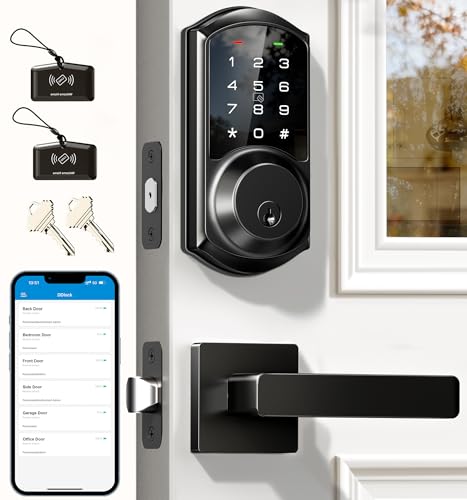
Pros
- App and web control with no subscription fee
- Stores 250+ flexible access codes
- IP54 weatherproof, BHMA/ANSI Grade 3
- IC card capacity exceeds 1,000 cards
Cons
- Remote features require separate G2 gateway
- Two-year warranty requires product registration

Pros
- Fingerprint, PIN, app, and keyfob entry
- Supports Apple Home Key and Matter
- Remote access and smart activity alerts
- Six AA batteries included
Cons
- Wi-Fi supports 2.4 GHz networks only
- Requires compatible Matter controller and Thread router
Match the Entry Method to Your Routine
Fingerprint entry is useful when your hands are full, but stored capacity varies. Philips Upgraded Wi-Fi Smart Lock with Handle stores up to 50 fingerprints, while Aqara Smart Lock with Handle U300, Apple Home Key stores up to 25. PIN access is more flexible for guests, cleaners, tenants, or recurring schedules.
Phone-based access matters most when you need remote control or activity records. The Schlage Encode Smart WiFi Lock, Lever Handle connects through built-in Wi-Fi, while the Veise VE06-L Smart Deadbolt Lock with 2 Lever can manage extensive codes and access permissions through its app and web portal. Veise requires a separate G2 gateway for remote smart-home functions.
Pro Tip: Choose one primary entry method for everyday use and keep a different method available for visitors or emergencies.
Check Door Fit Before Ordering
A lever replacement is not automatically compatible with every door. Measure the door thickness, bore hole, backset, and the space between existing hardware before ordering. Philips Upgraded Wi-Fi Smart Lock with Handle needs a 2-1/8-inch hole and at least 4.53 inches between the deadbolt and handle set.
ULTRALOQ Latch 5 Pro WiFi Smart Lever Lock fits doors 1-3/8 to 1-3/4 inches thick, with a 2-3/8 or 2-3/4 inch backset and a 2-1/8-inch bore. The Philips WiFi Keypad Deadbolt with Handle also includes a matching handle set, which can simplify a complete front-door replacement.
| Entry type | Key distinction | Suitable situation |
|---|---|---|
| Fingerprint | Fast biometric access | Family daily entry |
| PIN codes | Guest scheduling | Rentals and visitors |
| Phone or voice | Remote smart control | Connected households |
If you are unsure whether the existing deadbolt and lever can coexist, review how deadbolts and knob locks work together before selecting a replacement.
Before You Mount It: A lock that fits the exterior hardware but does not match the door bore or backset may not operate correctly. Confirm measurements and the manufacturer’s battery requirements first.
Wi-Fi, Thread, and Battery Planning
Built-in Wi-Fi removes the need for a separate bridge on several models, but network limits still matter. Philips WiFi Keypad Deadbolt with Handle requires a 2.4GHz connection and recommends keeping the lock within 33 feet of the router. Aqara and ULTRALOQ add Matter over Thread support, which requires compatible controllers and Thread equipment for the relevant ecosystem.
Battery details can affect maintenance more than app features. Aqara specifies four AA alkaline batteries and up to 10 months of operation, while ULTRALOQ uses six AA batteries and includes them. Philips models require alkaline batteries, and one Philips model does not include batteries, so check the box contents before installation.
Expert Examined
From Jenna Castellano

I keep seeing households focus on app features while ignoring the door’s measurements and wireless location. I would measure the opening first, then confirm the router or Thread equipment can support the chosen setup before removing the existing hardware.
Read more about Jenna CastellanoFor broader security context, the risks of smart-lock hacking are worth considering alongside convenience. Local encryption, access logs, and a dependable physical backup can matter more than having every available platform connection.
Which Lock Fits Your Household
I would point families wanting fast biometric entry and many scheduled credentials to Philips Upgraded Wi-Fi Smart Lock with Handle. It supports fingerprints, app access, voice control, physical keys, up to 100 passwords, and adjustable auto-lock timing. That combination suits a busy home with relatives, recurring visitors, or short-term occupants.
I would put the Schlage Encode Smart WiFi Lock, Lever Handle on a front door where built-in Wi-Fi, app monitoring, alarm customization, and recognized residential security certification are priorities. For Apple households, I would point you to Aqara Smart Lock with Handle U300, Apple Home Key, provided you already have the required Thread-enabled Apple hub. Its local AES encryption and USB-C emergency power ports add useful planning details.
The Bottom Line
The mistake most buyers make is treating a lever smart lock as a universal drop-in replacement. Door thickness, bore size, backset, clearance, Wi-Fi range, and battery type can determine whether the installation works as intended.
Start by measuring the door and listing who needs access. Then choose the entry method and network platform that fit those measurements, and keep a physical key or emergency power option available where the product supports one.
FAQs
Fingerprint models can be faster for household members, while keypads are easier to share with guests and service providers. Choose based on who needs access and whether you need scheduled or temporary codes. Check door thickness, bore hole diameter, backset, and clearance around the existing hardware. Some models also specify a required distance between the deadbolt and handle set. Battery life depends on the model, battery type, connection method, and daily use. Use the specified alkaline or lithium format, watch for low-battery alerts, and confirm whether batteries are included. It indicates that the product has been evaluated against defined hardware performance requirements. The specific grade and certification claim still matter, so read the manufacturer’s stated rating rather than assuming every smart lock has the same level.Are fingerprint lever locks better than keypad models?
What measurements should I check before buying a lever smart lock?
How often do smart lever lock batteries need replacement?
What does BHMA or ANSI certification mean on a smart lock?
Sources
- UL Solutions and Residential Lock Standards. www.ul.com
- National Fire Protection Association and Home Safety Guidance. www.nfpa.org