
Shopping for the best fingerprint smart locks gets easier once you separate bedroom knobs from full entry-door hardware. Door thickness, mortise style, and the need for remote access matter more than a fingerprint reader alone, especially for renters, families, and Airbnb owners.

Pros
- Fingerprint, app, and mechanical-key entry
- Rechargeable battery with one-year life
- Access records and shared app access
- Passage, Normal, Privacy, and Silent modes
Cons
- Remote control requires a separately purchased gateway
- Not suitable for doors with weather strips

Pros
- 3D fingerprint recognition in under 0.3 seconds
- Stores up to 99 fingerprints
- Five entry methods, including physical key
- Remote app control and real-time alerts
Cons
- Not compatible with storm doors
- Not compatible with round latch holes

Pros
- Fingerprint recognition with 99.98% accuracy
- Four entry methods, including backup keys
- Removable battery charges indoors via USB-C
- Local fingerprint and passcode storage
Cons
- Remote access requires a separately sold gateway
- Fits standard interior doors, not every entry door

Pros
- Five entry methods for flexible access
- Matter support for major smart-home platforms
- DIY installation in under 15 minutes
- Adjustable five-second auto-lock feature
Cons
- Emergency power requires a power bank
- Auto-lock begins after five seconds by default

Pros
- Eight entry methods for flexible household access
- Built-in camera with two-way audio
- Tuya app supports history and user permissions
- 3200mAh battery with Type-C backup charging
Cons
- Larger than standard residential deadbolt assemblies
- 2.4GHz Wi-Fi connection needed for app functions
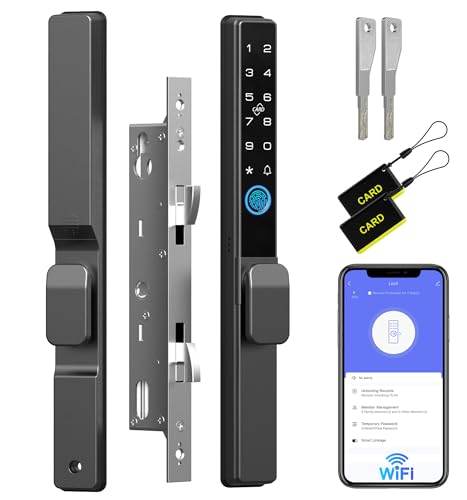
Pros
- Five access methods, including fingerprint and RFID
- WiFi remote control through mobile app
- 90-second shutdown after five invalid attempts
- Up to eight months of battery life
Cons
- Requires compatible mortise and door dimensions
- Frame must be at least 1.6 inches wide
Start With the Door, Not the App
A fingerprint knob is generally aimed at an interior bedroom, office, or similar door. The KLLOQUE and GHome options use knob-style hardware, while the Lockly model is a deadbolt designed for doors between 1⅜ and 2 inches thick. That distinction affects whether the existing latch or deadbolt can remain in place.
For an entry door, inspect the lock body, door thickness, swing direction, and available frame space before ordering. The face-recognition model uses a larger 6068 mortise assembly, and the Anweller model requires a compatible mortise and a frame at least 1.6 inches wide.
Door hardware that does not sit squarely can cause binding, incomplete latching, or unreliable auto-lock behavior. If you are unsure whether the existing hardware is suitable, review why the strike plate matters before selecting a replacement.
Before You Mount It: Measure the door, frame, mortise, and latch opening first. The Anweller and camera-equipped lock have specific fit requirements, while the KLLOQUE knob is not suitable for doors with weather strips.
Match Access Methods to the Household
Fingerprint access is convenient, but a useful lock gives you alternatives when a finger is wet, a guest needs entry, or a child does not have a phone. Lockly combines a 3D fingerprint reader with PIN Genie, an app, voice control, and a physical key. GUSEI adds a card option through its five access methods.
For shared access, app permissions and history records can be more useful than the biometric reader itself. KLLOQUE supports fingerprint setup, access records, and family access through Bluetooth, while GHome adds permanent or temporary passcodes and local storage for fingerprint and passcode data.
| Lock style | Main access choice | Best placement |
|---|---|---|
| Knob | Fingerprint and app | Bedroom or office |
| Deadbolt | Fingerprint, PIN, app | Main entry door |
| Mortise handle | Fingerprint, card, key | Specialty doors |
Remote control is not universal. KLLOQUE requires a separately purchased gateway for remote operation, GHome needs a G2 or G2B Gateway for remote access and voice control, and the camera-equipped model connects directly to 2.4GHz Wi-Fi according to its product information.
Expert Examined
From Ray Okafor

I keep seeing buyers focus on the number of access methods and overlook the door preparation. The practical mistake is ordering first and measuring later, so I would photograph the existing lock area, record the door thickness, and compare those details with the product dimensions.
Read more about Ray OkaforPlan for Batteries and Emergencies
Battery design changes the maintenance routine. KLLOQUE uses a rechargeable battery with a stated one-year life, GHome uses a removable 700mAh battery rated for more than 300 days of typical use, and the camera lock lists a 3200mAh battery lasting up to eight months.
Emergency entry varies too. GHome includes backup keys and Type-C emergency power, GUSEI provides a Type-C port for a power bank, and the Anweller also supports emergency power when its battery is depleted. Keep the backup method available without placing a key where an outsider can easily find it; these spare-key practices help avoid an obvious hiding spot.
Auto-lock timing should suit the room. GUSEI automatically secures after five seconds with adjustable timing, GHome allows settings from five to 1,800 seconds, and Lockly offers customizable auto-locking. A short delay may work for a private bedroom, but it can be inconvenient when carrying items through an entry door.
Pro Tip: Before relying on fingerprint access, add at least one backup method, enable low-battery alerts, and confirm that every regular user can operate it.
Choose Connectivity Without Overbuying
Bluetooth is enough for nearby control, user setup, and entry history, but it does not provide the same remote reach as Wi-Fi or a compatible gateway. Lockly offers remote control, real-time alerts, voice control, and offline access codes, making it the most connected option for a rental or busy household.
Matter support can matter if your home already uses several platforms. GUSEI is described as Matter-certified and also works with Tuya Smart, Alexa, Google Home, and Apple Home. For broader questions about digital access risks, see how smart locks can be hacked, then limit permissions to people who genuinely need them.
For privacy-sensitive rooms, local storage is worth noting. GHome states that fingerprint and passcode data stay on the device, while the camera model adds video intercom, two-way audio, door status, and history through the Tuya app.
Which Lock Fits Your Door
I would point renters and bedroom users toward the Fingerprint Door Lock, Smart Fingerprint Door Knob when a simple knob replacement is the priority. It offers fingerprint, app, and mechanical-key entry, four operating modes, USB Type-C charging, and screwdriver installation. Confirm the weather-strip limitation before ordering.
For a household wanting more flexible battery care, I would choose the GHome Smart Fingerprint Door Lock. Its removable battery charges indoors, and it adds keypad codes, Bluetooth control, backup keys, local data storage, and temporary access codes. That combination suits bedrooms, apartments, offices, and homes where frequent battery removal would be irritating.
I would reserve the Lockly Secure Pro Wi-Fi Smart Deadbolt Lock for a compatible main entry door or rental. Its PIN Genie keypad, 3D fingerprint reader, remote app, voice control, alerts, offline codes, and rekeying capability make it the strongest fit when different people need different ways in.
The Bottom Line
The mistake most buyers make is treating every fingerprint lock as interchangeable. A knob for a bedroom, a deadbolt for an entry door, and a mortise lock for a specialty door require different measurements and installation conditions.
If you do one thing first, measure the door and identify the existing lock style before comparing app features. Then choose the backup entry method, battery routine, and connectivity level that match the people and room using it.
FAQs
Some fingerprint knobs are intended mainly for bedrooms, offices, or interior doors. For a front door, confirm that the product matches the existing deadbolt or mortise, door thickness, frame clearance, and weather conditions before ordering. A physical key, passcode, card, or emergency Type-C power option can help when a fingerprint is not recognized or the battery is low. Choose at least one backup method every household member can use reliably. The stated battery periods vary by model, from about eight months to more than 300 days or one year. Usage, alerts, connectivity, and battery condition affect maintenance, so enable low-battery notifications and keep the emergency method available. Matter is a smart-home interoperability standard intended to help compatible devices work across supported platforms. It does not replace checking the lock’s door fit, access methods, battery design, or whether a separate hub is required.Are fingerprint knobs suitable for front doors?
What backup entry method should a smart lock have?
How often do fingerprint smart locks need charging?
What does Matter certification mean for a smart lock?
Sources
- UL Solutions www.ul.com
- National Fire Protection Association www.nfpa.org
- US Consumer Product Safety Commission www.cpsc.gov