
Shopping for the best Eufy smart door locks starts with the door itself: a front entrance needs different hardware from a bedroom or garage entry. Fingerprint access, video monitoring, and battery format are the decisions that separate these models, so your household and installation point should lead the choice.

Pros
- Fingerprint access in under one second
- Built-in Wi-Fi, no bridge required
- Up to eight months with eight AA batteries
- BHMA Grade 3 certification
Cons
- Requires eight AA batteries
- IP53 protection, not fully waterproof

Pros
- Fingerprint handle recognition for keyless entry
- Built-in Wi-Fi with remote app control
- Real-time notifications and event history
- 15-minute installation with no drilling
- Works with left- and right-hand doors
Cons
- Requires eight AA batteries
- IP53 protection limits outdoor exposure

Pros
- 2K camera with f/1.6 lens
- Fast fingerprint recognition
- Built-in Wi-Fi and 8GB storage
- BHMA Grade 3, IP65 weather resistance
Cons
- Rechargeable battery requires periodic charging
- Compatible accessories sold separately

Pros
- Fast palm vein recognition in 0.6 seconds
- BHMA Grade 1 deadbolt certification
- 2K HD camera with 150-degree view
- 16GB built-in local storage
Cons
- Camera streams unavailable through Matter
- Not compatible with HomeBase 2
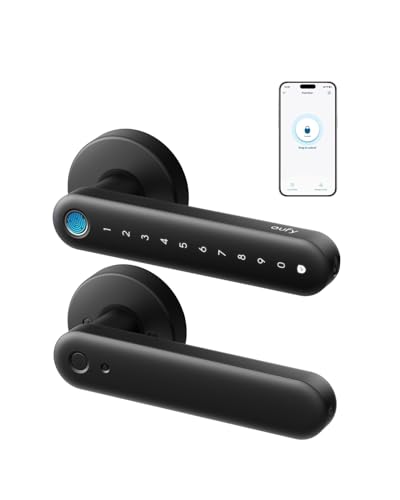
Pros
- 0.3-second fingerprint entry
- Built-in 2.4 GHz Wi-Fi
- Four AA batteries last over five months
- Alexa and Google Assistant integration
Cons
- Not recommended for front doors
- Rekeying is not supported

Pros
- Built-in Wi-Fi, no bridge or hub required
- Keypad, app, voice, and physical-key access
- Auto-lock with customizable countdown timer
- DIY installation in about 15 minutes
Cons
- Four AA batteries last up to five months
- BHMA Grade 3 security certification
Match the Lock to the Door
For a standard front-door deadbolt, built-in Wi-Fi keeps remote access available without a separate bridge. The eufy Security Smart Lock C220 and eufy Security Smart Lock C30 both suit buyers who want keypad, app, voice, and physical-key options, while the C220 adds fingerprint entry and a longer stated battery period.
A handle-style design changes the placement question. The eufy Security Smart Lock C33 combines the handle grip with fingerprint recognition and is described for front, garage, side, office, or basement doors. The eufy Security Smart Lock FamiLock C32 is aimed at interior doors, including bedrooms and offices, and is not recommended for front doors.
Video models make the entrance itself the priority. The eufy Security Video Smart Lock E331 adds a 2K camera, visitor notifications, and built-in storage, while the eufy Security Video Smart Lock FamiLock S3 Max combines a 2K doorbell camera with palm-vein access and an interior video screen.
Before You Mount It: A lock intended for interior doors should not be treated as a front-door substitute. Confirm the model’s stated placement, deadbolt compatibility, and door fit before removing existing hardware.
Fingerprint, Palm, or Keypad Access
Fingerprint entry is useful when several household members need quick access without carrying keys. The C220 uses self-learning fingerprint recognition, the C33 adapts to family members, and the C32 specifies a large-area array with 360-degree recognition and a 0.3-second entry response.
Palm-vein access makes the FamiLock S3 Max the distinctive choice for buyers focused on forgery resistance and local biometric storage. If guests, children, or service workers need flexible entry methods, keypad and physical-key options remain important rather than treating biometrics as the only route.
| Lock type | Key distinction | Best placement |
|---|---|---|
| Keypad deadbolt | Auto-lock and Wi-Fi | Standard front door |
| Fingerprint handle | Grip-based entry | Front or interior door |
| Video lock | Camera and alerts | Visitor-facing entrance |
Access history and real-time notifications matter most when you manage entry remotely. The C33 highlights event history and access management, while the E331 and S3 Max add visitor awareness through cameras. For broader context on digital entry risks, read how smart locks can be hacked.
Battery Planning and Home Integration
Battery choice affects maintenance more than the app does. The C220 uses eight AA batteries and lists around eight months, the C30 uses four AA batteries for up to five months, and the C32 uses four AA batteries for over five months with USB-C emergency backup.
The E331 uses a rechargeable 10,000mAh battery for its lock and video functions. The S3 Max lists up to four months of full functionality, followed by an emergency set of four AAA batteries for essential operation, so its power routine differs from the AA-based models.
Pro Tip: Before installation, check your deadbolt dimensions, door handing, Wi-Fi location, and battery access. A strong network connection near the entrance makes remote management more practical.
Integration also varies by household. The C220 can join routines with a compatible eufy doorbell, the E331 works with selected eufy devices and HomeBase 3, and the S3 Max supports Matter connections with Apple Home, Google Home, Alexa, and SmartThings. Matter does not carry the camera stream, so the eufy app remains necessary for full video features.
Expert Examined
From Ray Okafor

I keep seeing homeowners focus on the phone app while overlooking the door’s existing deadbolt and battery compartment. Measure the hardware first, then decide which access method your household will actually use every day.
Read more about Ray OkaforFor general door hardware context, the strike plate’s role in door security is worth understanding before installation. The lock is only one part of the entry assembly.
Which Eufy Lock Fits Your Home
I would put the eufy Security Smart Lock C220 on a standard front door when you want fingerprint access, built-in Wi-Fi, voice control, and several backup entry methods without adding a bridge. Its stated eight-month AA battery life also suits households that prefer fewer battery changes.
I would point you to the eufy Security Video Smart Lock E331 when seeing visitors is as important as controlling the deadbolt. Its 2K camera, notifications, fingerprint access, keypad, physical keys, and rechargeable battery make it a better fit for a front entrance where delivery and visitor awareness matter.
For a household wanting the most advanced biometric and viewing setup, I would choose the eufy Security Video Smart Lock FamiLock S3 Max. Palm-vein recognition, local biometric storage, a wide-angle 2K doorbell camera, and an interior screen are especially useful when children or older adults need to check the entrance without relying on a phone.
The Bottom Line
The most common mistake is choosing by fingerprint speed alone while ignoring whether the model fits the intended door. The C32 is specifically not recommended for front doors, while video models add different battery and privacy considerations.
If you do one thing first, identify the door type and confirm deadbolt compatibility. Then decide whether your priority is simple keypad access, biometric convenience, or visitor video before comparing the remaining features.
FAQs
The C220 suits a standard front door when you want fingerprint access, built-in Wi-Fi, keypad entry, and physical-key backup. The E331 or FamiLock S3 Max is more appropriate when visitor video and notifications are central to your decision. The FamiLock C32 is described for interior doors and is not recommended for front doors. Use a model whose specifications identify front-door or standard deadbolt compatibility for the main entrance. Battery formats and stated runtimes vary by model. AA-powered locks include battery indicators or emergency access features, while the E331 and S3 Max use rechargeable systems with different backup arrangements. BHMA Grade 3 is a certification classification associated with residential lock performance. It does not tell you which access method is best or replace checking fit, installation, and the security of the complete door assembly. The UL Solutions standards organization provides additional information about safety and performance standards.Which Eufy smart lock is best for a front door?
Can an interior Eufy lock go on a front door?
How do Eufy smart locks handle battery power?
What does BHMA Grade 3 mean on these locks?
Sources
- BHMA, Builders Hardware Manufacturers Association. www.buildershardware.com
- UL Solutions, Safety and Performance Standards. www.ul.com