
Choosing the best Aqara smart locks means matching the lock format to your door and deciding how much access flexibility you need. Apple Home users, families sharing entry, and households replacing a deadbolt will have different priorities.

Pros
- Multiple entry methods, including fingerprint and passcode
- Matter over Thread supports multiple ecosystems
- Rechargeable battery lasts up to six months
- BHMA-certified with IP65 outdoor protection
Cons
- UWB requires specific Apple devices and a Thread hub
- NFC cards sold separately
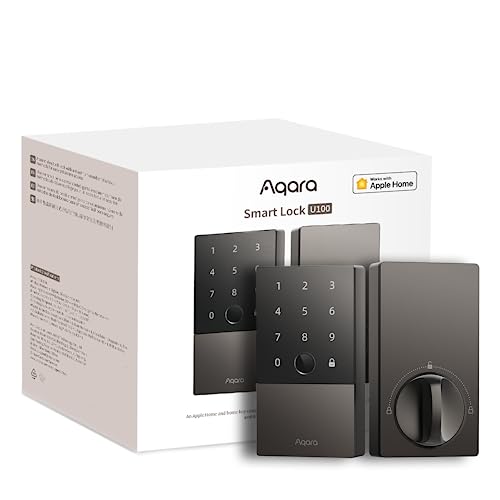
Pros
- Apple Home Key with iPhone and Apple Watch
- Fingerprint reader stores up to 50 prints
- Four AA batteries last up to 8 months
- IP65 zinc-alloy body, emergency USB-C charging
Cons
- Aqara Zigbee hub required for remote passwords
- NFC card sold separately

Pros
- Apple Home Key with iPhone or Apple Watch
- Fingerprint recognition in under 0.3 seconds
- Matter over Thread supports multiple ecosystems
- Up to 10 months on four AA batteries
Cons
- Alkaline batteries required for stable operation
- Thread-enabled Matter controller required for platforms

Pros
- Apple Home Key support with iPhone and Apple Watch
- Touchscreen keypad with temporary and one-time passwords
- IPX5-rated zinc alloy lock body
- Rekeyable cylinder supports an existing five-pin key
Cons
- Aqara hub required for remote access features
- NFC card sold separately
Start with the Door Hardware
The U400, U100, and U50 are deadbolt-style locks, while the U300 replaces a lever-style handle. That distinction matters more than a small feature difference because a lever lock is intended for a different door preparation than a standard deadbolt.
Before ordering, confirm whether your existing door uses a deadbolt or a lever assembly, and check that the exterior hardware will fit the available space. If you are unsure how the door hardware works, this explanation of what a strike plate does can help you inspect the frame before installation.
Pro Tip: Measure the door edge, backset, and existing hardware before choosing between a deadbolt and lever model.
Apple Home Access Is Not the Same on Every Model
All four locks support Apple Home Key, but the U400 adds UWB hands-free access for compatible iPhones and Apple Watches. That feature requires a Thread-enabled Apple Home hub and specific supported devices, so it should not be treated as a universal phone feature.
The U100 and U300 suit households that prefer tapping a device or using a fingerprint. The U50 also supports keypad access, temporary passwords, and one-time local passwords, while Aqara hubs are required for certain remote password and third-party automation functions.
| Lock format | Standout access | Best fit |
|---|---|---|
| U400 deadbolt | UWB approach access | Apple households |
| U100 deadbolt | Fingerprint reader | Shared family entry |
| U300 lever lock | Fast fingerprint access | Lever-door replacement |
Apple Home Key sharing requires an Apple Home hub, and Matter over Thread features require the appropriate controller. For broader smart-home planning, review how a smart lock bridge works before assuming every platform works without added hardware.
Power, Weather, and Emergency Entry
The U400 uses a removable rechargeable battery rated for up to six months per charge. The U100 uses four AA batteries for up to eight months, the U300 uses four AA alkaline batteries for up to ten months, and the U50 uses four AA batteries for up to six months.
Each model has a USB-C emergency power option, but the battery routine differs. Rechargeable power may reduce disposable battery use, while AA power can be easier to replace immediately. The U400, U100, and U50 list exterior weather resistance, although the U50 has an IPX5 rating while the other two list IP65.
Before You Rely on Keyless Entry: Keep a working physical-key plan or understand the emergency charging method before disabling your normal entry routine.
The U400 is BHMA-certified, while the U100, U300, and U50 list security information tied to their individual designs. Certification language is not a substitute for checking the door frame, cylinder, and strike alignment. The National Fire Protection Association is a useful authority for broader residential safety planning.
Expert Examined
From Ray Okafor

I keep spare-entry planning in view because a smart lock can still become inconvenient when batteries run low or household routines change. The mistake I see is choosing features first and checking the door hardware afterward, so I would verify the existing lock format before considering app functions.
Read more about Ray OkaforWhich Aqara Lock Fits Your Home
I would point Apple households wanting the most automatic arrival experience to the Aqara UWB Smart Lock U400, Apple Home Key. Its UWB presence, direction, and intent detection set it apart, but only if your iPhone or Apple Watch and Thread-enabled Apple Home hub meet the listed requirements. The removable rechargeable battery and rekeyable cylinder add practical flexibility.
For a conventional deadbolt with a lower hardware burden, I would choose the Aqara Smart Lock U100, Apple Home Key. Its fingerprint reader supports up to 50 fingerprints, and its AA battery system lasts up to eight months. I would reserve the Aqara Smart Lock U300, Apple Home Key for a household replacing a lever lock rather than a deadbolt, especially where fast fingerprint recognition and long AA battery life matter.
The Bottom Line
The most common mistake is buying by app compatibility while overlooking whether the door needs a deadbolt or lever lock. The U300 is the format exception, and the U400 also has device and hub requirements for its hands-free feature.
If you do only one thing first, identify your existing door hardware and confirm the required Apple, Thread, or Aqara hub setup. That check narrows the choice more reliably than comparing access features in isolation.
FAQs
The Aqara Smart Lock with Handle U300, Apple Home Key is the lever-style option in this selection. The U400, U100, and U50 are deadbolt-style locks, so they are not direct substitutes for the same door hardware. Apple Home Key sharing requires an Apple Home hub, and the U400’s UWB access requires a Thread-enabled Apple Home hub. Matter over Thread features also require the appropriate controller for the ecosystem you want to use. The U400 provides a rechargeable removable battery and a USB-C charging option. The U100, U300, and U50 use AA batteries and include USB-C emergency power, so you should monitor battery alerts and understand the backup procedure. BHMA certification indicates that a product has been evaluated against applicable performance and hardware requirements. It does not guarantee that every door installation is aligned correctly, so the frame, strike, and cylinder still need careful inspection.Which Aqara lock is best for a lever door?
Do Aqara smart locks need an Apple Home hub?
How do Aqara locks handle low battery conditions?
What does BHMA certification mean for a smart lock?
Sources
- Builders Hardware Manufacturers Association standards information buildershardware.com
- National Fire Protection Association residential safety information www.nfpa.org