
Shopping for the best zigbee doorbell cameras requires checking whether you need a doorbell that controls Zigbee devices or simply a camera that fits your existing setup. The important split is built-in hub control versus flexible power, storage, and mounting, so your choice should match the entryway and smart-home platform you already use.
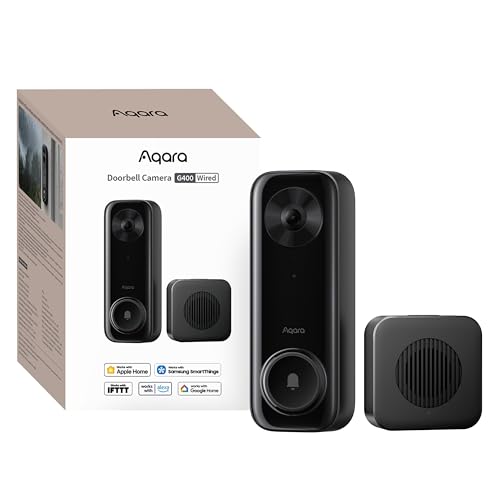
Pros
- 2K video with 165-degree head-to-toe view
- Local person and zone intrusion detection
- HomeKit, Alexa, Google, and SmartThings support
- PoE or 8–24V wired power options
Cons
- Requires wired power or PoE installation
- HomeKit needs iCloud+ and an Apple home hub

Pros
- MmWave radar for more accurate human detection
- 2K wide-angle video with 2-way audio
- Built-in Zigbee and Matter hub
- HomeKit Secure Video and major ecosystem support
Cons
- HomeKit limits resolution to 1600×1200
- MicroSD card for local storage not included

Pros
- 2K 4MP clarity with 1:1 head-to-toe view
- Up to 10 months battery life
- Local storage with no monthly fees
- Person, vehicle, animal, and package detection
Cons
- MicroSD card sold separately
- Up to 25 push alerts per day
What Zigbee Means at the Door
A Zigbee doorbell is useful when it can serve as a control point for other devices, not just send visitor alerts. The Aqara Smart Doorbell Camera G410 with Chime includes built-in Zigbee and Matter hubs, allowing compatible sensors, lights, and locks to connect through the doorbell without an extra hub.
The other two choices take a different approach. The Aqara Doorbell Camera G400 with Chime, Wired/PoE focuses on HomeKit Secure Video, RTSP, ONVIF, NVR integration, and local detection, while the REOLINK Battery Video Doorbell (2nd Gen) includes a Home Hub mini for local storage, camera management, and smart summaries.
If Apple devices are central to your home, compare the recording limits before buying. The G400 is limited to 1200p through HomeKit, while the G410 is limited to 1600×1200, despite each offering 2K video outside that platform.
Pro Tip: Confirm which device will act as your Zigbee or Matter hub before ordering. Avoid paying for overlapping hubs if your home already has one.
Power and Mounting Make the Bigger Difference
The G400 is a hardwired choice, with PoE or existing 8–24V AC/DC wiring, and it supports 24/7 recording to a microSD card up to 512GB. That makes it better suited to a stable entryway where continuous recording matters and wiring is available.
The G410 supports wireless or wired installation, while the REOLINK model can operate wire-free with up to 10 months of battery life based on five minutes of recording per day. It can also connect to compatible 8–24VAC wiring to help keep the battery topped up, which reduces charging without switching away from Battery Power Mode.
Before You Mount It: Do not assume existing doorbell wiring is compatible just because the cable is present. Confirm the required 8–24V range and follow safe electrical procedures, especially before opening a wired chime or transformer enclosure.
For additional wiring guidance, use this explanation of how to hardwire a video doorbell safely. If the camera will face a porch floor, a head-to-toe view can matter more than a wider landscape frame.
| Camera | Key distinction | Best placement |
|---|---|---|
| G400 | PoE, 24/7 recording | Wired entryway |
| G410 | Zigbee and Matter hub | Connected smart home |
| REOLINK | Battery and Home Hub | Wire-free doorway |
Detection, Storage, and Privacy
The G410 uses mmWave radar to detect human presence and reduce alerts from pets, wind, and shadows. It also stores face data locally and supports local face recognition, custom audio, privacy masking, and microSD storage in the indoor chime.
The G400 uses local person recognition and zone intrusion detection, with continuous recording to a microSD card and automatic backup to an SMB-compatible NAS server. The REOLINK system detects people, vehicles, animals, and packages locally, with Home Hub mini storage up to 1TB and recording that remains accessible without internet.
Expert Examined
From Ray Okafor

I keep seeing doorbell owners focus on resolution while overlooking storage access and power recovery. I would decide where footage lives first, then confirm the camera can stay powered and connected at that location.
Read more about Ray OkaforFor broader placement advice, see how to angle a video doorbell down. Clean the lens periodically as well, since dust and rain spots can reduce the usefulness of any resolution level.
Which Doorbell Fits Your Entryway
I would point you to the Aqara Doorbell Camera G400 with Chime, Wired/PoE for a wired home that values 24/7 local recording, PoE, NAS backup, and a 165° head-to-toe view. Its IP65 rating and included wedge kit also suit exposed entrances where positioning and weather resistance matter.
I would choose the Aqara Smart Doorbell Camera G410 with Chime when Zigbee control is the central requirement. Its built-in Zigbee and Matter hubs, mmWave detection, local face recognition, and indoor chime microSD slot make it the most direct fit for a connected Aqara-style entry system.
I would put the REOLINK Battery Video Doorbell (2nd Gen) on a rental, detached entrance, or doorway where running cable is inconvenient. Battery operation, optional 8–24VAC support, local Home Hub storage, and detection for people, vehicles, animals, and packages give it the broadest placement flexibility.
The Bottom Line
The mistake many buyers make is treating every smart doorbell as interchangeable with a Zigbee hub. Only the G410 in this group specifically includes built-in Zigbee and Matter hub functions, while the G400 and REOLINK options center on their own storage, ecosystem, or power advantages.
If you only do one thing first, inspect the doorway’s power and network arrangement. Then decide whether you need built-in Zigbee control, continuous wired recording, or a battery setup before comparing camera features.
FAQs
The Aqara Smart Doorbell Camera G410 includes built-in Zigbee and Matter hubs, so it can connect compatible devices directly. The other products have different hub or integration features and should not automatically be treated as Zigbee controllers. The G400 uses PoE or 8–24V AC/DC wiring. The G410 supports wireless or wired installation, while the REOLINK model can run on its battery or connect to compatible 8–24VAC wiring to help keep the battery topped up. Mount it where faces and packages remain visible without allowing the camera to point into unnecessary private areas. Use the included wedge kit when available, and adjust the angle to preserve the head-to-toe view. IP65 indicates dust resistance and protection against water jets, but it does not mean the device should be submerged. Mount the doorbell according to its installation instructions and avoid locations where water can pool around wiring.Does a Zigbee doorbell replace a separate Zigbee hub?
Can these doorbells work without battery power?
Where should a video doorbell be mounted?
What does an IP65 rating mean for a doorbell?
Sources
- UL Solutions safety standards information www.ul.com
- US Consumer Product Safety Commission home safety information www.cpsc.gov