
Shopping for the best wireless doorbell cameras means deciding whether you value local recording, a built-in indoor screen, or the simplest battery setup. This selection suits renters and homeowners who need useful porch coverage without committing to a hardwired installation.

Pros
- 2K HD video with 166-degree wide view
- No subscription for alerts and playback
- HDR night vision up to 10 meters
- MicroSD storage support up to 128GB
Cons
- 2.4 GHz Wi-Fi only
- Built-in battery is non-removable

Pros
- Head-to-Toe 2K video resolution
- Three AA lithium batteries included
- Two-way audio with noise cancellation
- IP65 weather-resistant design
Cons
- Person detection requires a separate subscription
- Three AA batteries eventually need replacement

Pros
- 2K video with 165° head-to-toe view
- Color night vision for dark entrances
- 4.3-inch monitor with quick response button
- Free 4GB SD card, no subscription
Cons
- Indoor monitor requires a power cable
- Best connection within 5 metres

Pros
- 1:1 head-to-toe view, 150° × 150° coverage
- 1536x1536 HD+ video with color night vision
- Wire-free or AC hardwired installation
- Two-way audio and visitor auto-responses
Cons
- Chime options sold separately
- Micro SD card sold separately
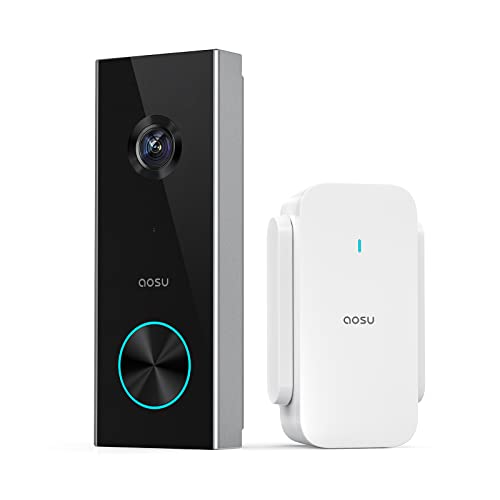
Pros
- 2K resolution with 166° ultra-wide view
- AI human detection reduces unnecessary alerts
- Local storage without a subscription
- Two-way talk with quick replies
- Included base adds Wi-Fi and chime
Cons
- 2.4 GHz Wi-Fi only, no 5 GHz support
- MicroSD card sold separately
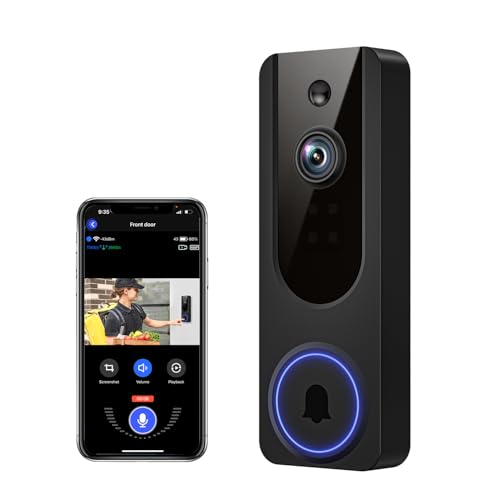
Pros
- AI human detection filters unnecessary motion alerts
- 1080p video with four-LED night vision
- Two-way audio from a smartphone
- Encrypted cloud storage with AES-128
Cons
- 2.4GHz WiFi only
- Cloud subscription required for recording storage
Start With the View You Need
A wide field of view matters when visitors stand close to the door or packages sit below the camera. BOIFUN and aosu both list a 166° view, while SwitchBot lists 165°. These designs are suited to porches where side coverage matters as much as seeing a face.
Head-to-toe framing is especially useful for deliveries. SwitchBot lists a 16:9 head-to-toe view, aosu uses a 4:3 format, and Wyze combines a 1:1 view with a 150° by 150° field. The right shape depends on whether your priority is a tall visitor view, nearby packages, or a broad entrance.
If your door sits under an overhang or faces changing light, night performance deserves attention. BOIFUN lists HDR night vision with invisible 940 nm infrared, while Wyze lists color night vision and a starlight sensor.
Pro Tip: Aim the camera so the lower part of the frame includes the doorstep, not only a visitor’s face.
Storage and Alerts Shape Daily Use
Subscription rules vary more than the word wireless suggests. BOIFUN keeps real-time alerts, two-way audio, human detection, and playback available without a subscription, with microSD support up to 128GB. SwitchBot includes a 4GB SD card and supports cards up to 512GB, while aosu supports local storage up to 128GB through its base.
Cloud access can still add convenience, but check what remains available without it. VanaOrbi keeps two-way audio, human detection, and real-time notifications available without cloud service, while Blink identifies its person detection as requiring a compatible subscription.
| Device type | Storage approach | Useful placement |
|---|---|---|
| Local-storage model | microSD recording | Privacy-focused porch |
| Monitor bundle | Indoor screen and SD | Homes needing quick viewing |
| Cloud-centered model | App alerts and cloud | Remote notification priority |
Person detection can reduce interruptions from general movement, but it does not replace sensible camera positioning. For practical placement ideas, see these instructions on angling a video doorbell downward.
Expert Examined
From Dana Whitfield

I keep seeing the same household mistake: the camera is pointed straight ahead, so it records faces but misses parcels at the threshold. Set the lower edge of the view first, then adjust the angle so visitors remain visible.
Read more about Dana WhitfieldPower, Wi-Fi, and Installation Limits
Battery formats affect maintenance. Blink uses three AA Energizer lithium batteries and lists months of operation, while Wyze lists up to six months and also supports AC hardwiring. BOIFUN uses a built-in rechargeable battery, with laboratory conditions listing up to 60 days under specified activity, though real use varies.
Wireless does not mean every part of the setup is cable-free. SwitchBot’s indoor monitor requires a power cable and works best when the monitor and exterior doorbell are within five metres. aosu includes a base that acts as Wi-Fi extender, storage point, and chime, but both aosu and BOIFUN require 2.4 GHz Wi-Fi.
Before You Mount It: Do not assume a battery doorbell can use an existing wired chime. Confirm the included chime or monitor arrangement first, and keep the mounting point reachable for charging or battery replacement.
Connection problems often come from distance, walls, or choosing a model that does not support the home’s available band. If the camera repeatedly drops offline, review these steps for a doorbell camera that keeps disconnecting.
For installation near existing wiring, follow electrical safety guidance and use a qualified professional when the circuit is unfamiliar. UL Solutions explains safety evaluation and certification concepts, but a certification mark does not tell you whether a particular battery, chime, or mounting location suits your home.
Which Doorbell Fits Your Home
I would point renters toward the Blink Battery Doorbell 2K+ (newest model) when simple battery installation and months of battery operation matter most. Its head-to-toe 2K view, noise-canceling two-way audio, and IP65 weather resistance fit a straightforward entrance setup, though person detection requires a compatible subscription.
I would put the SwitchBot Video Doorbell Camera in a home where someone wants to see visitors on a dedicated 4.3-inch indoor screen instead of relying only on a phone. The 5000 mAh battery, 2K view, local 4GB storage, and quick response button suit households that value immediate indoor access.
For buyers who want broad coverage without a required subscription, I would choose the BOIFUN Video Doorbell Camera. Its 166° view, human detection, local microSD support, two-way audio, and built-in anti-theft alarm make it a sensible fit for a porch with frequent motion. The 2.4 GHz-only requirement should be checked before ordering.
The Bottom Line
The mistake most buyers make is treating every wireless doorbell as the same kind of system. Battery format, local storage, indoor ringing, Wi-Fi band, and package visibility can change daily use more than resolution alone.
If you only do one thing first, measure the doorway and identify where the camera must show faces and packages. Then confirm the available Wi-Fi band, charging access, and whether you want phone alerts, local recording, or an indoor monitor.
FAQs
A wide view helps cover side approaches, while a head-to-toe format helps show faces and packages together. Compare the field of view and aspect ratio, then angle the camera toward the threshold rather than aiming only at eye level. Place it where the visitor’s face and the doorstep both appear in frame. Keep the unit reachable for charging or battery service, and avoid a position blocked by a wall, storm door, or heavy overhead structure. Battery life depends on activity, recording length, signal quality, and environment. Follow the maker’s stated conditions, reduce unnecessary motion coverage when possible, and choose a model with a convenient charging or battery-access arrangement. Not always. BOIFUN, SwitchBot, aosu, and VanaOrbi list core features or local storage without a required subscription, while some advanced alerts or cloud services may cost extra. Blink identifies compatible subscription service as required for person detection. A certification mark relates to the product’s evaluation under particular safety requirements, not to every installation condition. Check the manufacturer’s instructions for power, weather, mounting, and wiring details before connecting accessories or existing doorbell circuits.Which view is best for a wireless doorbell camera?
Where should I place a battery doorbell camera?
How often do wireless doorbell batteries need maintenance?
Does a wireless doorbell camera need a subscription?
What does a doorbell camera certification mean?
Sources
- UL Solutions www.ul.com
- US Consumer Product Safety Commission www.cpsc.gov