
Shopping for the best tp-link doorbell cameras means deciding first whether your entry can support wiring or needs a rechargeable battery. Renters, delivery-heavy households, and homeowners replacing an existing bell each have a different fit.

Pros
- 2K 5MP live view
- 180° head-to-toe field of view
- Color night vision with spotlight
- Person, vehicle, and package detection
Cons
- Wired installation required
- MicroSD card not included

Pros
- Sharp 2K video resolution
- 160° ultra-wide field of view
- Person detection with instant alerts
- Up to 180 days of battery use
Cons
- Chime not included
- MicroSD card sold separately
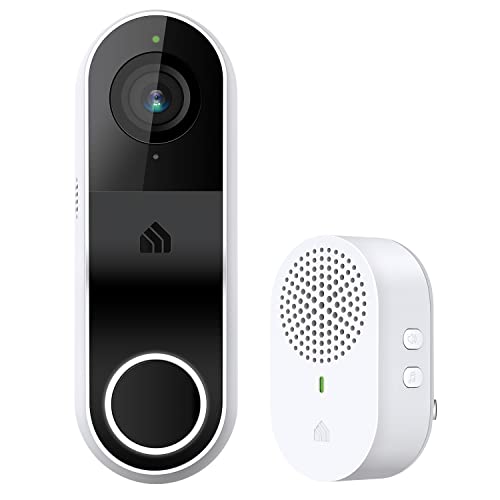
Pros
- 2K 3MP video with 160° diagonal view
- Modular chime with adjustable volume
- Two-way audio through the Kasa/Tapo app
- Infrared night vision up to 30 feet
Cons
- Hardwired installation requires an existing circuit
- Works on the 2.4GHz Wi-Fi band only

Pros
- 2K QHD video with 180-degree viewing
- Wired or battery-powered installation
- Person, package, and vehicle detection
- Local storage without a subscription
Cons
- 2.4GHz Wi-Fi required, no 5GHz support
- microSD card required for local storage

Pros
- 4K video with 180° diagonal field of view
- Radar detection helps reduce false alerts
- Free AI detection for people and packages
- Subscription-free microSD storage up to 512GB
Cons
- Facial recognition unavailable in Illinois and Texas
- MicroSD card sold separately
Match the power format to your doorway
A hardwired doorbell makes sense when low-voltage wiring already reaches the frame and you want a permanent installation. The Tapo D130 and Kasa KD110 are corded options with indoor chimes, while the D225 and D260 can also use wiring for continuous recording features.
Battery power removes the wiring constraint, but it adds a charging routine. The D205 has a built-in rechargeable battery rated for up to 180 days, while the D225 offers up to eight months and the D260 up to 180 days, with actual runtime depending on use.
Before You Mount It: Do not connect a wired doorbell until you confirm the existing doorbell voltage and follow safe low-voltage installation practices.
If you are replacing a wired unit, review how to hardwire a video doorbell safely before touching the terminals. A wireless model may be the simpler route if the frame has no suitable wiring.
Choose coverage for the approach
A wide view is especially useful when packages land close to the threshold. The D130, D225, and D260 offer 180-degree coverage, while the D205 and KD110 provide 160-degree views. The D130 and D225 also emphasize head-to-toe framing, which can help show visitors and parcels in one image.
Resolution matters most when you need detail in a distant or poorly lit approach. The D130, D205, KD110, and D225 use 2K video, while the D260 adds 4K, radar detection, and recognition for people, pets, vehicles, and packages.
| Doorbell type | Coverage feature | Suitable placement |
|---|---|---|
| Wired | Continuous power | Existing doorbell wiring |
| Battery | Flexible mounting | Doorways without wiring |
| 4K smart | Detailed recognition | Busy approach areas |
Mounting angle can change what the camera sees more than a headline specification suggests. Use a wedge when the door sits beside a wall or walkway, and consult these instructions for angling a video doorbell down.
Separate useful alerts from noise
All five options provide app-based communication, but detection varies. The D130 identifies people and vehicles, the D205 identifies people, and the D225 and D260 add package detection. The D260 also recognizes animals and supports a face library.
Night viewing differs too. The D130, D225, and D260 use color night vision with a spotlight, while the D205 and KD110 use infrared night vision. If your porch is dim and color detail matters, the spotlight-equipped models deserve closer attention.
Pro Tip: Create activity zones around the walkway and doorway so alerts focus on the approach you actually need to monitor.
Storage is another meaningful split. Each listed model supports local microSD storage, while optional cloud plans are available for certain features and video history. Check card compatibility before buying media, and consider common doorbell camera connection problems if the installation is far from your router.
Expert Examined
From Ray Okafor

I keep seeing homeowners choose a wide-angle camera but mount it too close to a side wall, leaving part of the approach blocked. I would position the bracket for the walking path first, then use the live view to check faces, packages, and the door threshold before tightening everything.
Read more about Ray OkaforWhich model fits your household
I would point you to the Tapo 2K Wired Smart Video Doorbell w/Chime, D130 when existing wiring is available and you want a 180-degree head-to-toe view, color night vision, and person, vehicle, and package awareness. Its included chime also makes it a practical replacement for a conventional bell.
For a doorway without wiring, I would choose the Tapo 2K Wireless Smart Video Doorbell, D205. Its rechargeable battery, phone-call alerts, custom activity zones, and local storage cover the essentials without requiring an indoor chime in the box.
If you want the broadest feature set and can accept a higher-tier model, I would put the Tapo 4K Wired or Battery Powered Smart Video at the front of the shortlist. Its 4K view, radar detection, animal alerts, face library, voice masking, and wired or battery installation are aimed at busy approaches where identifying activity matters.
The Bottom Line
The mistake most buyers make is treating resolution as the only deciding specification. A sharp image cannot compensate for the wrong power format, a blocked field of view, or alerts that do not cover the activity outside your door.
Start by checking whether usable doorbell wiring is present and then mark the camera’s intended view from the threshold to the walkway. That single check narrows the models quickly and helps you choose the right bracket, storage method, and maintenance routine.
FAQs
Wired models suit doorways with compatible existing wiring and can support continuous power or recording features on applicable models. Battery models are more flexible for installation where wiring is absent, but you must plan for periodic charging and monitor runtime. Mount it where the camera can see faces, the threshold, and the approach without a wall blocking the wide view. Check the live image before final tightening, and use an included wedge when the camera needs a different horizontal or vertical angle. Keep the lens clear, inspect the mount after severe weather, and recharge the battery before it reaches an inconvenient level. A clean lens is particularly important for night vision and package identification; these doorbell lens cleaning steps help avoid scratches. An IP rating describes protection against dust and water under defined conditions, but it does not make installation careless-proof. Use the supplied mounting hardware, keep connections protected, and follow the manufacturer’s placement instructions. UL Solutions provides broader product-safety information at its official site.Should I choose a wired or battery doorbell camera?
Where should a video doorbell be mounted?
How do I maintain a battery doorbell camera?
What does IP weather resistance mean on a doorbell camera?
Sources
- UL Solutions product safety information www.ul.com
- US Consumer Product Safety Commission home safety information www.cpsc.gov