
Shopping for the best doorbell cameras without subscription means choosing where recordings live and how the doorbell gets power. Local storage avoids recurring fees, while battery or wired installation determines how much maintenance your entryway needs. Renters, homeowners, and package-heavy households each have a different priority.

Pros
- 2K FHD video with a 4:3 head-to-toe view
- Human and motion detection
- Battery or hardwired power options
- No subscription or monthly fee
Cons
- Hardwiring requires bypassing the existing chime
- MicroSD card and HomeBase sold separately

Pros
- 5MP Ultra HD video with 4:3 framing
- 166° head-to-toe view
- 8GB local storage with 60-day loop
- Wireless or wired power options
Cons
- Wireless mode requires periodic battery recharging
- Advanced AI and extended storage need cloud plans
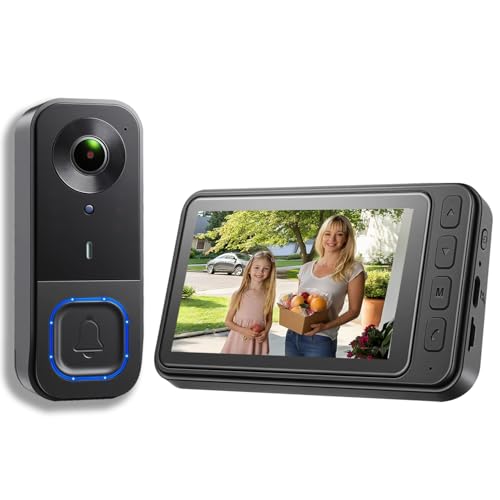
Pros
- 1080p video resolution
- Included monitor screen for live viewing
- Local storage without subscription fees
- 160° view with night vision
Cons
- MicroSD card not included
- No WiFi or app connectivity

Pros
- 7-inch 1080p touchscreen monitor
- No wiring or drilling required
- 160° wide-angle view with night vision
- Local TF-card storage, no subscription
Cons
- Motion alerts cover movement within 5 meters
- Phone features depend on Wi-Fi and app access
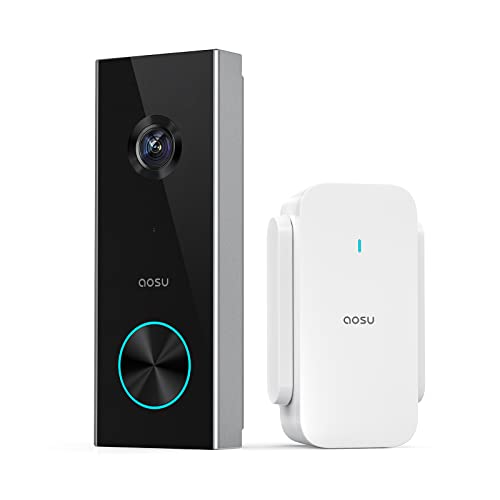
Pros
- 2K resolution with 166° ultra-wide view
- AI human detection reduces unnecessary alerts
- Local storage without a subscription
- Two-way talk with quick replies
- Included base adds Wi-Fi and chime
Cons
- 2.4 GHz Wi-Fi only, no 5 GHz support
- MicroSD card sold separately

Pros
- Dual cameras capture visitors and packages
- 2K video with color night vision
- Built-in 8GB local storage
- Wireless or wired installation
Cons
- Supports 2.4 GHz Wi-Fi only
- Rechargeable battery requires periodic charging
Start With Storage That Fits Your Routine
A no-subscription model still needs somewhere to save motion clips. The aosu 5MP Ultra HD Wireless & Wired Video Doorbell includes an aosuBase Mini with 8GB storage and 60-day loop recording, while the eufy Security Video Doorbell E340, Dual Cameras has 8GB of built-in storage. Those choices suit households that want recordings available without adding a card.
The aosu 2K Wireless Doorbell Camera with aosuBase uses a separately purchased microSD card for local recording and also leaves cloud storage optional. The KALOGL Video Doorbell Wireless with Screen 1080p stores footage locally, does not need Wi-Fi or an app, and sends live video to its included monitor. That simpler arrangement can work well where phone access is not the main priority.
| Storage approach | Key distinction | Best fit |
|---|---|---|
| Built-in storage | Ready without card | Simple local recording |
| MicroSD storage | Card added separately | Flexible capacity |
| Monitor storage | View without app | App-free households |
Pro Tip: Choose the storage method before mounting. Confirm whether a card is included, separately purchased, or unnecessary for the system you prefer.
Match the View and Alerts to the Porch
A 4:3 head-to-toe view is useful when deliveries sit close to the threshold. The eufy Security Video Doorbell C31, 2K FHD, both aosu models, and the E340 emphasize views that include visitors and packages. The E340 adds a second camera aimed downward, giving delivery-heavy homes a dedicated package view.
Detection also changes the number of alerts you receive. The aosu 5MP model combines radar, PIR infrared sensing, and AI human recognition, while the aosu 2K model uses AI human detection. The WISDOM VIEW Wireless Smart Video Doorbell detects movement within 5 meters and sends notifications to its monitor and phone app, so placement should keep the intended approach inside that area.
Before choosing a wide-angle model, check the mounting surface and the direction visitors approach from. The advice in how to angle a video doorbell down can help if a standard mount misses packages near the floor.
Before You Mount It: Turn off power at the circuit breaker before working with existing doorbell wiring or installing a memory card in a wired installation.
Decide Between Battery Freedom and Continuous Power
Battery operation avoids wiring and is practical for renters or homes without a usable doorbell circuit. The C31 has a quick-release 6,500mAh rechargeable battery, while the E340 uses a quick-release rechargeable battery and can also connect to a 16 to 24V power source to keep it topped up.
Wired operation reduces charging interruptions, but compatibility matters. The C31 requires its battery to remain inserted when wired and requires bypassing the existing chime. The E340 supports an existing mechanical chime and works with selected eufy hubs and chimes, while the aosu 5MP model offers wired operation for maintenance-free power.
I keep the power decision separate from the camera decision because a clear image is not useful if the unit is frequently unavailable. For wiring questions, consult the safety guidance in how to hardwire a video doorbell safely and review the manufacturer’s installation instructions.
Expert Examined
From Dana Whitfield

I keep seeing doorbell projects fail because the buyer chooses a battery model but mounts it where removal requires a ladder. Put the release point within comfortable reach, or choose wired power when the entryway makes charging awkward.
Read more about Dana WhitfieldChoose the Indoor Experience You Will Actually Use
Phone alerts are convenient, but an indoor display can be better for households where not everyone carries a phone. WISDOM VIEW includes a 7-inch 1080P touchscreen monitor, and KALOGL includes a monitor that shows live video without Wi-Fi or an app. Both also provide two-way audio for speaking with visitors indoors.
The C31 can show a pop-up video call with quick responses and voice messages. The aosu 2K model adds quick replies and a voice changer, while the E340 supports two-way talk and smart-home connections. Alexa and Google Assistant compatibility is listed for several models, but the E340 supports 2.4 GHz Wi-Fi only, so check your network before ordering.
For more context on indoor alert hardware, see what a doorbell chime kit is. If your priority is an uncluttered local system, avoid assuming every doorbell needs a separate chime or cloud account.
Which Doorbell Fits Your Home
I would point you to the <a href="https://www.amazon.com/dp/B09H2T18WD":aosu 5MP Ultra HD Wireless & Wired Video Doorbell when detailed porch coverage and built-in recording matter most. Its 5MP resolution, 166-degree view, triple-sensor detection, 8GB aosuBase Mini, and wired or battery power cover a wide range of front-door layouts. The included 60-day loop recording is especially useful for households that want local storage without managing a card.
I would put the <a href="https://besafehomesecurity.com/amazon":eufy Security Video Doorbell E340, Dual Cameras at a package-focused entrance. Its second camera points downward, so visitors and parcels receive separate attention, and its built-in 8GB storage keeps recordings local. Choose the <a href="https://besafehomesecurity.com/amazon":KALOGL Video Doorbell Wireless with Screen 1080p when an app-free indoor monitor matters more than higher resolution. It works without Wi-Fi and supports local storage, night vision, and two-way audio.
The Bottom Line
The mistake most buyers make is treating “no subscription” as the whole decision. You still need to check local storage, Wi-Fi requirements, detection style, viewing angle, and whether battery charging or wiring suits the mounting location.
If you only do one thing first, inspect the door area and decide whether you need a downward package view, an indoor monitor, or continuous wired power. That single choice narrows the six options faster than comparing resolution alone.
FAQs
Some do, but not all. KALOGL is described as working without Wi-Fi or an app because it uses a local monitor, while the other listed smart models use Wi-Fi for phone alerts, smart-home features, or remote viewing. Choose battery power when installation flexibility matters or wiring is unavailable. Wired power is better when you want continuous operation and can safely use compatible existing wiring, but confirm chime and voltage requirements first. Aim for a view that includes faces and the area where packages land. A 4:3 head-to-toe view or a downward camera can help, but the correct angle depends on the height and setback of your mounting surface. Local storage saves recordings on the doorbell, a base, a monitor, or a memory card instead of requiring a subscription service. Check whether storage is included, whether a card is sold separately, and how recordings are accessed. Look for installation and electrical information from the manufacturer rather than assuming every model has the same certification. For consumer safety information about connected products and home hazards, consult the US Consumer Product Safety Commission.Do no-subscription doorbells need Wi-Fi?
Should I choose a battery or wired video doorbell?
Where should a video doorbell point?
What does local storage mean on a doorbell camera?
Does a doorbell camera need a certification?
Sources
- US Consumer Product Safety Commission www.cpsc.gov
- UL Solutions www.ul.com