
Shopping for the best doorbell cameras with night vision means deciding whether you need phone alerts over Wi-Fi or a private indoor monitor that works without internet. This selection suits renters, apartment residents, and homeowners who want clearer doorstep awareness after dark.

Pros
- 1080p video with infrared night vision
- AI human detection minimizes pet alerts
- Two-way audio through your smartphone
- Indoor receiver supports multiple receivers
Cons
- Cloud subscription required for live view and playback
- 2.4GHz Wi-Fi only

Pros
- Dual cameras, front and bottom views
- Wireless battery setup, no wiring required
- 1080P video with IR night vision
- PIR alerts and two-way audio
Cons
- Cloud storage requires subscription after 24 hours
- TF card for local storage not included

Pros
- AI human detection filters pets and vehicles
- 720P video with 33-foot IR night vision
- Instant mobile alerts and cloud storage
- Two-way audio for visitor conversations
Cons
- Requires app and 2.4GHz Wi-Fi
- Charger not included with USB cable
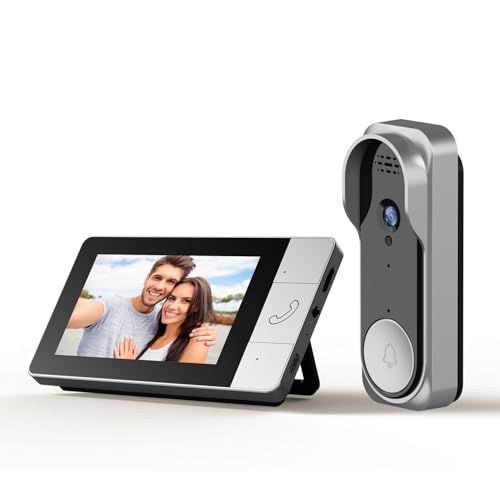
Pros
- No WiFi needed, no monthly fees
- 130° wide-angle viewing
- Infrared night vision
- Two-way audio and local SD recording
Cons
- Wired setup requires a power connection
- No remote monitoring without an internet connection

Pros
- 720P video on a 4.5-inch IPS screen
- Two-way audio without opening the door
- No WiFi, app, or subscription required
- IP54 outdoor protection and IR night vision
Cons
- Indoor monitor should stay connected to charging
- TF card required for local recording, not included

Pros
- No Wi-Fi, app, or subscription required
- 4.3-inch indoor monitor with auto wake-up
- 170-degree wide-angle infrared night vision
- Two-way audio and visitor communication
Cons
- Indoor display needs prolonged power connection
- Video recording requires a separate SD card
Match Night Vision to the Doorway
Infrared night vision is useful when porch lighting is weak or absent, but the viewing pattern still matters. A wide-angle lens can cover more of the approach, while dual cameras can show both a visitor and a package area. The INNOSECU model uses front and bottom cameras, while Winnes lists a 170-degree lens.
Consider whether you need a live view from outside the home. Connected models from Cookedixo, INNOSECU, and MeshSear use phone apps and 2.4GHz Wi-Fi, while the FUNNYPANDA and Winnes systems use a dedicated indoor display without home Wi-Fi.
| Device type | Key night feature | Best placement |
|---|---|---|
| Connected camera | Infrared and phone alerts | Wi-Fi entryway |
| Dual-camera unit | Front and bottom views | Door with packages |
| Monitor system | Infrared and local viewing | Offline doorway |
A camera aimed toward a bright porch lamp may show less useful detail because glare can wash out the visitor. If your door sits under an overhang, confirm that the selected field of view includes the walkway rather than only the door surface. Guidance on angling a video doorbell down can help with package visibility.
Choose the Storage and Alert Method
Cloud storage is convenient, but the terms differ. Cookedixo requires a subscription for live view and playback, INNOSECU includes twenty-four hours of free cloud storage before a subscription is required, and MeshSear pairs alerts with cloud storage. INNOSECU also supports a TF card up to 128GB.
Local recording may suit households that want fewer recurring services. FUNNYPANDA records to a TF card through its indoor monitor, while Winnes records video with an SD card. The irianu system is designed to operate without Wi-Fi and supports local SD card recording.
Pro Tip: Choose the storage method before mounting the doorbell. If local recording is important, obtain the compatible card separately when the product listing says it is not included.
Privacy is another meaningful split. The irianu system does not require an internet connection, and FUNNYPANDA and Winnes use a private connection between the outdoor unit and monitor. For broader context on why a doorbell camera may disconnect, see common doorbell camera connection problems.
Plan Battery and Indoor Access
Battery capacity and stated operating time vary considerably. INNOSECU lists a 9000mAh rechargeable battery with up to ninety days of standby, MeshSear lists 5200mAh, and Winnes lists up to two months of continuous use. These figures make charging access part of the installation decision.
Monitor-based systems have a second power consideration. FUNNYPANDA says its display should remain connected to charging power for daily use, while Winnes says its display needs prolonged connection to a power source and has a backup battery. A receiver or screen is useful only if it is placed where you can hear or see it.
Before You Mount It: Do not assume wireless means every component runs independently on batteries. Check which unit needs regular charging or a power connection, then place the monitor where an outage or low battery will not leave you unaware.
Expert Examined
From Dana Whitfield

For installation and upkeep, keep the lens clear and avoid placing the unit where an obstruction blocks the lower view. The advice in how to clean a doorbell camera lens safely is especially relevant to infrared images, since dust and smudges can become more noticeable at night.
Which Doorbell Fits Your Household
I would point you to INNOSECU Wireless Battery Video Doorbell Dual for a doorway where packages sit below the visitor. Its dual-camera layout is the clearest match for that placement, and its phone alerts, included chime, local TF storage, and cloud option give you more than one way to review activity.
I would choose Doorbell Camera for a household that wants a screen and no app or home Wi-Fi. Its 4.5-inch monitor, 120-degree view, infrared LEDs, private connection, and local TF recording make it a sensible fit for an apartment entrance or a family that prefers a dedicated display.
For a fully offline setup with a wider stated view, I would consider Winnes Wireless Camera Doorbell Camera Doorbell. Its 170-degree lens, infrared night vision, private 2.4G connection, 4.3-inch screen, and no-subscription design suit a renter or homeowner who wants to answer from indoors without relying on an app.
The Bottom Line
The mistake many buyers make is treating night vision as the only deciding specification. The better choice depends on whether you need a phone-based alert, a dedicated indoor monitor, dual views for packages, or storage that stays local.
If you only do one thing first, identify how you want to receive an alert after dark. Then confirm the matching power, Wi-Fi, storage, and viewing requirements before mounting the camera.
FAQs
Infrared models are the relevant choice for dark entryways, but the lens and camera layout also matter. A dual-camera unit can show a visitor and a lower package area, while a wide-angle model can cover more of the approach. Place it where the lens has a clear view of the visitor approach and any package drop area. Avoid obstructions and strong glare, and use the selected model’s stated viewing angle to decide whether the doorway or walkway receives priority. Battery life depends on the model and usage conditions. The listed products range from stated standby or continuous-use periods to systems whose indoor displays should stay connected to power, so check both the outdoor unit and monitor requirements. A certification mark should identify the organization and the applicable safety standard. These product details do not state a certification for the listed models, so verify any mark on the product or packaging rather than assuming one. UL Solutions explains how its safety marks work.Which type of doorbell camera is best for night vision?
Where should I place a night vision doorbell camera?
How often do wireless doorbell cameras need charging?
What does a safety certification mean on a doorbell camera?
Sources
- UL Solutions and Safety Marks www.ul.com
- National Fire Protection Association and Electrical Safety www.nfpa.org