
Shopping for the best doorbell cameras that work with Alexa gets easier once you separate voice control from the hardware decision. The important split is wired versus battery power, especially for households that need dependable indoor alerts and simple installation.
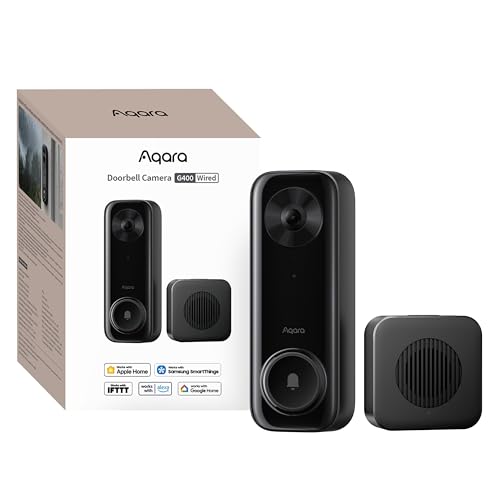
Pros
- 2K video with 165-degree head-to-toe view
- Local person and zone intrusion detection
- HomeKit, Alexa, Google, and SmartThings support
- PoE or 8–24V wired power options
Cons
- Requires wired power or PoE installation
- HomeKit needs iCloud+ and an Apple home hub

Pros
- 2K video with 165° head-to-toe view
- Color night vision for dark entrances
- 4.3-inch monitor with quick response button
- Free 4GB SD card, no subscription
Cons
- Indoor monitor requires a power cable
- Best connection within 5 metres

Pros
- Sharp 2K video with Head-to-Toe View
- Continuous power from hardwired connection
- Two-way audio with noise cancellation
- IP65 weather-resistant design
Cons
- Requires existing doorbell wiring
- Person detection requires separate Blink subscription

Pros
- 2K video with 120-degree wide-angle lens
- Night vision reaches up to 33 feet
- Local microSD storage up to 128GB
- No-drill adhesive mounting option
Cons
- 2.4GHz Wi-Fi only, no 5GHz support
- Cloud storage requires a subscription

Pros
- MmWave radar for more accurate human detection
- 2K wide-angle video with 2-way audio
- Built-in Zigbee and Matter hub
- HomeKit Secure Video and major ecosystem support
Cons
- HomeKit limits resolution to 1600×1200
- MicroSD card for local storage not included
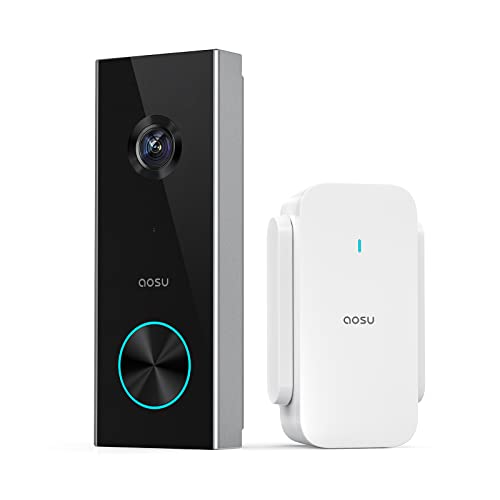
Pros
- 2K resolution with 166° ultra-wide view
- AI human detection reduces unnecessary alerts
- Local storage without a subscription
- Two-way talk with quick replies
- Included base adds Wi-Fi and chime
Cons
- 2.4 GHz Wi-Fi only, no 5 GHz support
- MicroSD card sold separately
Start With Power and Installation
A wired model suits an entryway with usable doorbell wiring or a planned PoE connection. Aqara Doorbell Camera G400 with Chime, Wired/PoE accepts 8–24V AC/DC wiring or PoE, while Blink Wired Doorbell 2K+ (newest model) is designed for continuous hardwired power. These choices avoid routine battery charging, but installation requires care around existing electrical wiring.
Battery models make more sense for renters, detached entrances, or homes without convenient wiring. SwitchBot Video Doorbell Camera uses a 5000 mAh battery and includes a monitor, while XTU 2K Wireless Doorbell Camera with Chime supports adhesive mounting or screws. Check the mounting surface and Wi-Fi signal before fastening anything permanently.
Before You Mount It: Do not work on existing doorbell wiring without shutting off the appropriate circuit and confirming it is safe. If the wiring is unfamiliar, use a qualified electrician; a damaged transformer or short connection can disable the doorbell system.
Placement affects what the camera can actually see. Head-to-toe views from Aqara, SwitchBot, Blink, and aosu help include packages near the threshold, while XTU provides a 120° view and flexible viewing angle. If visitors stand off to one side, angle the camera toward the approach rather than directly at a bright wall.
For more positioning help, see this explanation of how to angle a video doorbell down. A wedge can improve the view, but it cannot fix a camera blocked by a storm door, deep recess, or nearby trim.
Match Alerts and Storage to Your Routine
Alexa support does not mean every model handles alerts in the same way. Aqara G400 and G410 support several major ecosystems, while SwitchBot, XTU, Blink, and aosu list Alexa compatibility. The indoor alert method still matters: SwitchBot has a 4.3-inch monitor, Aqara models include chimes, aosu includes an aosuBase Mini, and Blink requires Alexa or a separately sold Blink Chime for in-home alerts.
| Power type | Storage approach | Best fit |
|---|---|---|
| Wired or PoE | Local and network options | Permanent installation |
| Battery powered | Local or optional cloud | Renters and retrofit doors |
| Wired with Alexa | Subscription may apply | Alexa-centered homes |
Local storage can reduce recurring service dependence. G400 supports a microSD card up to 512GB and SMB-compatible NAS backup, G410 stores footage on a microSD card in its indoor chime, and aosu supports a card up to 128GB. XTU supports local storage up to 128GB but makes cloud storage optional, while Blink lists a compatible subscription for person detection.
Review the common causes of doorbell camera disconnections before choosing a wireless model. XTU, aosu, and the SwitchBot monitor rely on 2.4GHz connections, while the Aqara models support dual-band Wi-Fi. A busy router location can matter more than a headline resolution.
Pro Tip: Keep the indoor monitor or chime close to the exterior unit, and verify that your router supports the required band before mounting the camera.
Choose Detection for Your Doorway
Detection features shape how useful Alexa notifications become. Aqara G400 offers local person recognition and zone intrusion detection, G410 uses mmWave radar for human presence, and aosu uses AI human detection. XTU allows sensitivity and detection-zone adjustments, while Blink identifies people through a compatible subscription.
Privacy and communication features vary as well. Aqara G400 and G410 provide voice-changing options, G410 keeps face data locally, and SwitchBot includes quick responses on its monitor. These tools are useful when you want to answer a stranger without opening the door or revealing your normal voice.
Expert Examined
From Jenna Castellano

I keep seeing doorbell owners focus on Alexa commands while overlooking the indoor alert path. The mistake I see is mounting the camera first and discovering later that the chime, monitor, or wireless band does not suit the home. Confirm those details before drilling or wiring.
Read more about Jenna CastellanoFor Apple households, HomeKit Secure Video compatibility adds another decision beyond Alexa. Aqara G400 and G410 support it, but an iCloud+ plan and Apple home hub are required, and HomeKit limits their listed resolution. The HomeKit doorbell camera comparison explains that ecosystem trade-off in more detail.
Which Doorbell Fits Your Home
I would put Aqara Doorbell Camera G400 with Chime, Wired/PoE at a permanently wired entrance where broad coverage, local detection, 24/7 microSD recording, and Alexa support matter together. Its PoE option also suits a home already organized around network equipment, while IP65 weather resistance supports outdoor placement.
I would point renters or families wanting a screen indoors toward SwitchBot Video Doorbell Camera. Its battery power, 4.3-inch monitor, included 4GB SD card, quick replies, and ability to operate without the internet make it a practical fit when an occupant needs to see the visitor without reaching for a phone.
For a lower-complexity wireless setup, I would consider aosu 2K Wireless Doorbell Camera with aosuBase. The base combines Wi-Fi extension, storage, and an indoor chime, while AI human detection and a 166° view address busy approaches. Choose it only if your network can provide 2.4GHz, since 5GHz is not supported.
The Bottom Line
The mistake many Alexa shoppers make is treating voice-assistant compatibility as the whole buying decision. A doorbell can work with Alexa and still be a poor fit if its power method, indoor alert, Wi-Fi band, or storage plan conflicts with your home.
First, identify whether you can safely use existing wiring or need battery power. Then confirm the required Wi-Fi band and decide whether local recording matters before comparing detection features and Alexa control.
FAQs
Both can work with Alexa, so the better choice depends on the entrance. Wired models provide continuous power, while battery models simplify installation where wiring is unavailable. Check the listed chime or monitor requirements because Alexa compatibility does not guarantee a separate indoor alert. Mount it where the lens can see faces and packages without a wall, storm door, or trim blocking the view. A head-to-toe field of view helps cover the threshold, but the camera may still need an angle adjustment when visitors approach from one side. Battery models need charging based on motion activity and settings. Keep the lens clear, review motion zones, and confirm the wireless connection after changing router settings. Wired models avoid routine charging but still need lens cleaning and occasional storage checks. IP65 indicates protection against dust and water jets, which is useful for exposed outdoor placement. It does not remove the need for correct mounting, sealed wiring, or protection from unusual installation conditions such as standing water.Are wired or battery doorbells better for Alexa homes?
Where should I mount an Alexa-compatible doorbell camera?
How often do wireless doorbell cameras need maintenance?
What does IP65 mean on a doorbell camera?
Sources
- National Fire Protection Association www.nfpa.org
- UL Solutions www.ul.com
- US Consumer Product Safety Commission www.cpsc.gov