
Shopping for the best doorbell cameras for privacy means deciding where video should live, not simply chasing the sharpest image. Local storage, offline viewing, and app connectivity matter most for households that want useful alerts without sending every recording to a cloud service.

Pros
- 5MP Ultra HD video with 4:3 framing
- 166° head-to-toe view
- 8GB local storage with 60-day loop
- Wireless or wired power options
Cons
- Wireless mode requires periodic battery recharging
- Advanced AI and extended storage need cloud plans
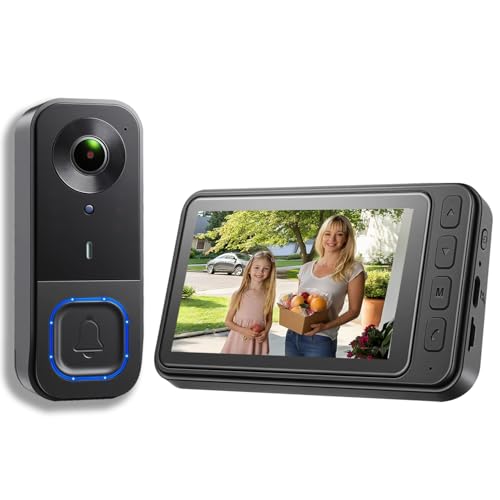
Pros
- 1080p video resolution
- Included monitor screen for live viewing
- Local storage without subscription fees
- 160° view with night vision
Cons
- MicroSD card not included
- No WiFi or app connectivity

Pros
- 2K Super HD with HDR and 3D DNR
- 4:3 view with 180-degree coverage
- Local storage without a subscription
- Included chime with 10 selectable tunes
Cons
- Hardwired only, requires compatible power
- Free rich notifications limited to 25 images daily

Pros
- 7-inch 1080p touchscreen monitor
- No wiring or drilling required
- 160° wide-angle view with night vision
- Local TF-card storage, no subscription
Cons
- Motion alerts cover movement within 5 meters
- Phone features depend on Wi-Fi and app access
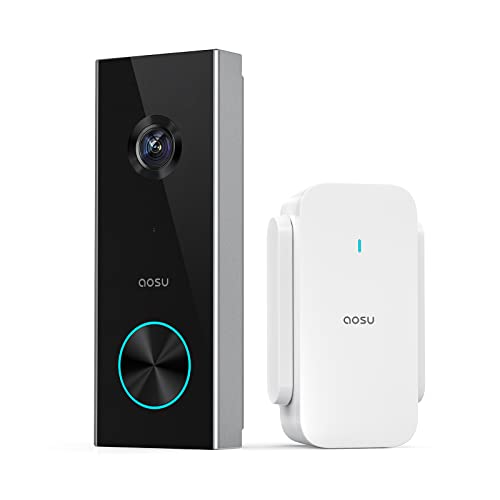
Pros
- 2K resolution with 166° ultra-wide view
- AI human detection reduces unnecessary alerts
- Local storage without a subscription
- Two-way talk with quick replies
- Included base adds Wi-Fi and chime
Cons
- 2.4 GHz Wi-Fi only, no 5 GHz support
- MicroSD card sold separately

Pros
- Dual cameras capture visitors and packages
- 2K video with color night vision
- Built-in 8GB local storage
- Wireless or wired installation
Cons
- Supports 2.4 GHz Wi-Fi only
- Rechargeable battery requires periodic charging
Local storage changes the privacy equation
A doorbell with local recording can keep footage on the device, a base station, a memory card, or an included monitor. That arrangement reduces dependence on recurring cloud storage, but you still need to understand which features require Wi-Fi, an app, or an optional cloud plan.
The aosu 5MP Ultra HD Wireless & Wired Video Doorbell includes an aosuBase Mini with 8GB storage and 60-day loop recording. The eufy Security Video Doorbell E340, Dual Cameras also has 8GB of built-in storage, while the aosu 2K Wireless Doorbell Camera with aosuBase accepts a microSD card up to 128GB, sold separately.
KALOGL Video Doorbell Wireless with Screen 1080p is the clearest fit for someone who wants a monitor-based system without Wi-Fi or an app. Its microSD card is not included, so plan for that storage accessory before installation.
Pro Tip: Keep the indoor monitor or storage base in a private room, and restrict access to the household members who need door alerts.
Choose the connection that fits your doorway
Wireless models simplify placement, especially where existing doorbell wiring is absent. The aosu 5MP model supports battery or wired power, the eufy E340 supports a rechargeable battery or a 16 to 24V connection, and WISDOM VIEW Wireless Smart Video Doorbell is designed for installation without wiring.
Wired power is more suitable when you want continuous operation without recharging. REOLINK Video Doorbell WiFi 2K Wired Camera uses a hardwired 12 to 24VAC or DC 24V power solution, so it belongs at a compatible wired location rather than a rental doorway with no usable connection.
Before You Mount It: Never connect a wired doorbell to an incompatible power source. Confirm the existing doorbell voltage and follow the product instructions before working near household wiring.
For additional installation context, see this explanation of how to hardwire a video doorbell safely. A wireless camera may be easier to place, but battery charging becomes part of ongoing privacy and maintenance planning.
Frame the doorstep, not just the visitor
Privacy is partly about what the camera records. A wide vertical view can show a person from head to toe and reveal packages near the threshold, while a broad horizontal view may capture more neighboring space than you intended.
| Camera type | View detail | Suitable placement |
|---|---|---|
| Vertical wide view | Visitor and package | Directly above entry |
| Dual-camera view | Visitor and parcel | Door with drop zone |
| Monitor system | Indoor live view | Homes avoiding apps |
The aosu models and REOLINK model use a 4:3 view for more vertical coverage. The eufy E340 adds a downward camera for packages, while KALOGL and WISDOM VIEW use 160° views. Before mounting, aim the lens at the approach and threshold rather than toward unnecessary private areas.
The article on how to angle a video doorbell down can help if your current view misses parcels. You should also review motion zones where available, since tighter zones can reduce alerts from areas outside your property.
Expert Examined
From Dana Whitfield

I keep the camera view as narrow as the entrance allows. The mistake I see is mounting for the widest possible scene, then accepting recordings of sidewalks, neighbors, and passing cars that the household never needed.
Read more about Dana WhitfieldMatch alerts and access to your routine
AI human detection can make privacy easier to manage by reducing unnecessary event notifications. The aosu 5MP combines radar, PIR infrared sensing, and AI human recognition, while the aosu 2K and eufy E340 identify people or packages through their stated detection features.
REOLINK offers AI detection, two-way talk, preset replies, and a chime with ten tunes. WISDOM VIEW sends motion notifications to its monitor and phone app, and its included TF card stores events in the monitor. If you prefer an indoor screen over phone access, KALOGL provides live viewing and communication through its integrated monitor.
For households using voice assistants, aosu supports Alexa and Google Assistant, and eufy can connect with Alexa devices and Google Voice Assistant devices. Read the privacy settings before enabling integrations, and consider whether voice alerts expose visitor information in shared rooms.
Which model fits your privacy priorities
I would point renters or households without dependable wiring toward the KALOGL Video Doorbell Wireless with Screen 1080p. Its monitor-based design does not require Wi-Fi or an app, and local storage keeps the basic viewing arrangement separate from recurring cloud service needs. Remember that the microSD card is an additional requirement.
I would point a homeowner wanting flexible power and substantial included storage toward the aosu 5MP Ultra HD Wireless & Wired Video Doorbell. It combines battery or wired operation with 8GB local storage, 60-day loop recording, 166° coverage, and triple-sensor detection. Its optional cloud plan is not required for the stated local functions.
For a doorway where packages are the main concern, I would choose the eufy Security Video Doorbell E340, Dual Cameras. The front camera covers visitors while the downward camera shows deliveries, and its 8GB local storage avoids a subscription. Use its 2.4 GHz Wi-Fi requirement as a compatibility check before buying.
The Bottom Line
The biggest privacy mistake is assuming that every no-subscription doorbell works entirely offline. Some still depend on Wi-Fi, an app, a base station, or optional services for particular alerts and remote features.
Start by deciding whether you want local storage on the doorbell, a base, a monitor, or a memory card. Then confirm power, Wi-Fi frequency, camera angle, and the exact area you intend to record.
FAQs
Local storage can reduce reliance on cloud recording and recurring service plans. The storage location varies by model, including built-in memory, a base station, a TF card, or a separately purchased microSD card, so check how footage is accessed before choosing. Choose wireless power when you need flexible placement or lack compatible wiring. Choose wired power when you want continuous operation and your existing doorbell circuit matches the product requirements, such as the stated 12 to 24VAC range for the REOLINK model. Aim it at the visitor approach and the package drop area while limiting unnecessary views of sidewalks, neighbors, and private spaces. Use the available motion zones and adjust the angle if the camera captures more area than your security needs require. AI detection can distinguish people from other motion on supported models, which may reduce unnecessary alerts. It does not replace careful camera positioning, and each product may offer different detection features or optional advanced services. Check the product documentation and installation instructions for applicable approvals rather than assuming that a feature label is a certification. For broader electrical and product-safety information, consult UL Solutions and follow the manufacturer’s power requirements.Is local storage better for a private doorbell camera?
Should I choose a wired or wireless video doorbell?
Where should a privacy-focused doorbell camera point?
What does AI detection do on a doorbell camera?
Do doorbell cameras need a safety certification?
Sources
- UL Solutions www.ul.com
- US Consumer Product Safety Commission www.cpsc.gov