
Shopping for the best doorbell cameras for Google Nest means deciding whether your priority is Google integration, local storage, or an installation that avoids existing wiring. The right match depends on your home ecosystem and the power already available at the door.
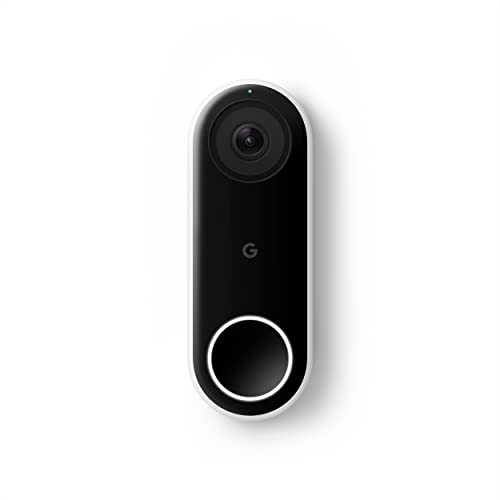
Pros
- 24/7 streaming with three-hour snapshot history
- Person alerts without requiring a doorbell ring
- HDR video and night vision
- 4:3 view shows people and packages
Cons
- Hardwired installation required
- Requires Nest app, not Google Home
- Chime sold separately
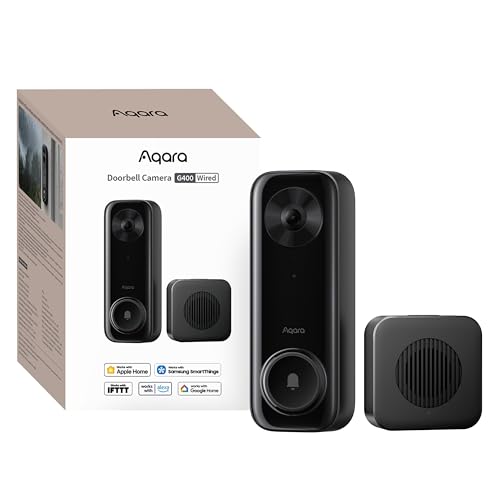
Pros
- 2K video with 165-degree head-to-toe view
- Local person and zone intrusion detection
- HomeKit, Alexa, Google, and SmartThings support
- PoE or 8–24V wired power options
Cons
- Requires wired power or PoE installation
- HomeKit needs iCloud+ and an Apple home hub

Pros
- 2K head-to-toe video
- Color night vision
- Package and visitor notifications
- 24/7 local recording via microSD
Cons
- Hardwired only, existing wiring required
- MicroSD card sold separately

Pros
- MmWave radar for more accurate human detection
- 2K wide-angle video with 2-way audio
- Built-in Zigbee and Matter hub
- HomeKit Secure Video and major ecosystem support
Cons
- HomeKit limits resolution to 1600×1200
- MicroSD card for local storage not included
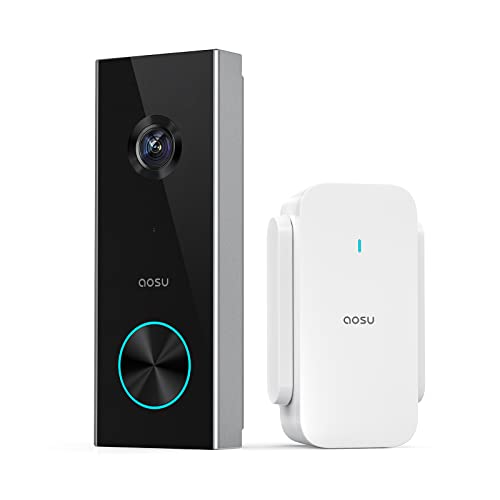
Pros
- 2K resolution with 166° ultra-wide view
- AI human detection reduces unnecessary alerts
- Local storage without a subscription
- Two-way talk with quick replies
- Included base adds Wi-Fi and chime
Cons
- 2.4 GHz Wi-Fi only, no 5 GHz support
- MicroSD card sold separately

Pros
- 2K HDR video with color night vision
- Expanded 166° field of view
- No battery charging or replacement
- Encrypted video and two-step verification
Cons
- Wired installation requires an existing circuit
- Gemini features require Google Home Premium
Start With Your Existing Wiring
Hardwired models are the natural fit when your entry already has compatible doorbell wiring. The Google Nest Doorbell (Wired) requires the Nest app and provides 24/7 streaming, while the Google Nest Doorbell (Wired, 3rd Gen) – 2K Video works with Google Home and adds 2K HDR video.
The WYZE Wired Doorbell Camera v2 also requires existing wiring, specifically 16-24V AC with at least 10VA. It supports continuous local recording with a microSD card, so it suits a household that wants around-the-clock footage without relying only on cloud features.
Before You Mount It: Do not connect a wired doorbell until you have confirmed the home’s voltage and turned off power at the appropriate circuit. If the wiring is unclear, use a qualified electrician rather than guessing at the terminals.
Match Storage and Smart-Home Support
Google’s wired models are the clearest choice if you want the Google-branded experience. The older wired model uses the Nest app, while the third-generation model works with Google Home and can use Gemini features with a Google Home Premium subscription.
Local-storage options give you a different kind of flexibility. The Aqara Doorbell Camera G400 with Chime, Wired/PoE supports microSD recording up to 512GB, NAS backup, HomeKit Secure Video, Alexa, Google Assistant, and SmartThings. The Aqara Smart Doorbell Camera G410 with Chime also supports local microSD storage and adds Matter, Home Assistant, and a built-in Zigbee and Matter hub.
| Device type | Key distinction | Best placement |
|---|---|---|
| Wired Google | Nest or Google Home | Existing doorbell wiring |
| Wired local | microSD or NAS storage | Privacy-focused entry |
| Wireless aosu | Battery and 2.4GHz Wi-Fi | Doors without wiring |
Apple households should note that Aqara models have resolution limits when HomeKit is active. The G400 is limited to 1200p in HomeKit, while the G410 is limited to 1600×1200 when connected to Apple HomeKit.
See HomeKit doorbell camera options if encrypted Apple recording matters more than native Google features.
Choose the View and Detection Style
Vertical viewing is valuable when packages sit close to the threshold. The Google Nest Doorbell (Wired) uses a 4:3 ratio to show people from head to toe and packages on the ground, while the G400 offers a 165° head-to-toe view and the aosu 2K Wireless Doorbell Camera with aosuBase offers a 166° view.
Detection features vary by model. Google’s older wired doorbell provides person alerts, the aosu model uses AI human detection, and the G400 uses local person recognition and zone intrusion detection. The G410 adds mmWave radar for human-presence detection and local face recognition.
Pro Tip: Aim the camera so the entry path and package drop area stay inside the vertical frame. A correctly angled view can matter more than choosing a wider horizontal image.
For mounting guidance, review this explanation of how to angle a video doorbell down. It is especially useful when the camera is mounted higher than the visitor’s face or close to a porch ceiling.
Expert Examined
From Ray Okafor

I keep seeing doorbells aimed too far outward, leaving packages at the bottom edge or outside the frame. I prefer setting the vertical view around the doorstep first, then checking that a visitor’s face remains visible before tightening the mount.
Read more about Ray OkaforWhich Doorbell Fits Your Home
I would point Google Home households toward the Google Nest Doorbell (Wired, 3rd Gen) – 2K Video when 2K HDR video, Google Home support, and an expanded 166° field of view are the main priorities. It is the most direct choice for a newer Google-centered setup, although advanced Gemini notifications require Google Home Premium.
I would put the Aqara Doorbell Camera G400 with Chime, Wired/PoE at a home where local recording and broad ecosystem support matter. Its PoE or 8-24V wiring options, microSD support, NAS backup, 2K head-to-toe view, and 2.4GHz or 5GHz Wi-Fi 6 make it a flexible wired alternative.
For a door without usable wiring, I would choose the aosu 2K Wireless Doorbell Camera with aosuBase. The included base provides Wi-Fi extension, storage, and an indoor chime, while the battery format removes the need to reuse an existing doorbell circuit. Remember that it requires 2.4GHz Wi-Fi.
The Bottom Line
The mistake many buyers make is treating every Google-compatible doorbell as if it offers the same app, storage, or power arrangement. Google Nest models, Aqara options, WYZE, and aosu can work with Google Assistant, but their wiring, recording, and ecosystem details are different.
If you only do one thing first, inspect the existing doorbell wiring and confirm your preferred app. That single check will quickly separate the wired models from the aosu battery option and clarify whether Nest, Google Home, Apple Home, or local storage should lead your decision.
FAQs
Person alerts are useful when you want notifications specifically about people rather than general motion. The Aqara G400 adds local person recognition and zone intrusion detection, while the G410 uses mmWave radar and local face recognition for more detailed detection choices. The aosu 2K Wireless Doorbell Camera with aosuBase is battery powered and designed for doors without a usable wired connection. The Google, Aqara, and WYZE models listed here use wired power, although the Aqara G400 supports either PoE or existing 8-24V wiring. Keep the doorstep and package area inside the vertical frame, then check that approaching faces remain visible. A wedge kit or downward angle can help when the mounting surface points the camera too high. IP65 indicates protection against dust and water exposure under the product’s stated rating. It does not change the need for correct wiring, secure mounting, or a suitable location protected from unnecessary impact. The Google Nest Doorbell (Wired) provides 24/7 streaming and continuous video recording, while the WYZE model supports 24/7 local recording with a microSD card. The Aqara G400 supports continuous recording to a microSD card up to 512GB.Which detection type should I choose for a Google Nest home?
Can these doorbell cameras work without existing wiring?
How should I position a video doorbell?
What does IP65 mean on a doorbell camera?
Do wired doorbells record continuously?
Sources
- National Fire Protection Association www.nfpa.org
- US Consumer Product Safety Commission www.cpsc.gov
- UL Solutions www.ul.com