
Shopping for the best doorbell cameras for Google Home starts with one practical split: do you have dependable doorbell wiring, or do you need a battery-powered installation? That choice matters most for renters, older homes, and anyone who wants continuous video.
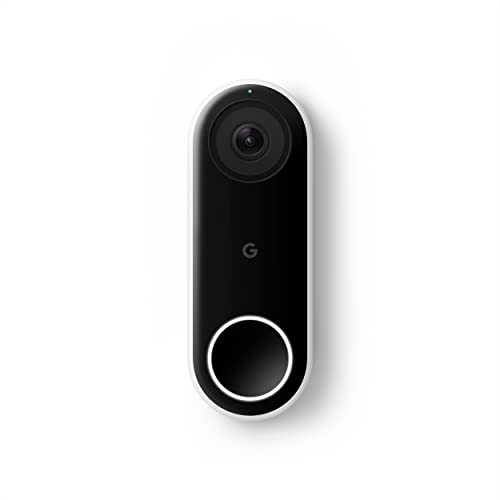
Pros
- 24/7 streaming with three-hour snapshot history
- Person alerts without requiring a doorbell ring
- HDR video and night vision
- 4:3 view shows people and packages
Cons
- Hardwired installation required
- Requires Nest app, not Google Home
- Chime sold separately

Pros
- 2K video with 165° head-to-toe view
- Color night vision for dark entrances
- 4.3-inch monitor with quick response button
- Free 4GB SD card, no subscription
Cons
- Indoor monitor requires a power cable
- Best connection within 5 metres

Pros
- 2K head-to-toe video
- Color night vision
- Package and visitor notifications
- 24/7 local recording via microSD
Cons
- Hardwired only, existing wiring required
- MicroSD card sold separately

Pros
- MmWave radar for more accurate human detection
- 2K wide-angle video with 2-way audio
- Built-in Zigbee and Matter hub
- HomeKit Secure Video and major ecosystem support
Cons
- HomeKit limits resolution to 1600×1200
- MicroSD card for local storage not included
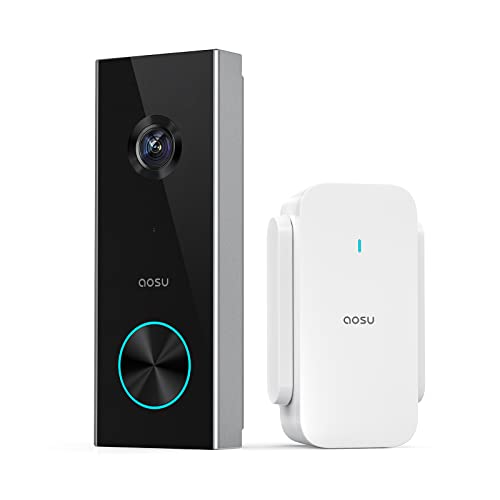
Pros
- 2K resolution with 166° ultra-wide view
- AI human detection reduces unnecessary alerts
- Local storage without a subscription
- Two-way talk with quick replies
- Included base adds Wi-Fi and chime
Cons
- 2.4 GHz Wi-Fi only, no 5 GHz support
- MicroSD card sold separately

Pros
- 2K HDR video with color night vision
- Expanded 166° field of view
- No battery charging or replacement
- Encrypted video and two-step verification
Cons
- Wired installation requires an existing circuit
- Gemini features require Google Home Premium
Start with the power format
Wired models suit a doorway that already has compatible electrical service. The Google Nest Doorbell (Wired) provides 24/7 streaming and continuous recording, while the WYZE Wired Doorbell Camera v2 requires existing doorbell wiring and a 16-24V AC power supply rated at least 10VA.
Battery models avoid that wiring constraint, but they introduce charging and placement considerations. The SwitchBot Video Doorbell Camera uses a 5000 mAh battery and pairs with a powered indoor monitor, while the aosu 2K Wireless Doorbell Camera with aosuBase uses an included base that also provides Wi-Fi extension, storage, and an indoor chime.
Before You Mount It: Do not connect a wired doorbell to unsuitable power. Check the existing doorbell circuit and the manufacturer’s stated requirements before working on the wiring.
If you are unsure about the circuit, review this explanation of how to hardwire a video doorbell safely before removing the old unit.
Match the view and alerts to your entry
A head-to-toe view is useful when packages land below the camera. The Google Nest Doorbell (Wired) uses a 4:3 view for people and packages, while the newer Google Nest Doorbell (Wired, 3rd Gen) – 2K Video adds 2K HDR and a 166° field of view.
Motion filtering also affects how useful notifications feel. The Aqara Smart Doorbell Camera G410 with Chime uses mmWave radar for human presence detection, and the aosu model uses AI human detection. These approaches are aimed at reducing alerts caused by pets, wind, or other motion, although settings still need to match your doorway.
| Device type | Key distinction | Best placement |
|---|---|---|
| Wired doorbell | Continuous power | Existing doorbell wiring |
| Battery doorbell | Flexible installation | Homes without wiring |
| Monitor system | Indoor screen | Family or older users |
Mounting angle can change whether the camera sees faces or packages. Use this advice on how to angle a video doorbell down when a high entry or deep porch blocks the lower part of the frame.
Choose storage and smart-home fit
Storage varies more than the doorbell shape suggests. The WYZE Wired Doorbell Camera v2 supports continuous local recording with a separately purchased microSD card, while the SwitchBot model includes a 4GB SD card and supports cards up to 512GB. The aosu model accepts a microSD card up to 128GB and does not require a subscription for local storage.
The Aqara Smart Doorbell Camera G410 with Chime supports Google Assistant, Matter, Alexa, SmartThings, and Home Assistant, plus encrypted cloud storage and local microSD backup. Its face-recognition data stays local, but some functions depend on the Aqara Home app. The older Google Nest Doorbell (Wired) requires the Nest app rather than the Google Home app, so app compatibility deserves attention before buying.
Pro Tip: Check the app requirement and storage method before installation, especially if you want footage available without a recurring cloud plan.
Google households should also distinguish the older wired Nest model from the 3rd generation version. The newer model is listed with Google Home compatibility, 2K HDR video, color night vision, and Gemini-related features that require a Google Home Premium subscription.
Expert Examined
From Jenna Castellano

I keep seeing doorway cameras chosen for resolution alone, even when the real problem is an obstructed lower view or unreliable power. I would first confirm the wiring, viewing angle, and storage plan, then compare image resolution.
Read more about Jenna CastellanoFor broader setup advice, the explanation of why a doorbell camera keeps disconnecting is useful when the entry has weak wireless coverage.
Which doorbell fits your home
I would point you to the Google Nest Doorbell (Wired, 3rd Gen) – 2K Video if your home already uses Google Home and you want the most direct Google-focused option. Its 2K HDR video, 166° view, continuous wired power, and Google Home integration make it a strong match for a permanently powered front entrance.
I would choose the SwitchBot Video Doorbell Camera for a household that benefits from an indoor screen, local storage, and battery operation. The 4.3-inch monitor can help children or older family members see and answer visitors without relying only on a phone.
For a smart home that mixes platforms, I would put the Aqara Smart Doorbell Camera G410 with Chime on the shortlist. Its Matter support, dual-band Wi-Fi, local storage option, and built-in hub give it a wider role than a doorbell alone.
The Bottom Line
The biggest mistake is treating every Google-compatible doorbell as the same experience. App support, wiring, storage, and whether you need an indoor monitor can matter more than the headline resolution.
If you only do one thing first, inspect the existing doorbell wiring and decide whether local storage or cloud features matter more. That immediately narrows the six choices to models that fit your home rather than forcing your home to fit the camera.
FAQs
Wired models suit homes with compatible doorbell wiring and provide dependable power. Battery models are more flexible, while Aqara supports Google Assistant and Matter for households using several smart-home platforms. Mount it where faces and packages remain visible, adjusting the angle if the camera sits high or under a deep porch. A head-to-toe view can help show both visitors and deliveries. Battery doorbells require recharging when their power runs low, so place the unit where removal is practical. Wireless connection strength also matters, particularly for systems that use an indoor monitor or base. Matter is a smart-home connectivity standard intended to help supported devices work across compatible ecosystems. It does not replace the doorbell’s own app, storage options, or power requirements.Which doorbell camera type works best with Google Home?
Where should a video doorbell be mounted?
How often do battery doorbells need maintenance?
What does Matter compatibility mean for a doorbell?
Sources
- UL Solutions www.ul.com
- US Consumer Product Safety Commission www.cpsc.gov