
Shopping for the best DIY doorbell cameras usually means choosing between easy battery installation and dependable power, while renters and homeowners may also weigh local storage against cloud features. The right fit depends on your entrance, Wi-Fi range, and willingness to recharge or maintain the device.

Pros
- 2K HD video with 166-degree wide view
- No subscription for alerts and playback
- HDR night vision up to 10 meters
- MicroSD storage support up to 128GB
Cons
- 2.4 GHz Wi-Fi only
- Built-in battery is non-removable

Pros
- Solar power with built-in dual batteries
- 2K HDR head-to-toe video
- Radar, dual PIR, and AI detection
- Free local storage up to 128GB
- Alexa support and two-way audio
Cons
- MicroSD card not included
- Requires Wi-Fi for wireless operation

Pros
- 5MP resolution with 180-degree panoramic view
- AI person and package detection
- 32GB SD card included
- Up to 180 days of battery operation
Cons
- 2.4GHz WiFi only
- Battery requires periodic recharging

Pros
- 1:1 head-to-toe view, 150° × 150° coverage
- 1536x1536 HD+ video with color night vision
- Wire-free or AC hardwired installation
- Two-way audio and visitor auto-responses
Cons
- Chime options sold separately
- Micro SD card sold separately
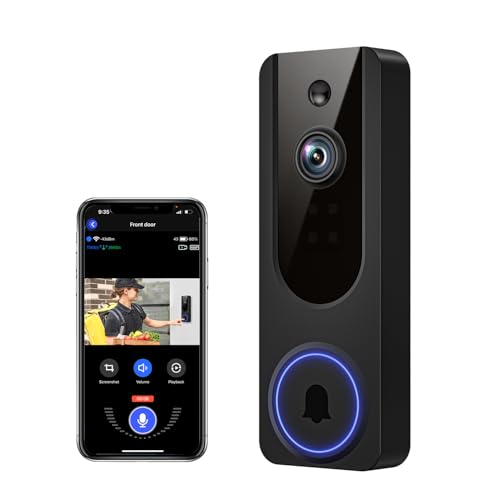
Pros
- AI human detection filters unnecessary motion alerts
- 1080p video with four-LED night vision
- Two-way audio from a smartphone
- Encrypted cloud storage with AES-128
Cons
- 2.4GHz WiFi only
- Cloud subscription required for recording storage

Pros
- 180° panoramic, head-to-toe coverage
- 5MP video resolution
- AI human and visitor detection
- Up to 150 days per charge
Cons
- 2.4GHz WiFi only
- Rechargeable battery needs periodic charging
Start With the Mounting Problem
A battery doorbell is attractive when you cannot run wiring or want a no-drill installation. BOIFUN, BOTSLAB, anyfree, Wyze, and VanaOrbi all support wireless operation, but their power approaches differ. Wyze also supports AC hardwiring, while one BOTSLAB model supports AC power for continuous use.
Position the camera so faces and packages remain visible without pointing directly into strong sunlight. A head-to-toe view is useful for parcels close to the threshold, while a wider horizontal view helps cover steps and visitors approaching from the side. For more placement advice, see how to angle a video doorbell down.
Pro Tip: Choose the mounting height and viewing angle before fixing the bracket. A wide lens cannot correct a blocked view or a package hidden directly below the camera.
Match Detection to Your Porch
Motion alerts are more useful when the device can distinguish people from general movement. The BOIFUN model includes human detection, anyfree combines radar, dual PIR, and AI logic, and both BOTSLAB models use AI-based detection with radar or PIR sensors. Wyze identifies people, vehicles, and packages, while VanaOrbi focuses on human detection.
Package recognition matters if deliveries are left in a predictable area. BOTSLAB includes package detection, and the anyfree model is designed for package monitoring with a head-to-toe view. If alerts become excessive, detection zones and sensitivity settings are more practical fixes than simply turning notifications off. A doorbell camera connection checklist can also help separate Wi-Fi issues from detection problems.
| Detection approach | Storage option | Best placement |
|---|---|---|
| AI and PIR | Local card | Busy porch |
| Radar and PIR | Local or cloud | Open approach |
| Human detection | Cloud option | Covered entry |
Power, Storage, and Privacy
Battery claims vary with motion activity, recording length, weather, and signal conditions. BOIFUN states up to 60 days in laboratory conditions, BOTSLAB lists up to 180 days for its base-station model, and Wyze lists up to six months. These figures are useful for planning, not guarantees for every entrance.
Local storage can reduce recurring costs and keep recordings available without a cloud plan. BOIFUN supports a microSD card up to 128GB, anyfree supports up to 128GB, BOTSLAB includes a 32GB card, and Wyze supports up to 256GB with a card sold separately. VanaOrbi keeps encrypted cloud storage available, with core alerts and two-way audio remaining without a subscription.
Before You Mount It: Do not assume a wireless doorbell is maintenance-free. Check battery condition, storage capacity, and Wi-Fi strength regularly, and avoid placing the device where removal would expose wiring or create a fall hazard.
Expert Examined
From Dana Whitfield

I keep seeing missed visitors caused by placement rather than camera resolution. The common mistake is aiming straight across a porch, so a person moves through the edge of the frame; angle the unit toward the approach and keep the doorstep in view.
Read more about Dana WhitfieldChoosing the Right Fit for Your Home
I would put the BOIFUN Video Doorbell Camera on a typical porch where no subscription is important and 2.4 GHz range is sufficient. Its 166-degree view, HDR night vision, two-way audio, human detection, and support for local storage cover the core needs without requiring a monthly plan.
I would point you to the BOTSLAB 5MP Doorbell Camera for an entrance where package recognition, a 180-degree view, and included local storage matter. Its listed battery duration is also suited to households that want fewer charging interruptions.
For a sunny location with flexible Wi-Fi, the anyfree Built-in Solar Doorbell Camera is the more distinctive choice. Solar assistance, dual-band Wi-Fi, local storage, Alexa support, and radar-assisted motion detection make it appealing when regular charging is inconvenient.
The Bottom Line
The biggest mistake is treating resolution as the only deciding feature. A sharp image does not help much if the camera misses the approach, loses Wi-Fi, runs out of battery, or stores important clips only behind a service plan.
If you do one thing first, inspect the entrance and identify the available power and Wi-Fi conditions. Then choose the field of view, detection system, and storage method that fit that physical location.
FAQs
Radar, PIR, and AI can work together to distinguish people from general movement. Models with adjustable zones or sensitivity are useful near sidewalks, roads, or busy shared entrances. Mount it where visitors’ faces and packages remain visible, while avoiding direct glare and obstructions. A head-to-toe view helps when parcels are placed close to the door. Charging frequency depends on motion activity, recording length, Wi-Fi conditions, and weather. Check the battery and storage periodically rather than waiting for alerts to stop. A certification mark can indicate that a product was assessed against a particular safety standard, but the exact meaning depends on the mark and product category. Check the manufacturer’s documentation and the issuing organization.Which motion sensor type suits a doorbell camera?
Where should a wireless video doorbell be mounted?
How often does a battery doorbell need maintenance?
Does a doorbell camera need a certification?
Sources
- UL Solutions safety standards information. www.ul.com
- US Consumer Product Safety Commission consumer guidance. www.cpsc.gov