
Shopping for the best google nest video doorbells gets easier once you decide between battery flexibility and continuous wired power. That choice matters most for renters, existing doorbell wiring, and anyone who wants recorded video without recharging.

Pros
- Wire-free or wired installation
- HD HDR video with night vision
- Person, package, animal, and vehicle alerts
- Stores up to one hour of offline events
Cons
- Cannot continuously record 24/7 video
- Only 3 hours of free event history

Pros
- Person, package, animal, and vehicle alerts
- 24/7 live HD video with HDR
- Night vision for low-light viewing
- Wire-free or wired installation
Cons
- Battery model cannot continuously record 24/7
- Extended history requires a Nest Aware subscription
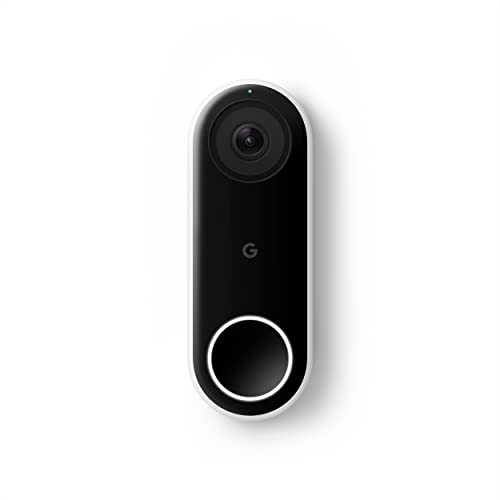
Pros
- 24/7 streaming with three-hour snapshot history
- Person alerts without requiring a doorbell ring
- HDR video and night vision
- 4:3 view shows people and packages
Cons
- Hardwired installation required
- Requires Nest app, not Google Home
- Chime sold separately

Pros
- Wire-free or wired installation
- Person, package, animal, and vehicle alerts
- HDR and night vision video
- Three hours of free event history
Cons
- No continuous 24/7 video recording
- Longer history requires Nest Aware subscription

Pros
- Continuous wired power, no battery recharging
- Distinguishes people, packages, animals, and vehicles
- Three hours of free event video history
- Pre-recorded visitor responses and two-way talk
Cons
- Requires compatible chime and transformer
- Google Home app and account required

Pros
- 2K HDR video with color night vision
- Expanded 166° field of view
- No battery charging or replacement
- Encrypted video and two-step verification
Cons
- Wired installation requires an existing circuit
- Gemini features require Google Home Premium
Battery flexibility versus wired continuity
The battery models can be installed wire-free or connected to existing doorbell wires with the included wire connector. That makes them useful when your entryway lacks compatible wiring or when you want to avoid replacing the current setup.
Battery operation has one important limitation: these models cannot continuously record 24/7 video history, even with a Nest Aware subscription. They provide live HD video with HDR and night vision, three hours of free event history, and up to one hour of stored events if Wi-Fi or power goes down.
Pro Tip: Choose the battery format when installation flexibility matters more than continuous recording.
Wired models do not need recharging. The original wired model supports 24/7 streaming and continuous recording, while the wired 2nd Gen includes three hours of event history in the Google Home app. The 3rd Gen adds 2K HDR video, color night vision, and a 166-degree field of view.
| Device type | Recording approach | Best placement |
|---|---|---|
| Battery | Event history, no 24/7 recording | Doors without wiring |
| Wired | Continuous or extended history | Existing wired entryways |
App compatibility changes your daily routine
The battery models work with the Google Home app and can identify people, packages, animals, and vehicles without a subscription. The wired 2nd Gen also uses Google Home, while the original wired model requires the Nest app and is not compatible with Google Home.
That app difference is easy to overlook when two products share similar names. If you already manage compatible devices in Google Home, the newer wired 2nd Gen or 3rd Gen may fit your routine more naturally. For broader setup context, see our explanation of what a doorbell chime kit does.
Before You Mount It: A wired Nest Doorbell requires suitable doorbell wiring, and the wired 2nd Gen requires a compatible chime and transformer. Turn off power before handling existing wiring, or use a qualified electrician.
Match the view to the entryway
Video shape matters as much as resolution. The original wired model uses a 4:3 ratio that helps show visitors from head to toe and packages on the ground, while the 3rd Gen expands the view to 166 degrees and raises resolution to 2K HDR.
Before mounting, check whether a wall, porch roof, or nearby trim blocks the lower view. Our instructions on angling a video doorbell downward can help you preserve sight of both faces and deliveries.
Expert Examined
From Ray Okafor

I keep seeing doorbells aimed too high, especially when the existing screw holes force a poor angle. Mark the visitor’s standing position first, then confirm that the lower frame includes the delivery area before tightening the mount.
Read more about Ray OkaforKeep the lens clear and inspect it after storms or dusty work near the entrance. Safe placement also supports better alerts because people and packages remain inside the visible area.
Which Nest Doorbell fits your home
I would point renters, older homes, and entryways without dependable wiring to the Google Nest Doorbell (Battery) – Ivy. It has the same core battery format as the other battery choices, supports wired or wire-free installation, and offers live HD video with HDR, night vision, and three hours of free event history. The lower listed rating also makes it a sensible value-oriented choice within this group.
I would choose the Google Nest Doorbell (Wired, 2nd Gen) for a home already prepared for a compatible chime and transformer. It uses Google Home, provides 24/7 access without battery charging, and distinguishes people, packages, animals, and vehicles. For shoppers prioritizing the clearest listed image and widest view, I would choose the Google Nest Doorbell (Wired, 3rd Gen) – 2K Video, with 2K HDR and a 166-degree field of view.
The Bottom Line
The mistake most buyers make is treating every Nest Doorbell as interchangeable. Battery models are easier to place but cannot provide continuous 24/7 video history, while wired models demand compatible hardware and may use different Google apps.
If you only do one thing first, inspect the doorbell wiring and transformer at your entryway. That answer immediately narrows the choice between flexible battery installation and a permanently powered model.
FAQs
Battery models suit doors without dependable wiring and can be installed wire-free. Wired models suit existing doorbell setups and avoid recharging, with some models supporting continuous recording or extended video history. Aim for a view that includes faces and the package drop area. Check for trim, porch ceilings, and walls that block the lower frame, and follow safe electrical practices if wiring is involved. Battery models require attention to their charge level, while wired models do not need battery replacement. All models benefit from keeping the lens clear and confirming that Wi-Fi remains reliable. A certification claim should identify the applicable safety or performance standard and the organization behind it. The product details provided here do not specify a certification, so verify the package or manufacturer documentation before relying on one. The external authority UL Solutions site explains how safety marks are evaluated.Should I choose a battery or wired Nest Doorbell?
Where should I mount a Google Nest Doorbell?
How often does a battery Nest Doorbell need maintenance?
What does certification on a video doorbell mean?
Sources
- UL Solutions www.ul.com
- National Fire Protection Association www.nfpa.org