
Choosing the best video doorbells for renters means balancing removable installation with dependable alerts, since drilling, wiring, and monthly fees may all be off the table. The key split is whether you value broad doorstep coverage, longer battery life, or the simplest low-cost setup.

Pros
- 180-degree head-to-toe viewing angle
- 2K 3MP video with night vision
- No subscription required for local storage
- 5200mAh battery supports up to two months
Cons
- Only compatible with 2.4GHz WiFi
- Built-in battery is non-removable

Pros
- Lifetime free cloud storage, no subscription
- 4000mAh battery, up to 60 days standby
- Human detection and motion push alerts
- IP66 weatherproof outdoor construction
Cons
- TF card needed for local storage
- 720P video is modestly detailed
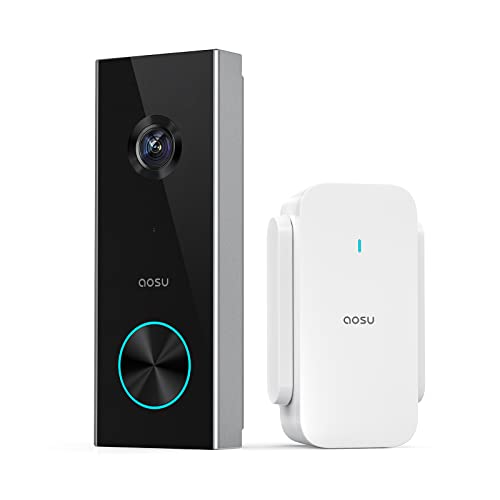
Pros
- 2K resolution with 166° ultra-wide view
- AI human detection reduces unnecessary alerts
- Local storage without a subscription
- Two-way talk with quick replies
- Included base adds Wi-Fi and chime
Cons
- 2.4 GHz Wi-Fi only, no 5 GHz support
- MicroSD card sold separately

Pros
- 2K video with 170° head-to-toe view
- Person detection reduces irrelevant alerts
- No subscription required for essential features
- Local microSD or optional cloud storage
Cons
- 2.4 GHz Wi-Fi only, no 5 GHz support
- microSD card sold separately

Pros
- No subscription required
- 4000mAh rechargeable battery
- Human and PIR motion detection
- 38 chimes plus mute mode
Cons
- 2.4GHz WiFi only
- App required for video calls and alerts

Pros
- Wire-free placement with up to 10-month battery life
- 2K 4MP video with 150°×150° head-to-toe view
- No subscription required for smart detection
- Local storage supports SD cards up to 512GB
Cons
- Chime not included
- Solar charger sold separately
Start With a Removable Mount
Battery-powered models are the natural fit for apartments and rental homes because they avoid permanent wiring. The ieGeek Video Doorbell Camera supports both nailing and adhesive installation, while the ViewBell model advertises tool-free setup and flexible mounting. Even so, check your lease and ask the property manager before attaching anything to a shared hallway or exterior surface.
Placement matters as much as the camera itself. A 1:1 or vertical view can show a visitor from head to toe and keep packages in frame, while a wide horizontal view may capture more of the corridor. If your door opens onto a narrow landing, measure the available surface first and avoid blocking neighboring doors, walkways, or building hardware.
Pro Tip: Use removable mounting only where the surface and lease allow it, and keep the camera aimed at your own entry area.
Match Coverage to the Doorway
The ieGeek model offers a 180° head-to-toe view and 2K 3MP video, making it a strong fit for tall visitors, steps, and parcels close to the threshold. The aosu 2K Wireless Doorbell Camera with aosuBase uses a 166° view with a 4:3 aspect ratio, while the other aosu model provides a 170° vertical view.
Detection features can reduce unnecessary notifications in busy shared spaces. The aosu models use human detection, the visiPower model combines PIR motion and human detection, and the REOLINK Battery Video Doorbell (2nd Gen) identifies people, vehicles, animals, and packages. For a quieter apartment hallway, prioritize the detection type that best matches the movement outside your door.
| Coverage priority | Useful feature | Suitable placement |
|---|---|---|
| Head-to-toe view | 1:1 or vertical video | Doorsteps and parcels |
| Fewer alerts | Human detection | Busy apartment corridors |
| Flexible connection | 2.4 GHz or dual-band | Distant routers |
Plan Around Wi-Fi and Battery Care
Most models here require 2.4 GHz Wi-Fi, including both aosu doorbells, the ieGeek model, ViewBell, and visiPower. That band generally suits devices placed farther from the router, but the REOLINK Battery Video Doorbell (2nd Gen) also supports 5 GHz. Confirm your building network allows the required band before buying.
Battery access is important for renters because removal should not damage the door or wall. The ieGeek model uses a built-in 5200mAh rechargeable battery, ViewBell and visiPower use 4000mAh batteries, and REOLINK states that its battery can last up to 10 months under its stated usage conditions. Keep the charging schedule in your calendar, especially if the doorbell is mounted high.
Before You Mount It: Do not assume a third-party chime or existing wiring is compatible. The REOLINK model does not include a chime and has specific compatibility limits, while other models rely on an included or paired chime.
Storage Without a Monthly Commitment
Local storage can be useful when you want to avoid recurring charges. The ieGeek, aosu, and ViewBell models support a memory card, while REOLINK supports local options including an SD card, Home Hub, NVR, or FTP. Cards are sold separately for the models that specify that requirement.
Cloud features differ, so read the included service details rather than assuming every alert is stored forever. The ieGeek model includes basic cloud storage, ViewBell advertises lifetime free cloud storage, and the aosu models offer local storage without a subscription alongside optional cloud services. For general privacy information about connected devices, consult the Cybersecurity and Infrastructure Security Agency.
Expert Examined
From Dana Whitfield

I keep seeing renters focus on camera resolution while overlooking the chime and Wi-Fi requirements. I would first confirm the network band and where the indoor chime can sit, then choose the widest view that does not point into a shared private area.
Read more about Dana WhitfieldWhich Doorbell Fits Your Rental
I would point you to the ieGeek Video Doorbell Camera for a rental doorway where packages sit close to the threshold or visitors may be tall. Its 180° head-to-toe coverage, 2K 3MP video, motion zones, local card support, and adhesive mounting give it a flexible mix for apartment entry points.
I would choose the REOLINK Battery Video Doorbell (2nd Gen) when minimizing charging interruptions matters more than keeping the setup inexpensive. Its stated battery life reaches up to 10 months under specified conditions, and it supports both Wi-Fi bands plus several local-storage choices, though you need to account for the missing chime.
For a basic, low-commitment setup, I would consider the Doorbell Camera Wireless No Subscription with Free when free cloud storage, tool-free installation, 720P video, and a 4000mAh battery meet your needs. Its simpler resolution makes it better suited to straightforward visitor alerts than detail-heavy identification.
The Bottom Line
The mistake renters make most often is choosing a camera before checking the mounting surface, Wi-Fi band, and chime arrangement. A doorbell that cannot connect reliably or cannot be removed cleanly is a poor fit regardless of its field of view.
If you only do one thing first, measure the doorway and confirm the available 2.4 GHz or dual-band network. Then select the battery and coverage combination that fits that exact entry area.
FAQs
PIR detects movement, while human detection is designed to focus alerts on people. In a busy apartment corridor, human detection may help reduce notifications caused by animals, shadows, or other movement, but the available detection features vary by model. Several listed models support wireless installation, and the ieGeek model supports nailing or pasting. ViewBell also advertises tool-free setup. Check your lease and the surface before using adhesive or placing equipment in a shared area. Battery life depends on the model, activity, and conditions. The listed products range from stated standby or usage periods of about 60 days to up to 10 months under specified conditions, so plan periodic checks and keep charging access convenient. IP66 indicates protection against dust and strong water jets, but it does not describe video quality, Wi-Fi performance, or battery life. The ViewBell and ieGeek product data specify an IP66 weatherproof rating.Should renters choose a doorbell with PIR or human detection?
Can a renter install a wireless video doorbell without drilling?
How often do battery doorbells need charging?
What does an IP66 rating mean for a video doorbell?
Sources
- Cybersecurity and Infrastructure Security Agency www.cisa.gov
- UL Solutions www.ul.com