
Shopping for the best video doorbells with live view means deciding whether you value broader porch coverage or simpler everyday maintenance. The right choice depends on your Wi-Fi band, power access, and how much recorded video you want to keep.

Pros
- 2K 4MP video resolution
- 150° × 150° head-to-toe view
- Wireless and wired power options
- Chime Plus included in bundle
Cons
- Wireless setup requires Wi-Fi coverage
- Battery power requires ongoing charging

Pros
- Head-to-toe video with 66% more vertical coverage
- Built-in battery with convenient USB-C charging
- Live View and two-way talk
- Real-time motion alerts on your phone
Cons
- Smart person and package alerts require subscription
- Doorbell must be detached for recharging

Pros
- 180-degree head-to-toe coverage
- 2K video with 33-foot night vision
- Human detection with custom alert zones
- No subscription required for cloud storage
Cons
- 2.4GHz Wi-Fi only, not 5GHz
- 128GB TF card not included

Pros
- 2K 4MP head-to-toe video
- 150° by 150° viewing angle
- No subscription for smart detection
- Local storage supports cards up to 512GB
Cons
- Battery requires charging despite long runtime
- Not compatible with Reolink Chime
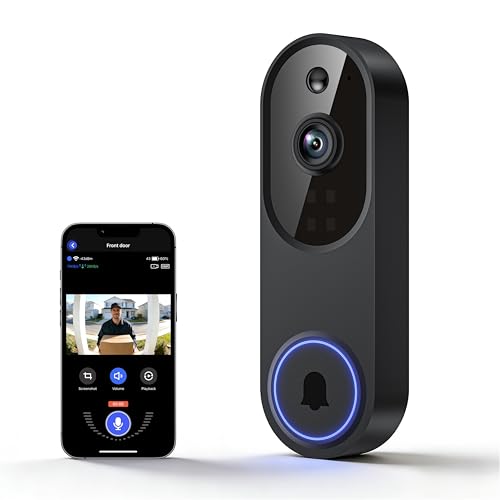
Pros
- AI distinguishes humans from pets and vehicles
- 1080p FHD live view
- Instant motion and doorbell alerts
- Two-way audio with night vision
Cons
- 2.4GHz Wi-Fi only, no 5GHz support
- Cloud storage purchased separately

Pros
- 1080P video with color night vision
- AI human detection
- Instant motion and doorbell alerts
- Two-way talk with visitors
Cons
- 2.4GHz Wi-Fi only
- Cloud storage free trial lasts three days
Start With the View You Actually Need
Live view is useful only when the camera shows the area that matters. Head-to-toe coverage can include a visitor and a package in one frame, while a narrower view may leave the doorstep or lower approach outside the image.
The KAMEP model offers a 180-degree full-body view and 2K video, while both REOLINK entries specify a 150° by 150° head-to-toe view. Ring describes its latest Battery Doorbell as providing more vertical coverage, which can help when parcels sit directly below the doorbell.
Mounting angle also affects what appears in the frame. Before fixing the bracket, use the advice in how to angle a video doorbell down to think through visitors, deliveries, and glare.
Pro Tip: Aim the camera at faces and the package zone, not just the visitor’s shoulders.
Match Wi-Fi and Power Before Buying
Wireless installation does not mean every model works with every home network. KAMEP, Lunelyx, and SearByte specify 2.4GHz Wi-Fi only, while the REOLINK Battery Video Doorbell (2nd Gen) supports dual-band Wi-Fi. Ring’s listed features focus on a built-in battery charged through USB-C.
Battery maintenance varies sharply across the models. One REOLINK version lists up to 10 months per charge under a stated recording pattern and can connect to 8-24VAC wiring, while KAMEP lists two to three months per charge. Lunelyx and SearByte provide wireless operation but do not list a battery interval in the supplied details.
Before You Mount It: Do not assume an existing mechanical chime is compatible. The REOLINK model with smart detection specifically notes that it is designed to work with Reolink Chime Plus and is not recommended with a third-party mechanical chime.
If your doorbell loses connection, check the router band and signal path before moving the camera. The troubleshooting advice in why a doorbell camera keeps disconnecting is especially relevant to 2.4GHz-only devices.
| View type | Wi-Fi choice | Best placement |
|---|---|---|
| Head-to-toe | Dual-band or 2.4GHz | Front porch |
| Wide-angle | 2.4GHz only | Package zone |
| Standard wide | 2.4GHz only | Entry door |
Storage and Alerts Shape the Daily Experience
Every model provides live communication, but storage policies differ. The KAMEP listing describes free lifetime cloud storage or optional TF-card storage, while the REOLINK model with dual-band Wi-Fi supports local storage through compatible Reolink equipment, NVRs, FTP, or an SD card without a subscription.
Ring offers live view, two-way talk, motion alerts, and Alexa compatibility, but smart alerts and reviewing recorded events require a separately sold subscription. Lunelyx lists optional encrypted cloud storage, and SearByte includes a three-day free cloud-storage trial with AES-128 encryption.
Expert Examined
From Jenna Castellano

For package-heavy entrances, consider the practical advice in where to put a package lock box alongside the camera’s viewing area.
Which Doorbell Fits Your Entrance
I would point you to the REOLINK Battery Video Doorbell (2nd Gen) when you want a flexible power arrangement and local storage options. Its 2K 4MP image, 150° by 150° head-to-toe view, dual-band Wi-Fi, smart detection, and support for people, vehicles, animals, and packages make it the most adaptable choice for a busy entrance.
I would put the Doorbell Camera Wireless,Head-to-Toe Video on a 2.4GHz network where a wide full-body image matters. Its 180-degree view, 2K live view, human detection, preset replies, voice changer, and stated no-monthly-fee storage options suit a renter or homeowner who wants broad coverage without relying on 5GHz.
For a simpler branded setup, I would choose the Ring Battery Doorbell, Home or business security. Its built-in battery, USB-C charging, live view, two-way talk, motion alerts, and Alexa connection make sense when phone alerts and voice-assistant integration matter more than local storage.
The Bottom Line
The mistake buyers make most often is treating live view as the whole decision. Wi-Fi compatibility, battery upkeep, chime support, and recording rules determine whether the doorbell remains useful after installation.
If you do only one thing first, confirm your router band and decide whether you want local or cloud storage. Then select the model whose coverage and power arrangement match that constraint.
FAQs
Head-to-toe models are designed to show more vertical space, including visitors and packages. In this selection, KAMEP lists a 180-degree full-body view, while REOLINK lists a 150° by 150° head-to-toe view. The best result still depends on mounting angle and the entrance layout. The KAMEP, Lunelyx, and SearByte listings specify 2.4GHz-only operation. The REOLINK Battery Video Doorbell (2nd Gen) with dual-band Wi-Fi supports both 2.4GHz and 5GHz. Check your network before choosing a wireless model. Battery life depends on activity, settings, and the model. KAMEP lists two to three months per charge, while one REOLINK listing states up to 10 months under a specific recording pattern. Ring uses a built-in battery charged through USB-C. A certification or protection rating should be read as a statement about a defined safety or environmental requirement, not a promise that every installation is risk-free. Check the product documentation and consult recognized safety resources such as UL Solutions when a rating is important to your setup.Which type of video doorbell gives the widest live view?
Can these doorbells work on 5GHz Wi-Fi?
How often will a battery doorbell need charging?
What does a video doorbell certification mean?
Sources
- UL Solutions www.ul.com
- US Consumer Product Safety Commission www.cpsc.gov