
Shopping for the best video doorbells with motion detection means deciding whether you value sharper visitor detail, smarter person alerts, or fewer charging and storage concerns. The right fit depends on your porch traffic, Wi-Fi band, and preference for local or cloud video.

Pros
- 2K HD video with 166-degree wide view
- No subscription for alerts and playback
- HDR night vision up to 10 meters
- MicroSD storage support up to 128GB
Cons
- 2.4 GHz Wi-Fi only
- Built-in battery is non-removable

Pros
- 2K resolution for clearer facial details
- 160° head-to-toe field of view
- Free person detection reduces alerts
- Local storage without a subscription
Cons
- 2.4GHz Wi-Fi only
- microSD card required for local storage

Pros
- 2K video with color night vision
- 150-degree wide-angle view
- Battery or wired installation
- Motion detection with real-time alerts
Cons
- AI alerts require a separate monitoring plan
- Battery must be removed for USB-C charging
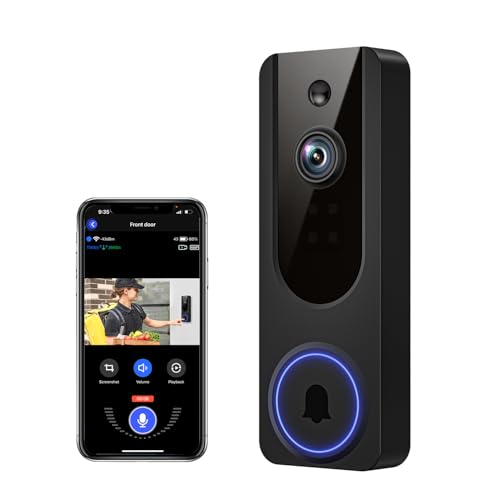
Pros
- AI human detection filters unnecessary motion alerts
- 1080p video with four-LED night vision
- Two-way audio from a smartphone
- Encrypted cloud storage with AES-128
Cons
- 2.4GHz WiFi only
- Cloud subscription required for recording storage

Pros
- AI identifies people and filters vehicles and animals
- AES-128 encrypted cloud storage
- Sharp night vision in total darkness
- Two-way audio for visitors and deliveries
Cons
- Not compatible with 5GHz Wi-Fi
- Pre-capture recording requires cloud subscription

Pros
- Dual cameras capture visitors and packages
- 2K video with color night vision
- Built-in 8GB local storage
- Wireless or wired installation
Cons
- Supports 2.4 GHz Wi-Fi only
- Rechargeable battery requires periodic charging
Start With the Alert You Actually Need
Motion detection does not always mean the same thing across doorbells. BOIFUN, Tapo, VanaOrbi, and Orbitell identify people or humans, while the Chamberlain myQ Video Doorbell provides motion alerts and offers AI alerts for recognized faces or unknown people with a separate monitoring plan.
Person detection can reduce interruptions from ordinary movement near the entrance, but activity zones still matter. Tapo lets you define areas for motion or people, and BOIFUN allows adjustments to motion sensitivity and detection zones. Those controls are especially useful on porches facing sidewalks, driveways, or busy communal areas.
Pro Tip: Choose the narrowest useful activity zone first, then widen it only if visitors are being missed.
Resolution and View Shape Matter at the Door
A wide image helps cover packages and approaching visitors, but a larger angle is not automatically the clearest choice. BOIFUN offers a 166° view, Tapo reaches 160°, Chamberlain provides 150°, and eufy combines a front camera with a downward camera for head-to-toe and package coverage.
For identifying faces, 2K models provide more stated detail than the 1080p VanaOrbi and Orbitell options. Night visibility also varies: Tapo uses a spotlight for full-color night vision, eufy provides color night vision, and BOIFUN uses HDR with invisible 940 nm infrared night vision.
If packages are your main concern, the downward camera on the package lock box placement resource pairs naturally with thinking about where the camera sees the doorstep. Keep the lens aimed at the arrival area without sacrificing a clear view of faces.
| Alert approach | Storage method | Useful placement |
|---|---|---|
| Person detection | Local or cloud | Busy entrances |
| Motion alerts | Cloud options | Quiet porches |
| Package view | Built-in local | Delivery-focused doors |
Power, Wi-Fi, and Storage Shape Daily Use
All six products rely on 2.4 GHz Wi-Fi, so a 5 GHz-only network will not work with these models. Battery operation simplifies placement, while the Chamberlain myQ Video Doorbell can be installed as a battery or wired unit and eufy supports wireless or wired use.
Storage choices are important if you want to revisit an event. BOIFUN supports microSD cards up to 128GB, Tapo supports cards up to 512GB, and eufy includes 8GB of local storage. VanaOrbi and Orbitell emphasize encrypted cloud storage, while cloud features may require a subscription for some functions.
Before You Mount It: Confirm that your home network has a 2.4 GHz connection and plan how you will recharge or wire the doorbell before finalizing its location.
Battery expectations depend on activity, not just the manufacturer’s stated maximum. BOIFUN cites up to 60 days under laboratory conditions with a defined motion and recording pattern, while Tapo describes a long-lasting rechargeable battery without giving a fixed duration. Frequent alerts can increase charging needs.
For additional installation context, review the advice on why a doorbell camera keeps disconnecting. A stable signal and practical charging routine are as important as the camera specification.
Expert Examined
From Jenna Castellano

I keep the motion zone away from the street whenever the entrance allows it. The mistake I see is treating every passing vehicle or person as a security event, which quickly makes useful alerts easy to ignore.
Read more about Jenna CastellanoWhich Doorbell Fits Your Front Entrance
I would point you to the Video Doorbells category when you want a broader look at placement and feature differences, but three models stand out for distinct household needs. I would put the BOIFUN Video Doorbell Camera on a porch where wide coverage, no required subscription, and adjustable motion behavior matter most. Its 166° view, human detection, local microSD support, and built-in anti-theft alarm make the feature set practical for a wire-free entrance.
I would choose the Tapo 2K Wireless Smart Video Doorbell w/Chime for a household that wants person-focused alerts, phone ring calls, and flexible local storage. Its activity zones, 160° view, spotlight, and support for microSD cards up to 512GB suit an entrance where unnecessary alerts are a concern.
For frequent deliveries, I would favor the eufy Security Video Doorbell E340, Dual Cameras. The second camera points downward at packages, while 2K video, local 8GB storage, and wireless or wired installation support a more delivery-focused setup without a subscription.
The Bottom Line
The mistake many buyers make is treating a high motion-alert count as better security. Alerts are useful only when the doorbell can show enough detail and distinguish meaningful activity from routine movement.
If you do one thing first, check your 2.4 GHz Wi-Fi coverage at the intended mounting location. Then match the camera view and storage method to the activity you need to understand, whether that is a visitor’s face, a package, or movement across the porch.
FAQs
What type of motion detection is best for a video doorbell?
Person or human detection can be more selective than motion-only alerts because it is designed to focus on people. Activity zones and sensitivity controls still matter, especially when a sidewalk, driveway, or shared entrance sits within the camera’s view.
Where should a motion-detecting doorbell camera point?
Aim it toward the approach to your door while keeping unnecessary street or neighboring activity outside the detection zone when possible. A wide view can help cover visitors and packages, but the lens should still preserve useful facial detail.
How often do wireless video doorbells need charging?
Charging depends on motion frequency, recording length, Wi-Fi conditions, and environmental factors. BOIFUN cites up to 60 days under specific laboratory conditions, but real use can vary, so choose adjustable sensitivity or wired support when frequent activity is expected.
What does a certification on a video doorbell mean?
A certification can indicate that a product was assessed against a particular safety or performance standard, but no certification information is provided for these six models. Check the product packaging or manufacturer documentation for the exact mark and standard instead of assuming one from a feature description.
For electrical safety information related to home devices, consult UL Solutions and follow the manufacturer’s installation instructions.
Sources
- UL Solutions www.ul.com
- US Consumer Product Safety Commission www.cpsc.gov
- NFPA www.nfpa.org