
Shopping for the best Zigbee video doorbells means checking more than camera resolution: the real split is whether you need a built-in smart-home hub, hardwired uptime, or battery-friendly installation. That choice matters most for homeowners fitting the doorbell into an existing automation system.
Pros
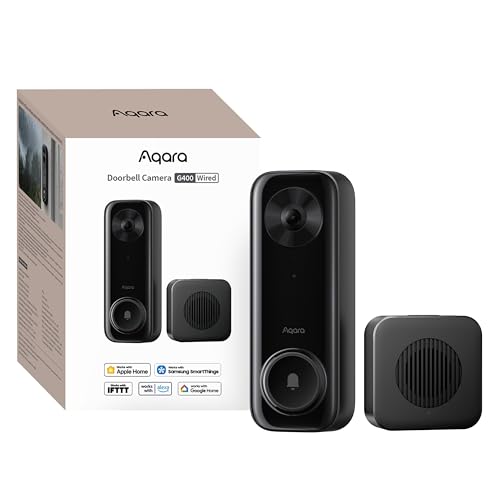
- 2K video with 165-degree head-to-toe view
- Local person and zone intrusion detection
- HomeKit, Alexa, Google, and SmartThings support
- PoE or 8–24V wired power options
Cons
- Requires wired power or PoE installation
- HomeKit needs iCloud+ and an Apple home hub

Pros
- MmWave radar for more accurate human detection
- 2K wide-angle video with 2-way audio
- Built-in Zigbee and Matter hub
- HomeKit Secure Video and major ecosystem support
Cons
- HomeKit limits resolution to 1600×1200
- MicroSD card for local storage not included

Pros
- 2K 4MP clarity with 1:1 head-to-toe view
- Up to 10 months battery life
- Local storage with no monthly fees
- Person, vehicle, animal, and package detection
Cons
- MicroSD card sold separately
- Up to 25 push alerts per day
Start With the Connection You Actually Need
A Zigbee-capable doorbell can simplify smart-home control, but the three products take different approaches. The Aqara Smart Doorbell Camera G410 with Chime includes built-in Zigbee and Matter hubs, so it can manage compatible sensors, lights, and locks without an additional hub.
The Aqara Doorbell Camera G400 with Chime, Wired/PoE focuses more on stable power and advanced integrations. It supports wired 8–24V AC/DC or PoE, dual-band Wi-Fi 6, RTSP/ONVIF, and NVR setups, making it a stronger fit for a more structured network.
REOLINK Battery Video Doorbell (2nd Gen) uses a Home Hub mini for central control, local storage, and smart summaries. Its wireless option suits a doorway where running cable is difficult, while compatible 8–24VAC wiring can help keep the battery topped up.
Pro Tip: Choose the connection before choosing the camera. Confirm whether your doorway has compatible wiring, a convenient outlet, or a location that can support a strong 2.4GHz or 5GHz Wi-Fi signal.
Power and Storage Shape Daily Ownership
Hardwired power is useful when you want continuous operation without regular charging. The G400 supports 24/7 recording to a microSD card up to 512GB and can back up footage to an SMB-compatible NAS, while its included indoor chime provides another alert path.
The G410 also accepts a microSD card up to 512GB, with the slot housed inside its indoor chime. That placement helps keep the card away from the exterior doorbell. REOLINK’s Home Hub mini supports up to 1TB of local microSD storage and offline recording without monthly fees.
Storage capacity is only part of the decision. Consider whether you want footage in a chime, a hub, a microSD card, or a NAS, then make sure the location remains accessible for maintenance without exposing it to visitors.
Troubleshooting doorbell disconnections is also useful before you blame the camera for a weak network.
Before You Mount It: Never connect a doorbell to existing wiring until you confirm that the voltage and installation method match the product requirements. If you are unsure, use a qualified installer rather than risking damage or an unsafe connection.
Coverage, Detection, and Privacy
Both Aqara models provide 2K video and two-way audio, but the G400 adds a 165-degree head-to-toe view with a 3:4 aspect ratio. That vertical framing is helpful when packages sit close to the threshold. The G410 uses mmWave radar for human-presence detection and stores face data locally.
REOLINK provides a 1:1 head-to-toe view with a 150-by-150-degree field of view, plus local detection for people, vehicles, animals, and packages. Its alerts can include up to 25 push notifications per day, while the hub adds event summaries.
HomeKit users should note that each Aqara model has a lower resolution limit when connected to Apple HomeKit. The G400 is limited to 1200p and the G410 to 1600 by 1200. Apple explains its HomeKit security approach through Apple’s official site, while privacy masking and local recognition can further reduce unnecessary exposure.
| Connection style | Standout feature | Best doorway fit |
|---|---|---|
| Wired or PoE | 24/7 recording | Existing cable or network |
| Wired or wireless | Zigbee and Matter hub | Aqara smart-home setup |
| Battery or wired | Hub storage | Cable-free installation |
Mounting angle also affects whether faces and packages stay in view. Before drilling, review advice on angling a video doorbell downward, especially if the camera will sit above a porch or beside a step.
Expert Examined
From Ray Okafor

I keep seeing doorbells installed where the camera sees a visitor’s forehead but not the package at the threshold. I would mark the likely standing position first, then check the live viewing angle and nearby privacy boundaries before fixing the bracket.
Read more about Ray OkaforMatching the Doorbell to Your Home
I would point you to the Aqara Smart Doorbell Camera G410 with Chime if your priority is a compact Aqara-centered setup. Its built-in Zigbee and Matter hubs, local face recognition, mmWave radar, and indoor storage location make it the clearest choice for a home already using compatible automation devices.
I would put the Aqara Doorbell Camera G400 with Chime, Wired/PoE at a doorway where reliability and recording flexibility matter most. PoE, 8–24V wiring, 24/7 microSD recording, NAS backup, and RTSP/ONVIF support give it the most useful range for a network-conscious homeowner.
I would choose the REOLINK Battery Video Doorbell (2nd Gen) for a rental, detached entry, or retrofit where cable routing is inconvenient. Its battery can last up to 10 months under the stated usage condition, and the Home Hub mini keeps local storage and camera management indoors.
The Bottom Line
The mistake many buyers make is treating Zigbee support as the entire decision. Power type, storage location, smart-home compatibility, and the camera’s vertical coverage can matter more than the label on the box.
Start by checking your existing doorbell wiring and deciding where recordings should live. Then choose the model whose hub, power method, and field of view match that doorway instead of adapting the installation around a feature you will not use.
FAQs
The Aqara Smart Doorbell Camera G410 with Chime includes built-in Zigbee and Matter hubs, so it does not need an extra hub for those supported connections. The G400 supports several advanced integrations, while REOLINK includes a Home Hub mini for storage and camera management. Choose wired or PoE when you want stable power and continuous recording options. A battery model is more practical where cable routing is difficult, and the REOLINK model can also connect to compatible 8–24VAC wiring to help maintain its battery. Aim the camera toward the visitor’s face and the area where packages are placed, while avoiding unnecessary views into private spaces. Check the vertical framing before drilling, since head-to-toe coverage can be especially useful at close doorways. IP65 indicates dust resistance and protection against water exposure described by the product rating. It does not remove the need for correct mounting, sealed connections, and installation that follows the manufacturer’s instructions.Does a Zigbee video doorbell need a separate hub?
Should I choose a wired or battery doorbell?
Where should I mount a video doorbell?
What does IP65 mean on a doorbell camera?
Sources
- National Fire Protection Association www.nfpa.org
- UL Solutions www.ul.com