
Choosing the best no-drill video doorbells means balancing removable mounting with the way you want to view, store, and power footage. Renters, apartment residents, and homeowners avoiding exterior work need different compromises than shoppers replacing a wired chime.

Pros
- 1080p video with infrared night vision
- AI human detection minimizes pet alerts
- Two-way audio through your smartphone
- Indoor receiver supports multiple receivers
Cons
- Cloud subscription required for live view and playback
- 2.4GHz Wi-Fi only

Pros
- 2K HD video with 166-degree wide view
- No subscription for alerts and playback
- HDR night vision up to 10 meters
- MicroSD storage support up to 128GB
Cons
- 2.4 GHz Wi-Fi only
- Built-in battery is non-removable

Pros
- Head-to-Toe 2K video resolution
- Three AA lithium batteries included
- Two-way audio with noise cancellation
- IP65 weather-resistant design
Cons
- Person detection requires a separate subscription
- Three AA batteries eventually need replacement

Pros
- 2K video with 165° head-to-toe view
- Color night vision for dark entrances
- 4.3-inch monitor with quick response button
- Free 4GB SD card, no subscription
Cons
- Indoor monitor requires a power cable
- Best connection within 5 metres
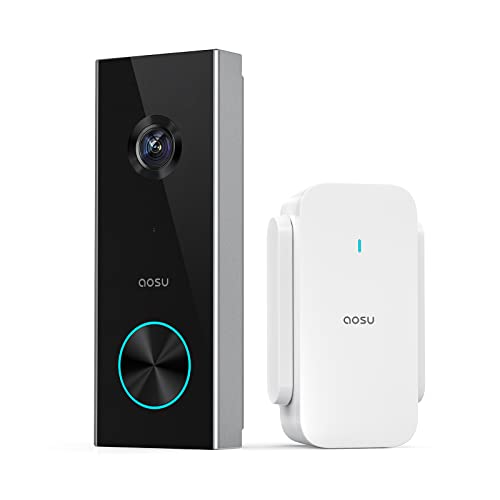
Pros
- 2K resolution with 166° ultra-wide view
- AI human detection reduces unnecessary alerts
- Local storage without a subscription
- Two-way talk with quick replies
- Included base adds Wi-Fi and chime
Cons
- 2.4 GHz Wi-Fi only, no 5 GHz support
- MicroSD card sold separately
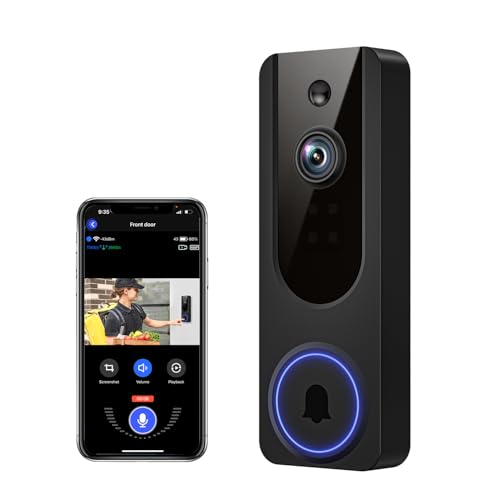
Pros
- AI human detection filters unnecessary motion alerts
- 1080p video with four-LED night vision
- Two-way audio from a smartphone
- Encrypted cloud storage with AES-128
Cons
- 2.4GHz WiFi only
- Cloud subscription required for recording storage
Start With the Mounting Constraint
A no-drill setup is most useful when the doorbell can sit securely on the door or frame without blocking the camera. Before buying, check whether the entrance has a smooth, stable surface and enough room for the battery unit, then confirm that the camera will not point directly into a bright window or light.
Wide coverage matters when the mounting position is fixed. BOIFUN Video Doorbell Camera and aosu 2K Wireless Doorbell Camera with aosuBase each list a 166° field of view, while SwitchBot Video Doorbell Camera lists a 165° ultra-wide angle and a head-to-toe view. If packages land low near the threshold, a head-to-toe view can matter more than a wider horizontal image.
For additional placement context, see these instructions on angling a video doorbell down. A small change in angle can help include both faces and deliveries when the mounting height is limited.
Pro Tip: Choose the mounting position before charging the doorbell, then check the live view for faces, the threshold, and the approach path.
Match Storage and Alerts to Your Routine
No-subscription access is not identical across these models. BOIFUN provides essential alerts, human detection, two-way audio, and playback without a subscription, with optional cloud services for advanced features. aosu supports local microSD storage through its aosuBase Mini, while SwitchBot includes a 4GB SD card and supports larger cards.
Cookedixo and VanaOrbi retain core functions without cloud service, but their listed cloud features require a subscription for live viewing or playback. Blink lists person detection with a compatible subscription required. That distinction matters if you want recorded clips available without an ongoing service.
| Storage approach | Alert method | Best fit |
|---|---|---|
| Local card | Human detection | Subscription-free viewing |
| Cloud service | Motion alerts | Remote clip access |
| Indoor monitor | Doorbell notifications | Homes needing a screen |
Motion filtering can reduce unwanted notifications, but no alert system should replace sensible entry habits. The common causes of doorbell disconnections are also worth considering before you choose a model that depends heavily on remote access.
Expert Examined
From Dana Whitfield

I keep seeing people focus on camera resolution while overlooking the viewing path. A doorbell aimed at a porch wall or bright sky can still produce an unhelpful image, so I would settle the mounting angle and Wi-Fi position before choosing extra features.
Read more about Dana WhitfieldPower, Wi-Fi, and Indoor Access
All six listed products use wireless operation, but their power and indoor-viewing arrangements differ. BOIFUN specifies a built-in rechargeable battery, Blink uses three AA Energizer lithium batteries, and SwitchBot lists a 5000 mAh battery. Battery format affects how often you plan maintenance and whether replacements are convenient.
Every model specifies 2.4 GHz Wi-Fi or a 2.4 GHz connection. SwitchBot adds a 4.3-inch indoor monitor, while Cookedixo includes an indoor receiver and aosu includes a base that combines Wi-Fi extension, storage, and chime functions. Those indoor components may be preferable if you do not want every visitor alert to depend on a phone.
Keep the indoor receiver or monitor close enough for the connection the manufacturer describes. For general consumer safety information about household devices, consult the US Consumer Product Safety Commission, especially if a battery or mounting component shows damage.
Before You Mount It: Do not attach a loose or damaged battery doorbell where it could fall onto a walkway. Secure the unit according to its supplied mounting method, and remove it before charging if the design requires that.
Which Doorbell Fits Your Entry
I would point renters who want a screen and local recording toward SwitchBot Video Doorbell Camera. Its 4.3-inch monitor, included 4GB SD card, head-to-toe view, and no-monthly-fee local storage make it a practical choice when family members need to see the entrance indoors without opening a phone app.
I would choose BOIFUN Video Doorbell Camera for a front porch where wide coverage, human detection, night vision, and subscription-free essentials matter. Its listed 166° view, 940 nm infrared night vision, built-in anti-theft alarm, and support for microSD cards up to 128GB suit a straightforward phone-first setup.
For someone who wants a base station that also handles storage and chime duties, I would consider aosu 2K Wireless Doorbell Camera with aosuBase. The 166° view, local storage option, person detection, quick replies, and voice changer give it a useful mix for a busy entrance where fewer false alerts and indoor ringing are priorities.
The Bottom Line
The mistake many buyers make is treating every wireless doorbell as equally subscription-free. Some keep alerts and two-way audio available without a plan but reserve live viewing or playback for cloud subscribers, so storage access deserves as much attention as resolution.
If you only do one thing first, decide whether you need local recorded footage, cloud playback, or simply live alerts. Then choose the model whose storage method and indoor connection match that answer before worrying about field of view or app extras.
FAQs
Human detection is useful when you want fewer alerts from passing vehicles, pets, or general movement. BOIFUN, Cookedixo, Blink, aosu, and VanaOrbi list human or person detection, while SwitchBot lists motion detection. Place it where the camera can see faces and the threshold without aiming into glare. A fixed no-drill mount makes angle especially important, so check the live view before committing the unit to the frame or door. The products use different approaches, including a built-in rechargeable battery, a listed 5000 mAh battery, or three AA Energizer lithium batteries. Follow the relevant charging or replacement instructions and expect runtime to vary with activity and conditions. Certification marks should identify the organization and the specific product or electrical requirement covered. The supplied product details do not state a certification for these models, so verify any mark directly with the manufacturer rather than assuming it covers installation or video privacy.What type of detection should a no-drill video doorbell have?
Where should I place a wireless video doorbell?
How do battery video doorbells stay powered?
What does a security certification on the box mean?
Sources
- US Consumer Product Safety Commission www.cpsc.gov
- UL Solutions www.ul.com
- National Fire Protection Association www.nfpa.org