

Shopping for the best 5ghz video doorbells makes sense when fast, reliable streaming matters, but the real split is whether your entry has dependable power or needs a battery. Renters, wired-home owners, and smart-home users each need a different balance of installation freedom, storage, and detection accuracy.

Pros
- 2.5K video with 19-foot night vision
- Free cloud storage without subscription fees
- Supports up to 256GB local SD card
- 2.4GHz and 5GHz Wi-Fi support
Cons
- SD card sold separately
- Free cloud activation may take 24 hours

Pros
- 5MP Ultra HD video with 4:3 framing
- 166° head-to-toe view
- 8GB local storage with 60-day loop
- Wireless or wired power options
Cons
- Wireless mode requires periodic battery recharging
- Advanced AI and extended storage need cloud plans
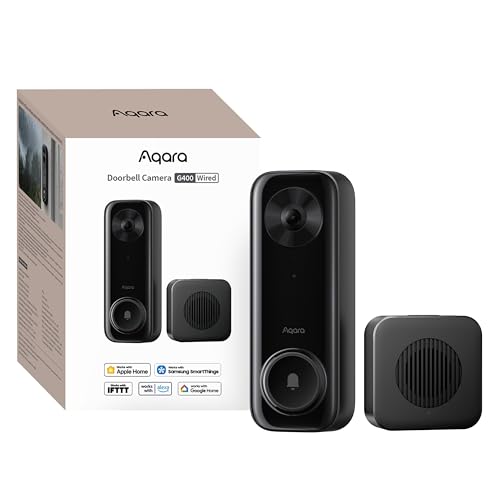
Pros
- 2K video with 165-degree head-to-toe view
- Local person and zone intrusion detection
- HomeKit, Alexa, Google, and SmartThings support
- PoE or 8–24V wired power options
Cons
- Requires wired power or PoE installation
- HomeKit needs iCloud+ and an Apple home hub

Pros
- MmWave radar for more accurate human detection
- 2K wide-angle video with 2-way audio
- Built-in Zigbee and Matter hub
- HomeKit Secure Video and major ecosystem support
Cons
- HomeKit limits resolution to 1600×1200
- MicroSD card for local storage not included

Pros
- Radar and PIR human detection
- 32GB local storage, no subscription
- Supports 2.4 and 5 GHz WiFi
- Works with Alexa and Google Home
Cons
- Battery needs recharging about every six months
- Wired setup requires existing 8 to 24VAC

Pros
- Wire-free placement with up to 10-month battery life
- 2K 4MP video with 150°×150° head-to-toe view
- No subscription required for smart detection
- Local storage supports SD cards up to 512GB
Cons
- Chime not included
- Solar charger sold separately
Start With Your Wi-Fi and Power Setup
Dual-band support lets these doorbells connect to either 2.4GHz or 5GHz Wi-Fi, but the stronger choice depends on the signal at the entry. A 5GHz connection can suit a nearby router, while 2.4GHz may be more practical where walls or distance weaken the faster band. Confirm that your home network reaches the mounting location before choosing a model.
Power is the next major divider. The aosu, WUUK, Aqara G400, and REOLINK options offer battery and wired flexibility in different forms, while the G400 also supports PoE. Battery models simplify placement, but charging becomes part of ownership; wired operation is better suited to an entry where existing wiring is available.
Pro Tip: Keep the doorbell within a strong Wi-Fi range before final mounting, then check live video and two-way audio from the exact entry location.
Match Detection to Your Doorstep
Motion systems vary more than the word “AI” suggests. The aosu combines radar, PIR infrared sensing, and AI human recognition, WUUK combines radar and PIR with human detection, and the Aqara G410 uses mmWave radar for human-presence detection. These approaches can help focus alerts, but you should still configure activity zones around your own porch.
For a narrow entry, head-to-toe framing can matter more than a wider landscape view because packages often sit below the visitor’s face. The aosu offers a 166-degree view, the Aqara G400 uses a 165-degree view, and REOLINK uses a 1:1 head-to-toe perspective. If the camera will face a walkway, check that the view includes both faces and deliveries.
| Connection type | Storage approach | Best placement |
|---|---|---|
| Battery or wired | Local hub or card | Flexible entry points |
| Wired or PoE | Card, NAS, or cloud | Permanent installations |
| Dual-band Wi-Fi | Local or cloud options | Strong router coverage |
Placement also affects privacy. The G410 includes image masking, while the G400 offers local person recognition and zone intrusion detection. If your camera sees a neighbor’s doorway or a shared path, use available zones or masking rather than aiming wider than necessary.
I keep the camera’s vertical framing in mind before choosing a mounting angle. The mistake I see is aiming only at face height and losing the package area, so I would position the view to include the threshold without unnecessarily recording the street.
Before You Mount It: Do not assume every chime is interchangeable. REOLINK specifies compatibility with Reolink Chime Plus and says its battery doorbell is not compatible with Reolink Chime or recommended for a third-party mechanical chime.
Choose Storage and Smart-Home Compatibility
Local storage is useful when you want recordings without depending entirely on a subscription. aosu includes an 8GB base with loop recording, WUUK includes a 32GB Homebase, CEMANTA supports an optional microSD card and free cloud storage, and REOLINK supports several local storage paths including a card, NVR, FTP, or Home Hub.
Smart-home support can narrow the field quickly. Aqara G400 works with HomeKit Secure Video, Alexa, Google Assistant, and SmartThings, while G410 adds Matter, Home Assistant, and a built-in Zigbee and Matter hub. The CEMANTA, aosu, and WUUK models also support selected voice platforms, so match the doorbell to the ecosystem already controlling your home.
HomeKit Secure Video requires an iCloud+ plan and an Apple home hub for the G400, and Aqara notes resolution limits when HomeKit is active. For broader platform details, Apple’s official Apple website is the appropriate place to verify current HomeKit requirements.
Which Doorbell Fits Your Entry
I would point apartment residents or renters toward the doorbell connection troubleshooting advice before selecting a battery model, then consider the package placement guidance to make sure the camera covers deliveries. The CEMANTA 2.5K Video Doorbell Camera is appealing for a lower-cost setup with 2.4GHz and 5GHz Wi-Fi, free cloud storage, quick voice replies, and installation designed without complicated wiring.
For a homeowner who wants local recording and flexible power, I would choose the aosu 5MP Ultra HD Wireless & Wired Video Doorbell. Its 5MP image, 166-degree head-to-toe view, 8GB local storage, and triple-sensor detection suit a porch where packages and visitors both need attention.
I would reserve the Aqara Doorbell Camera G400 with Chime, Wired/PoE for an Apple-centered or advanced wired setup. It combines 2K head-to-toe video with PoE, HomeKit Secure Video, local detection, microSD recording, and NAS backup. If your smart home extends beyond the doorbell, the G410’s built-in Matter and Zigbee hub may justify choosing it instead.
The Bottom Line
The biggest mistake with a 5GHz doorbell is treating band support as a guarantee of connection quality. Router distance, wall construction, power format, chime compatibility, and storage design can matter just as much as the Wi-Fi specification.
If you do only one thing first, check the Wi-Fi signal and power options at the exact door location. That simple check will quickly separate the models that fit your home from those that look attractive only on paper.
FAQs
Both bands can work, but the better choice depends on signal strength at the door. 5GHz can support smooth streaming near the router, while 2.4GHz may reach farther through walls. Choose a model that supports both when the signal conditions are uncertain. Radar, PIR, mmWave radar, and AI person recognition serve different purposes. Models combining sensor types may help reduce unnecessary alerts, but activity zones and sensitivity settings still need to match the porch and walkway. Battery power gives you more freedom during installation, while wiring supports continuous operation. Some models offer both options, so a flexible doorbell can suit a move or a future wiring upgrade. IP65 indicates protection against dust and water jets under the applicable rating system. It does not mean the device should be submerged, and correct mounting still matters for long-term outdoor use. Some products include a chime, while others require a compatible accessory. REOLINK specifically identifies Chime Plus as compatible with its battery doorbell, so check the listed chime requirements before installation.Is 5GHz or 2.4GHz better for a video doorbell?
Which detection system should a video doorbell use?
Should I choose a wired or battery doorbell?
What does an IP65 rating mean on a doorbell?
Do I need a separate chime?
Sources
- National Fire Protection Association www.nfpa.org
- UL Solutions www.ul.com