
Choosing the best wireless indoor security cameras is less about resolution alone and more about matching storage and power to the room. Renters, pet owners, and anyone avoiding wiring need different answers than shoppers building whole-home coverage.

Pros
- Dual-band 2.4GHz and 5GHz Wi-Fi support
- 4K resolution with 120-degree viewing angle
- Free rolling cloud storage backup
- Compact 1.4 by 1.4 inch housing
Cons
- App required for setup and alert notifications
- Indoor only design limits placement options

Pros
- Three AA batteries supply up to two years of life
- Rapid 0.4-second PIR motion recording
- Local SD card storage eliminates monthly fees
- Wide 168-degree coverage with color night vision
Cons
- Lacks a traditional indoor doorbell chime
- Cannot mount on powder-coated walls
- Video playback requires Wi-Fi or phone hotspot

Pros
- 1080P Full HD video
- 120° wide-angle lens
- Infrared night vision
- Motion alerts through free app
Cons
- WiFi and app required for setup
- Battery runtime is not specified

Pros
- 2.5K QHD resolution with full-color night vision
- Magnetic mount attaches rapidly to metal surfaces
- Built-in person detection cuts down animal false alerts
- Local Micro SD storage supported up to 256GB
- IP65 weather-resistant rating for outdoor rain and heat
Cons
- Short battery runtime of five to seven days
- Does not support 5 GHz Wi-Fi networks
- Micro SD card not included for local storage
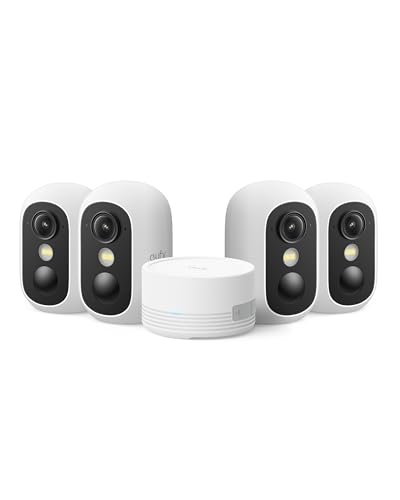
Pros
- Screw-free magnetic base for quick mounting
- Spotlight-free color night vision in darkness
- Local storage expandable up to 1TB
- IP67 weather resistance for outdoor use
- Facial recognition with zero subscription fees
Cons
- Incompatible with older HomeBase 2 systems
- Limited to 2.4 GHz Wi-Fi networks
- MicroSD card not included for standalone recording
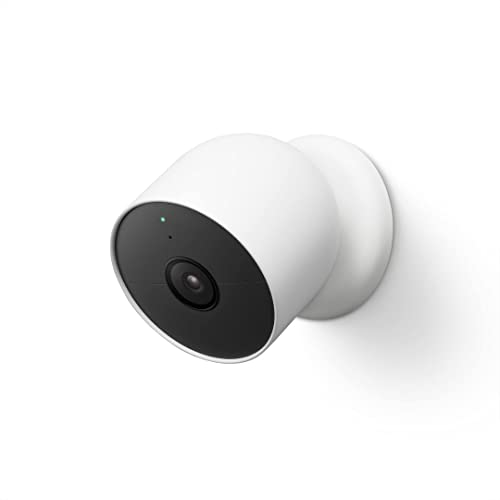
Pros
- Built-in person, animal, and vehicle alerts
- Sharp 1080p HDR video with night vision
- Battery-powered setup with magnetic mount
- Stores one hour of video during outages
Cons
- Free event video history limited to three hours
- Continuous 24/7 recording requires sold-separately cable
Start With the Room and Mounting Surface
A small camera can suit a shelf, entryway, nursery, or pet area, while a four-camera kit makes more sense when several rooms need coverage. Magnetic mounting is especially flexible: the eufy Security eufyCam C35 4-Cam Kit can attach to metal or sit on a flat surface, while the Front Door Wireless Security Camera uses included adhesive mounting without drilling.
Placement should give the lens a clear view without pointing directly at bright windows. A 120-degree lens, such as those on the realhide 2026 Upgraded 5GHz WiFi 4K Spy Camera and YISPK Hidden Camera, covers a broad indoor scene, while the Front Door Wireless Security Camera reaches 168 degrees for a wider entry view. For additional context, see these practical notes on security camera indicator lights.
Before You Mount It: A camera should not be hidden where recording would violate household privacy or local rules. Tell people in shared spaces about monitoring, and keep the lens away from private areas.
Storage Changes What You Can Recover
Local storage reduces dependence on a recurring service. The Front Door Wireless Security Camera records to a built-in SD card and keeps footage offline, although Wi-Fi or a phone hotspot is needed to view playback through the app. The eufy kit stores footage through HomeBase Mini, supports expansion up to 1TB, and also accepts a separate microSD card up to 256GB.
Cloud and local options provide more flexibility when a camera supports both. The realhide model offers free rolling cloud storage plus an SD card option up to 256GB, while CINMOORE supports a microSD card up to 256GB and offers cloud service after its free trial. Google Nest Cam includes three hours of event history, with longer history available through a separate Nest Aware subscription. Learn more about how camera footage may be used in court before relying on recordings for a serious dispute.
FYI: Local storage means recordings stay on a card or hub rather than relying entirely on remote cloud storage. Playback may still require an app connection.
Match Power and Alerts to Your Routine
Battery design affects maintenance more than headline resolution. The Front Door Wireless Security Camera uses three standard AA batteries and is designed for very long battery life, while Google Nest Cam and CINMOORE use rechargeable batteries. CINMOORE is rated for five to seven days after a full charge, so it suits a location where regular charging is practical.
Motion alerts also vary in how much filtering they provide. Google Nest Cam distinguishes people, animals, and vehicles, eufy adds people, vehicles, pets, activity zones, and facial recognition, and CINMOORE focuses on people with custom activity zones. The YISPK model uses frame changes for motion alerts, which may be useful for a simple room monitor but can require more attention to placement.
Expert Examined
From Dana Whitfield

I keep seeing cameras placed behind glass or aimed at a busy hallway, where reflections and constant movement create poor footage or excessive alerts. Give the lens a stable view, then adjust activity zones so the camera watches the area that actually matters.
Read more about Dana WhitfieldFor broader advice about recognition features, read more about facial recognition in security cameras. Google also explains its connected-home approach through Google, which matters if your household already uses Google Home.
Which Camera Fits Your Home
I would point renters toward the Front Door Wireless Security Camera when a no-drill installation, AA battery power, encrypted local-only storage, and a wide 168-degree view matter most. Its button-triggered alerts, two-way audio, and app-controlled electronic lock make it particularly suited to an apartment entry or porch, although playback still needs Wi-Fi or a phone hotspot.
I would choose the Google Nest Cam Outdoor or Indoor, Battery for a household already using Google Home and wanting person, animal, and vehicle alerts without a required subscription. Its 1080p HDR video, night vision, magnetic mount, and one-hour outage event storage support flexible placement, while the included three hours of event history keeps basic monitoring simple.
For several rooms, I would put the eufy Security eufyCam C35 4-Cam Kit ahead of a single-camera purchase. Its HomeBase Mini, local storage, activity zones, facial recognition, and cross-camera tracking create a more coordinated setup, and the magnetic or flat-surface mounting avoids drilling indoors or outdoors.
The Bottom Line
The most common mistake is choosing a camera for its sharpest video while ignoring where it will be mounted and how recordings will be stored. A 4K image does not help if the camera loses power, fills a card, or sends alerts from the wrong part of the room.
If you only do one thing first, decide whether you want local storage, cloud access, or both. Then choose the battery format and mounting method that you can realistically maintain in that exact room.
FAQs
Person, animal, and vehicle recognition can reduce unnecessary alerts, while activity zones help limit monitoring to a useful area. Basic frame-change detection can work for a simple room, but placement becomes more important because ordinary movement may trigger notifications. Place it on a stable shelf, flat surface, metal point, or suitable wall mount with a clear view of the room. Avoid direct window glare, private areas, and busy paths that create constant motion alerts. It depends on the power design and activity level. AA-powered, long-life models reduce charging routines, while rechargeable cameras require a cable and regular access for top-ups. A camera with frequent alerts may use power faster. Local storage saves recordings to an SD card or an indoor hub rather than relying entirely on cloud storage. It can reduce recurring service needs, but playback may still require an app connection or network access. A certification or rating can describe a specific safety or weather-resistance characteristic, but it does not replace checking storage, power, mounting, and alert features. For broader safety information, consult the U.S. Consumer Product Safety Commission at its official website.Which motion detection type is best for an indoor camera?
Where should a wireless indoor security camera be mounted?
How often do wireless camera batteries need attention?
What does local storage mean on a security camera?
Does a security camera need a certification to be useful?
Sources
- U.S. Consumer Product Safety Commission www.cpsc.gov
- UL Solutions www.ul.com
- National Fire Protection Association www.nfpa.org