
Fitness centers and workout spaces present layout challenges that make the best security cameras for gyms a split between ultra-wide fisheye views and dedicated network wiring. Most facility operators struggle to balance wide floor coverage against member privacy rules. Getting the right hardware depends on whether you run an offline local setup or an interconnected network.

Pros
- 160-degree wide-angle viewing coverage
- Completely offline use with zero app setup
- Supports microSD cards up to 512GB
- Continuous plug-in power connection
Cons
- No Wi-Fi connectivity for remote live viewing
- Requires constant plug-in power with no battery backup

Pros
- Anti-glare 2K lens films directly through glass
- Full-color starlight night vision without infrared glare
- Dual-band WiFi supports 2.4GHz and 5GHz networks
- Wide 130-degree field of view minimizes blind spots
Cons
- MicroSD card up to 256GB not included
- Indoor placement required to monitor outside areas

Pros
- 2K 3MP lens with anti-glare window design
- Full-color starlight night vision without infrared reflection
- Dual-band 5GHz and 2.4GHz Wi-Fi support
- Local recording supports up to 256GB Micro SD
Cons
- Micro SD card not included
- Relies on indoor window placement to monitor outside

Pros
- Ultra-wide 180-degree field of view
- 4-in-1 output supports TVI, CVI, AHD, and CVBS
- Infrared night vision reaches up to 65 feet
- Weatherproof housing built for outdoor mounting
Cons
- Requires coaxial BNC wiring and compatible DVR
- Defaults to lower resolution 960H analog output

Pros
- Ultra wide 180 degree coverage
- 4 in 1 hybrid compatibility
- Weather resistant metal housing
- Night vision up to 30 feet
Cons
- No PTZ movement capability
- Requires manual mode switching
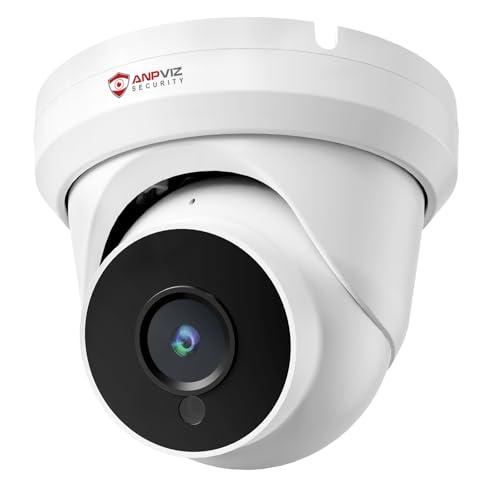
Pros
- 4MP resolution at 2560x1440 and 25fps
- PoE delivers power and data over single cable
- Wide 110-degree field of view with 2.8mm lens
- IP66 waterproof rated full metal enclosure
- Works with Blue Iris, NAS, and ONVIF NVRs
Cons
- Night vision range limited to 50 feet
- Requires wired Ethernet cable, no Wi-Fi option
Managing Wide Angles and Blind Spots Around Racks
Gym floors feature rows of squat racks, cable machines, and benches that create massive line-of-sight obstructions. A standard narrow-angle lens leaves wide pockets where dropped weights, equipment damage, or personal injuries go unrecorded. Opting for 160-degree or 180-degree panoramic lenses lets a single ceiling unit oversee multiple workout zones without requiring dozens of separate cable drops.
Placement requires careful height planning because high ceilings in commercial spaces can flatten details. Installing cameras along perimeter walkways or central structural beams ensures unobstructed views of weight areas. Facility managers should learn what do the lights on a security camera mean so active indicators do not distract members lifting heavy weights overhead.
Privacy Boundaries: Never point security lenses toward locker room entries, rest areas, or tanning booths. Restricting lenses strictly to weight floors, cardio banks, and entry doors prevents severe compliance and privacy violations.
Choosing Power and Video Transmission Methods
Wiring determines how reliably your cameras record during intense, continuous gym traffic. Standalone wireless cameras handle boutique studios or small private spaces where drilling into masonry is impractical. However, running Power over Ethernet directly to a network recorder ensures constant feeds without signal drops from gym Wi-Fi congestion.
Understanding what is an NVR and how is it different from a DVR helps owners choose between digital IP streams and analog coaxial cables. Analog BNC systems remain practical for budget retrofits across existing buildings, while PoE IP setups provide crisp digital resolutions and simple single-cable installation.
| Camera Type | Ideal Area | Connection Type |
|---|---|---|
| PoE IP Turret | Main workout floor | Ethernet to NVR |
| Analog Fisheye | Wide weight room | Coaxial BNC cable |
| Offline Plug-in | Private trainer studio | Standard wall outlet |
Federal guidelines from the FCC govern equipment interference, ensuring that commercial-grade electronic transmitters operate cleanly alongside audio gear and digital fitness machines.
Expert Examined
From Ray Okafor

In my experience, gym owners often position cameras directly opposite massive mirrored walls. The resulting infrared glare blinds night vision and doubles motion-sensor false alarms, so always angle lenses downward away from reflective surfaces.
Read more about Ray OkaforStorage Strategies for Incident Investigation
Liability claims regarding dropped equipment or slip-and-fall incidents require clear, uninterrupted records that survive network outages. Relying solely on remote cloud tiers can exhaust gym broadband when multiple high-bitrate cameras broadcast around the clock. Local storage options, such as onboard microSD cards or central hard drives, safeguard footage without recurring monthly service costs.
Proper time-stamped video retention is essential if an incident escalates legally. Knowing whether is security camera footage admissible in court helps gym owners establish proper chain-of-custody protocols for their video files. Secure, password-protected recorders maintain chain of custody and protect user privacy from external network snooping.
Pro Tip: Equip each camera with the maximum supported microSD card size to maintain at least thirty days of rolling footage without overwriting crucial liability records.
Selecting Cameras for Your Fitness Layout
For larger fitness facilities with existing network drops, I would point you to the Anpviz 4MP PoE IP Turret Security Wired Camera. Its 4MP resolution provides clear video for incident reviews, while Power over Ethernet cabling keeps the installation clean across high ceilings. The ONVIF compatibility and H.265 compression mean it integrates smoothly with professional multi-camera network video recorders without eating storage space.
If you manage an open weight room and need to cover the entire space with minimal wiring, I recommend the DCSEC HD 1080P 2MP 180 Degree Fisheye Dome. Its 1.7mm fisheye lens eliminates traditional dead zones between racks, and the metal housing stands up to occasional stray gym equipment bumps.
For private personal training studios or front check-in counters where app setups are unnecessary, the ALPHA TECH Indoor Camera with 160° Wide Angle is a practical choice. It operates completely offline with local card recording, protecting member privacy while keeping installation straightforward.
The Bottom Line
The biggest mistake gym operators make is treating fitness spaces like regular office environments and underestimating how equipment racks create blind spots. Installing cameras with standard narrow fields of view leaves massive coverage gaps where accidents and liability disputes occur.
Start by auditing the clear sightlines of your main weight floor and cardio zones before running any cables. Mount high-angle or panoramic cameras first over high-traffic barbell areas and entry points to guarantee comprehensive coverage from day one.
FAQs
Where should security cameras be placed in a gym?
Cameras belong above main entrances, free-weight floors, cardio areas, and emergency exits. Mount them high on perimeter walls or overhead rafters angled down to avoid equipment obstructions. Never position cameras near locker rooms, showers, or dressing stalls.
Do gym security cameras record sound?
Many modern commercial cameras include integrated microphones, but recording audio in fitness facilities often triggers two-party consent wiretapping laws. Check state regulations before enabling audio recording functions, and clearly post surveillance signage at all entrances.
How much video storage does a gym need?
A gym should retain footage for thirty to sixty days to handle delayed liability claims or member disputes. Using cameras with H.265 video compression or large local hard drives preserves high-resolution detail without filling storage drives prematurely.
Can members view gym security camera feeds?
Live security camera feeds should remain restricted to facility managers, authorized staff, and security personnel. Allowing public app access creates substantial privacy hazards and exposes member workout routines to unauthorized observation.
Sources
- Federal Communications Commission www.fcc.gov
- Occupational Safety and Health Administration www.osha.gov
- National Institute of Standards and Technology www.nist.gov