
Connecting the best security cameras for Google Nest usually forces a choice between native Google hardware and cost-effective third-party alternatives that stream to Nest smart displays. Your primary concern is whether you want automated Google Home app timeline history or subscription-free microSD card recording.
Pros
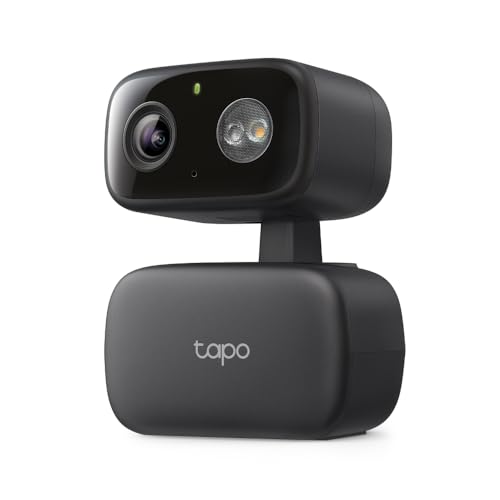
- Motorized 360-degree pan and 146-degree vertical tracking
- Subscription-free person and baby cry detection
- Spotlight-assisted color night vision mode
- Local storage support up to 512GB microSD card
Cons
- Requires a 2.4 GHz Wi-Fi network
- MicroSD card sold separately
- Video resolution limited to 1080p Full HD

Pros
- Free person, animal, and vehicle detection alerts
- Stores one hour of footage during Wi-Fi outages
- Clear 1080p HDR video with night vision
- Built-in stand supports wall or table placement
Cons
- Free video event history is limited to three hours
- Incompatible with the legacy Nest app and website
- Corded electric power requires an outlet nearby

Pros
- Indoor or outdoor weather-resistant design
- Battery powered, no nearby outlet needed
- Person, vehicle, and movement alerts
- Stores events during Wi-Fi or power outages
Cons
- Three hours of free event video history
- Up to 60 days requires Nest Aware
Pros
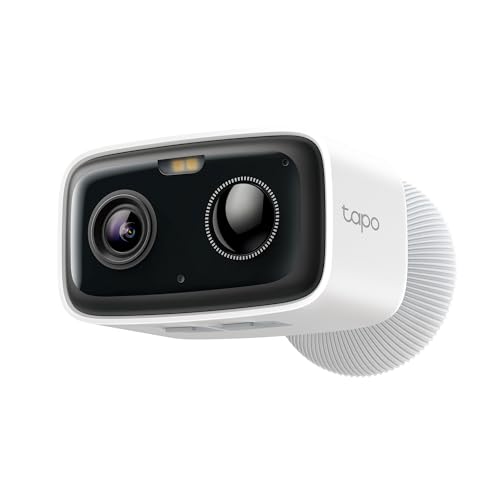
- Up to 180-day life from 5200mAh rechargeable battery
- On-device person detection without monthly fees
- Local video storage on microSD cards up to 512GB
- IP65 weather-resistant casing for outdoor durability
Cons
- MicroSD card not included in the box
- Google streaming restricted to Chromecast and Nest displays

Pros
- Plugs into power for constant operation
- Weatherproof design for outdoor elements
- Motion and loud sound alerts
- Two way audio with speaker and mic
Cons
- Requires proximity to an electrical outlet
- Short three hour free cloud storage

Pros
- Battery power for versatile placement
- On-device person and vehicle detection
- Three hours of free event history
- Magnetic mount for quick installation
Cons
- Needs power cable for continuous recording
- Subscription required for long term storage
Native Ecosystem vs Third-Party Integration
Native Nest cameras communicate directly with the Google Home app, storing event clips in the cloud and offering features like sound sensing or familiar face alerts. Third-party options like Tapo link via Google Assistant skills, letting you stream live video directly to a Nest Hub smart display while keeping their configuration in a separate utility.
If you choose hardware outside the first-party lineup, verify how alerts behave before mounting. While native units pipe notifications directly into unified Google timelines, third-party models handle detection notifications in their proprietary mobile apps and push live streams to your display on demand. Understanding what do the lights on a security camera mean helps confirm when an active stream is broadcasting across your local network.
Voice control remains consistent across both styles, allowing commands like requesting the front yard feed on your Google smart display. The split emerges in daily video review, where native Nest units offer integrated scrubbing while third-party alternatives lean on external apps or local storage cards.
Power Delivery and Network Redundancy
Continuous corded power supports uninterrupted streaming, whereas battery hardware conserves cell life by sleeping until onboard sensors detect activity. Weatherproof magnetic mounts allow quick battery removal for recharging, but corded options avoid ladder visits entirely. If you are preparing a property for transfer, consider whether are security cameras included when you sell a house before hardwiring fixtures into structural eaves.
Power loss or network dropouts can blind a digital monitoring perimeter. Certain models provide onboard flash memory to capture clips during local network outages, preserving critical incident records until connectivity returns. The Federal Communications Commission regulates the wireless spectrum these devices rely on, so setting up reliable 2.4 GHz coverage is vital for steady operation.
| Camera Format | Power Source | Video Storage |
|---|---|---|
| Native Wired | Corded outlet | Google cloud timeline |
| Native Battery | Rechargeable cell | Internal cache plus cloud |
| Third-Party Hub | Wire or battery | MicroSD card or stream |
Power Outage Vulnerability: Battery cameras keep recording during an electrical blackout, but your Wi-Fi router will lose power without an uninterruptible power supply. Ensure your home network has backup battery power so notifications can still leave the house.
Smart Detection and Storage Trade-offs
Advanced detection categorizes movement into people, vehicles, and animals, filtering out wind-blown branches or shifting shadows. Native units offer facial alerts with a subscription, answering the question of do security cameras have facial recognition in practical home monitoring.
Video retention splits between monthly cloud subscriptions and standalone microSD hardware. While first-party hardware relies on three hours of rolling event clips without a paid plan, third-party alternatives often accept high-capacity cards that record events locally without ongoing fees.
Pro Tip: Position outdoor lenses away from reflective surfaces like white vinyl siding or direct downspouts. Infrared emitters and built-in spotlights will bounce glare back into the sensor, washing out night vision clarity.
Expert Examined
From Ray Okafor

I frequently see homeowners position battery cameras too high, angling them steeply toward the ground. This geometry causes passive infrared sensors to miss approaching visitors until they are right beneath the lens, so aim for a seven-foot mounting height with a gentle forward tilt instead.
Read more about Ray OkaforChoosing Hardware for Your Nest Setup
For an entryway or central living area where you want immediate integration without managing separate smartphone software, I would point you toward the Google Indoor Nest Security Cam 1080p (Wired). Its corded design delivers continuous power, and the onboard backup memory ensures events are captured even if your internet connection briefly drops.
If you need exterior coverage without drilling holes through exterior walls, I would put the Google Nest Cam Outdoor or Indoor, Battery along driveways or detached garages. The magnetic mounting base allows you to adjust viewing angles smoothly, while the built-in intelligence differentiates between vehicles, people, and pets right out of the box.
For budget-conscious homeowners who want hands-free smart display feeds alongside subscription-free local storage, the Tapo 1080p Pan/Tilt Indoor/Outdoor Security is a practical choice. It supports full 360-degree panning, motion tracking, and high-capacity microSD cards, making it an effective multi-angle monitor that streams directly to your Nest Hub screen on command.
The Bottom Line
The single mistake most buyers make is assuming every camera labeled as compatible with Google Assistant will appear inside the Google Home app timeline. Third-party cameras can broadcast live video to a Nest Hub smart display, but their stored clips, event scrubbing, and detection settings live inside their respective proprietary apps.
Before purchasing hardware, determine your wiring access and decide whether you prefer local memory cards or automated cloud timelines. Mapping out clear line-of-sight paths to your 2.4 GHz wireless router ensures reliable feeds whenever an alert triggers.
FAQs
Can third-party cameras record directly to Google cloud storage?
No, third-party cameras like Tapo do not save recordings into Google cloud storage or Nest Aware plans. They utilize local microSD cards or their own proprietary subscription clouds, while using Google connectivity solely for live video streaming on smart displays.
Do battery Nest cameras record continuously 24/7?
Battery-powered Nest cameras only record event-based video clips when motion is detected. To get continuous 24/7 video history with an appropriate Nest Aware subscription, the camera must be connected to an optional weatherproof outdoor power cable.
What happens to Google Nest cameras during an internet outage?
Second-generation Nest cameras feature onboard flash storage that records up to one hour of event video during an internet disruption. Once the Wi-Fi connection is restored, the stored clips upload automatically to the Google Home app timeline.
Can I view multiple camera feeds at once on a Nest Hub?
A Google Nest Hub smart display can stream one camera feed at a time using voice requests. However, you can monitor multiple live camera feeds simultaneously using the Google Home mobile app interface on a smartphone or tablet.
Sources
- Federal Communications Commission www.fcc.gov
- UL Solutions Standards www.ul.com