
Finding the best cheap security cameras for home use requires deciding between standalone Wi-Fi units and hardwired DVR systems before spending anything. Wi-Fi cameras offer fast placement indoors, while analog wired options provide constant recording for exterior perimeters without monthly cloud fees. Understanding your actual infrastructure determines which budget hardware keeps your property properly monitored.

Pros
- 150-degree wide-angle lens with 1080p resolution
- Compact one-inch footprint for discreet placement
- Invisible infrared night vision reaching 5 meters
- Continuous 24/7 recording when plugged into power
Cons
- Internal battery lasts only about 120 minutes
- Video only recording with no audio support
- Micro SD storage card not included

Pros
- Two 1080P cameras for multi-area monitoring
- 2.4GHz and 5GHz dual-band WiFi
- Pan-tilt rotation with 4x digital zoom
- AI human detection and sound-light alarm
Cons
- SD card storage not included
- USB plug-in power required
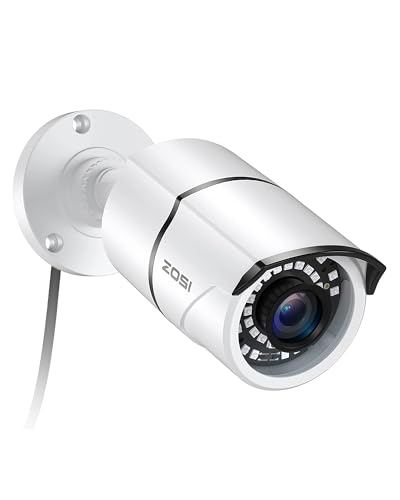
Pros
- 120-foot night vision with 36 IR LEDs
- IP66 weatherproof vandal-resistant aluminum housing
- Switchable 4-in-1 TVI, CVI, AHD, and CVBS
- Adjustable 3-axis mount with concealed cabling
Cons
- Requires separate DVR to function
- Power supply and CCTV cable not included

Pros
- Dual motion and sound detection alerts
- Two-way audio with infrared night vision
- Clear 1080P resolution in a two-pack
- Local storage up to 128GB microSD
Cons
- Manual angle adjustment with no remote pan
- MicroSD card not included in box

Pros
- Switchable 4-in-1 video output via onboard OSD menu
- Up to 120ft infrared night vision in total darkness
- IP67 weatherproof aluminum casing for outdoor mounting
- Adjustable 3-axis mount with cable-through bracket protection
Cons
- Requires a separate compatible DVR to function
- Power supply and CCTV cable not included in box

Pros
- 1080P video with 120-degree wide coverage
- Night vision works in low light
- Motion recording removes idle footage
- Battery or wall-power operation
Cons
- Requires WiFi and a mobile app
- Indoor security camera only
Wi-Fi Versus Hardwired Analog Infrastructure
Low-cost security hardware generally splits into wireless digital units and coaxial analog equipment. Wireless models transmit video over your household 2.4 GHz or 5 GHz network and draw power through a USB connection. They require very little preparation, making them popular for apartments, nurseries, and living areas where running permanent cables through walls is impractical.
Analog bullet cameras utilize coaxial BNC connections and connect straight into a centralized digital video recorder. To understand how recorder setups function, reviewing what is an NVR and how it differs from a DVR clarifies how local footage routes through your property. Wired analog lines never suffer from wireless interference, but running cables through exterior siding requires extra labor and planning.
Power and Cable Traps: Many entry-level analog cameras do not include power supplies or BNC video cables in the box, requiring separate purchases to function.
Storage Formats and Ongoing Subscription Costs
An inexpensive camera quickly becomes costly if viewing recorded clips demands an ongoing subscription. Many wireless options feature onboard microSD card slots that support cards up to 128GB for continuous local recording. This allows you to store event clips directly on the hardware, keeping your overall expenditure strictly limited to the original purchase price.
Cloud subscriptions provide off-site backups in case an intruder removes the camera itself. However, budget-conscious homeowners often find that local storage handles daily alerts and pet tracking without added bills. Selecting models with flexible dual-storage capabilities lets you decide whether to activate cloud storage later or depend entirely on an inexpensive memory card.
| Camera Type | Primary Storage | Best Location |
|---|---|---|
| Plug-in Wi-Fi | MicroSD or Cloud | Living rooms |
| Hardwired Analog | Central DVR drive | Building exterior |
| Mini Battery | Local MicroSD | Shelf or desk |
Night Vision Capabilities and Optical Placement
Reliable nighttime surveillance separates functional equipment from ineffective novelties. Most compact budget units utilize infrared LEDs that illuminate nearby areas in black and white when ambient light drops below a specific threshold. Checking the status indicators on your equipment helps verify sensor states, so consult our reference on what the lights on a security camera mean to confirm your night mode is functioning properly.
Expert Examined
From Dana Whitfield

The mistake I see most often is pointing an indoor night-vision lens through a window pane. The infrared LEDs reflect off the glass directly back into the sensor, creating a blinding glare that ruins nighttime footage.
Read more about Dana WhitfieldLonger ranges require exterior bullet models equipped with extensive infrared arrays capable of illuminating up to 120 feet in total darkness. Ensure that wireless devices meet consumer wireless standards outlined by the Federal Communications Commission to prevent network dropouts. Proper physical alignment ensures that motion triggers record genuine activity rather than ceiling fans or moving tree branches.
Network Separation: Assign budget smart cameras to an isolated 2.4 GHz guest network to protect your primary home computers and personal data.
Hardware Selections for Practical Protection
Matching the device to your living space prevents unnecessary expenses and configuration headaches. For general indoor monitoring across living spaces or hallways, I would point you to the Hawkray 2 Pack Indoor Home Security Camera. Its dual-band Wi-Fi connection maintains steady communication across rooms, while the pan-tilt rotation and AI human detection minimize false triggers caused by pets or ambient movement.
If you already operate an analog surveillance recorder and need to secure your driveway or siding, I would choose the ZOSI 2MP 1080p Security Camera. Its IP66 weatherproof aluminum housing withstands rain and snow, and the 36 infrared LEDs reach up to 120 feet in darkness. It connects seamlessly to TVI, CVI, AHD, or standard 960H recorders via the built-in OSD menu switch.
For baby nurseries, pet crates, or direct entryway visibility on a tight budget, the GNCC 2.4GHz Indoor Security Camera for Home offers a sensible solution. The integrated two-way audio allows clear communication through the mobile application, and the manual base adjustment simplifies shelf placement without complicated wall mounting. You can explore broader configurations across our security cameras section to build out your setup.
The Bottom Line
The single thing most buyers get wrong in this category is purchasing cameras without checking how footage is stored and powered. A low upfront price tag becomes frustrating if the device requires an active monthly subscription just to review motion clips, or if an exterior camera arrives without the power adapter and video cables necessary to complete installation.
Before buying any hardware, determine the exact location you plan to cover and confirm whether a power outlet or Wi-Fi signal is within range. If you need simple indoor monitoring, select a plug-in Wi-Fi camera with a microSD card slot and insert your own memory card to keep your total operating costs at zero.
FAQs
Do budget home security cameras require monthly subscriptions?
Most budget cameras do not require a paid monthly plan if they include a microSD card slot for local storage. You can view live streams and receive motion alerts for free through the manufacturer mobile application. Paid subscriptions are only necessary if you want off-site cloud video storage and extended recording history.
Can budget security cameras work without an internet connection?
Hardwired analog security cameras record directly to a digital video recorder without any internet connection. Battery-powered mini cameras can also save video directly to an installed microSD card without a network present. However, you will not receive remote mobile alerts or view live footage on your phone without an active connection.
Where should I place an inexpensive indoor camera?
Position indoor cameras in high-traffic transition zones such as main hallways, staircases, and living areas rather than pointing them directly at private spaces. Place the unit on an elevated shelf between six and eight feet high, angled slightly downward to provide broad coverage while keeping the power cable neatly concealed.
Do cheap security cameras have facial recognition?
Basic entry-level cameras generally feature rudimentary motion detection or simple human silhouette filtering rather than biometric processing. To understand what software capabilities exist in consumer surveillance, read our guide on whether security cameras have facial recognition before expecting advanced identity tracking from budget hardware.
Sources
- Federal Communications Commission www.fcc.gov
- UL Solutions www.ul.com