
Investing in the best affordable security cameras gives homeowners reliable property monitoring without requiring expensive whole-home contracts. The real divide in budget hardware sits between wire-free outdoor placement and continuous indoor monitoring. Choosing the wrong power architecture usually creates charging headaches or dropped wireless connections before the week is out.

Pros
- Removable solar panels provide non-stop power
- Pan and tilt control delivers 360-degree coverage
- Ultra-clear 2K resolution with color night vision
- PIR motion sensor cuts down false alarms
Cons
- Requires 2.4GHz connection, no 5GHz Wi-Fi support
- MicroSD card for local storage not included

Pros
- 3MP resolution with ChroMax AI color night vision
- Dual-band 2.4GHz and 5GHz Wi-Fi connectivity
- Supports 24/7 continuous local SD card recording
- Peel-and-stick installation with Bluetooth setup
Cons
- Indoor-only casing not built for exterior exposure
- Adhesive tape mounting complicates camera repositioning

Pros
- Dual-band 2.4GHz and 5GHz Wi-Fi connectivity
- 2K 3MP resolution with 32-foot night vision
- Continuous 24/7 recording to local microSD storage
- Includes adhesive tape and screw mounting options
Cons
- Remote recorded playback requires paid cloud subscription
- Fixed viewing angle requires manual physical adjustment
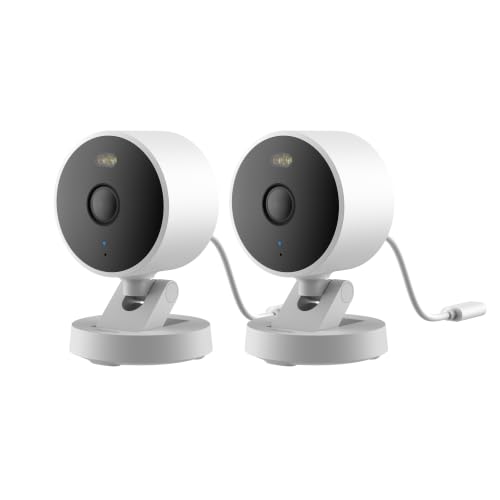
Pros
- 2K 1296p resolution with 140-degree field of view
- Local microSD storage up to 512GB plus NAS support
- Weatherproof IP65 housing for indoor or outdoor use
- Wi-Fi 6 connectivity with WPA3 security support
- Works with HomeKit Secure Video, Alexa, and RTSP
Cons
- Power adapter not included in the box
- Night vision modes must be manually enabled
- HomeKit connection caps video resolution at 1080p

Pros
- Peel-and-stick magnetic mount, no drilling
- 3MP color night vision
- Human, vehicle, motion, and sound detection
- 5GHz and 2.4GHz WiFi 6
Cons
- Cloud storage requires a subscription
- MicroSD card not included

Pros
- 2K 3MP video with color night vision
- PIR motion detection with customizable zones
- Hybrid power via battery or continuous plug-in
- Weatherproof IP65 housing for outdoor mounting
Cons
- Incompatible with 5GHz Wi-Fi networks
- Recharging takes 6 to 8 hours
Power Options and Daily Maintenance Requirements
Budget outdoor units often rely on internal rechargeable batteries to eliminate drilling through exterior siding. High-traffic walkways quickly deplete these cells, forcing owners to haul ladders out every few weeks. Adding a small solar panel solves that chore by maintaining an active charge through direct sunlight exposure.
Pro Tip: Position solar panels facing true south with a thirty-degree tilt to keep outdoor batteries topped up through overcast winter days.
Indoor hardware runs on basic USB adapters that pull continuous wall power. These plug-in models support uninterrupted video feeds without sleeping between movement events. If status LEDs create unwanted glare in bedrooms, checking what do the lights on a security camera mean helps you identify indicator settings in the companion app.
Wi-Fi Frequency Bands and Night Vision Glare
Most budget devices communicate exclusively over 2.4 GHz wireless networks because lower frequencies travel better through drywall and masonry. Dual-band models supporting 5 GHz deliver quicker live streams, yet their signal degrades rapidly through exterior walls. The Federal Communications Commission sets transmission standards that restrict home signal power, making router distance a primary consideration.
Expert Examined
From Dana Whitfield

The mistake I see most often is people sticking an infrared indoor camera onto a windowsill and wondering why the nighttime video is a bright white blur. If you must shoot through glass, you need specialized hardware or an external light source that eliminates the glass reflection.
Read more about Dana WhitfieldPointing an indoor lens through double-pane glass to monitor a driveway creates blinding glare after sundown. Standard infrared LEDs bounce off glass surfaces, washing out footage entirely. Purpose-built window units avoid reflection by pressing directly against glass, while traditional indoor units belong entirely inside interior rooms.
Window Mounting Hazard: Standard infrared illumination reflects off double-glazed window panes, blinding the sensor at night and ruining recorded clips.
| Camera Style | Primary Power | Best Placement |
|---|---|---|
| Solar Outdoor | Solar with Battery | Yard Perimeters |
| Window Mount | USB Wired | Window Sills |
| Indoor Plug-in | Continuous DC Cord | Living Areas |
Local Storage Versus Recurring Cloud Costs
Budget hardware frequently offsets a low retail cost by gating extended clip histories behind recurring monthly fees. Onboard microSD card slots let owners retain continuous recording without mandatory subscription tiers. Understanding how local drives differ from dedicated network hardware clarifies storage limitations, much like comparing standalone storage to what is an NVR and how is it different from a DVR setups.
When property incidents occur, maintaining uninterrupted local video files ensures you possess verifiable records. Before relying on recorded evidence, researching whether security camera footage is admissible in court provides clear guidance on chain-of-custody protocols. High-capacity local storage gives you direct ownership of critical files during network interruptions.
Selecting the Right Camera Setup
For monitoring exterior boundaries without climbing ladders, I would point you to the SEHMUA 2K Solar Security Cameras Wireless Outdoor. Its continuous solar power supply and 360-degree pan-tilt coverage eliminate blind spots around driveways, while the IP65 weatherproof housing handles rain and snow without degradation.
Renters who want perimeter visibility without exterior drilling should look at the Girafit 3MP 2K Window Camera,2.4GHz&5GHz WiFi. The peel-and-stick mount adheres directly to window glass, and the dual-band Wi-Fi support allows 24/7 recording directly to a local SD card without outdoor installation hassles.
For general interior oversight or keeping an eye on pets, I suggest the GNCC 2K Indoor Camera for Home Security with Phone. It pairs over 2.4 GHz or 5 GHz networks, offers 32-foot infrared vision, and includes a 6.5-foot power cord that plugs easily into existing wall outlets across living spaces.
The Bottom Line
The biggest mistake buyers make is shopping strictly by video resolution while ignoring daily power delivery and storage access. A sharp 2K video feed proves useless if the battery drains within a week or if critical alert clips sit locked behind an unexpected monthly subscription fee.
Before ordering any hardware, map the exact mounting location and verify your Wi-Fi signal strength at that specific spot using your smartphone. Securing a reliable network connection and confirming a practical power source guarantees your cameras stay operational without unexpected dropouts.
FAQs
Do affordable security cameras require a monthly subscription?
Most budget cameras function without a subscription if they feature an onboard microSD card slot for local recording. While live viewing and basic push notifications remain free, manufacturers often reserve extended cloud storage and advanced cloud detection features for optional monthly plans.
Can I mount an indoor camera inside to record through a window?
Traditional indoor cameras suffer from severe night vision glare when pointed through glass because infrared LEDs bounce directly off the pane. To record through a window successfully, use a specialized window camera that adheres flush against the glass or turn off internal infrared lights and rely on outdoor floodlights.
Is 2.4 GHz or 5 GHz Wi-Fi better for home security cameras?
A 2.4 GHz connection is generally better for exterior security cameras because the signal penetrates exterior siding and brick over greater distances. Dual-band indoor units benefit from 5 GHz networks due to higher bandwidth and less interference from household appliances, provided the camera sits near the router.
How long do battery-powered outdoor cameras last between charges?
Battery life ranges anywhere from one month to six months depending on activity levels and sensor triggers. Cameras placed in high-traffic zones trigger frequent recordings that drain batteries rapidly, making integrated solar panels the most dependable option for continuous outdoor operation.
Sources
- Federal Communications Commission www.fcc.gov
- Consumer Product Safety Commission www.cpsc.gov